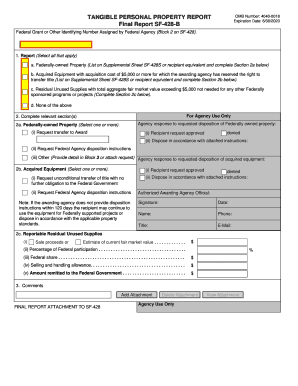
Report (Select all that apply) a. Federally-owned Property (List on Supplemental Sheet SF-428S or recipient equivalent and complete Section 2a below) b. Acquired Equipment with acquisition cost of $5,000 or more for which the awarding agency has reserved the right to transfer title (List on Supplemental Sheet SF-428S or recipient equivalent and complete Section 2b below). c. Residual Unused Supplies with total aggregate fair market value exceeding $5,000 not needed for any other Federally spon.
Loading
Open form follow the instructions
Easily sign the form with your finger
Send filled & signed form or save
How to fill out the GSA SF-428-B online
The GSA SF-428-B form is essential for reporting tangible personal property, particularly at the conclusion of federal assistance awards. This guide will walk you through each section of the form, ensuring you understand how to complete it accurately and efficiently online.
Follow the steps to successfully fill out the GSA SF-428-B form.
- Click the ‘Get Form’ button to access the GSA SF-428-B form and open it in your preferred online editor.
- In Block 2, enter the federal grant or other identifying number assigned by the federal agency. This information is crucial for identifying your specific funding.
- In the Report section, check all applicable boxes to indicate the type of property you are reporting. Options include federally-owned property, acquired equipment, residual unused supplies, or none.
- Complete the relevant sections based on your selection in Block 1. If you chose federally-owned property, respond in Section 2a regarding the requested disposition.
- If applicable, provide information on acquired equipment in Section 2b. Select the appropriate option to request transfer of title or disposition instructions.
- For Section 2c, if there are reportable residual unused supplies, fill in the sale proceeds or current fair market value, percentage of federal participation, federal share, selling and handling allowance, and amount to be remitted to the federal government.
- In Block 3, add any additional comments or explanations that may help clarify your report. You may attach further documentation if necessary.
- Once all fields are filled out, review the form for accuracy before saving your changes, downloading the completed document, printing, or sharing it as required.
Be sure to complete your GSA SF-428-B form online to ensure a smooth reporting process.
Experience a faster way to fill out and sign forms on the web. Access the most extensive library of templates available.
Related content
Form: SF428B. Tangible Personal Property Report - Final Report. Current Revision Date:...
Nov 15, 2006 — Financing; Notes to the Financial Statements; and SF 133, ... fund...
Section B - Ground Water Contamination by Crude Oil ... electrolyte solutions: GSA...
Get answers to your most pressing questions about US Legal Forms API.
What is the final report attachment for SF-428?
A. This Attachment is to be used by recipients when required to provide a final property report for closeout of Federal assistance awards. The Attachment allows recipients to request specific disposition of Federally-owned property and acquired equipment.
What is the SF 428 form?
Instructions for Tangible Personal Property Report: SF-428 This is a standard form to be used by awarding agencies to collect information related to tangible personal property (equipment and supplies) when required by a Federal financial assistance award.
What is the federal definition of tangible personal property?
Tangible personal property includes equipment, supplies, and any other property (including information technology systems) other than that is defined as an intangible property. It does not include copyrights, patents, and other intellectual property that is generated or developed (rather than acquired) under an award.
What is SF 428b?
SF-428 Attachment B. The Final/Award Closeout form on Acquired Equipment purchased with Federal Funds is due at the end of a Federal Assistance Award.
Where do I send sf428?
All grant programs are required to submit the SF-428s to your respective ACF Office of Grants Management (OGM) office for review and approval. ACF OGM will notify the recipient/grantee of the decision by filling out the “For Agency Use Only” section of the form and returning the form back to the recipient/grantee.
Use professional pre-built templates to fill in and sign documents online faster. Get access to thousands of forms.
If you believe that this page should be taken down, please follow our DMCA take down process here.