S greater than four, or down to a whole cent when the third decimal point is four or less. How to Compute Withholding To calculate tax amounts to withhold, employers may use a direct percentage computation (example shown below) or use the Michigan Income Tax Withholding Table. This table is found in Form 446, Michigan Income Tax Withholding Guide. Additional information regarding sales, use and withholding taxes, as well as Form 446 and the income tax withholding tables, is available by visitin.
Loading

Open form follow the instructions

Easily sign the form with your finger

Send filled & signed form or save
How to use or fill out the MI DoT 5089 (Formerly 2271) online
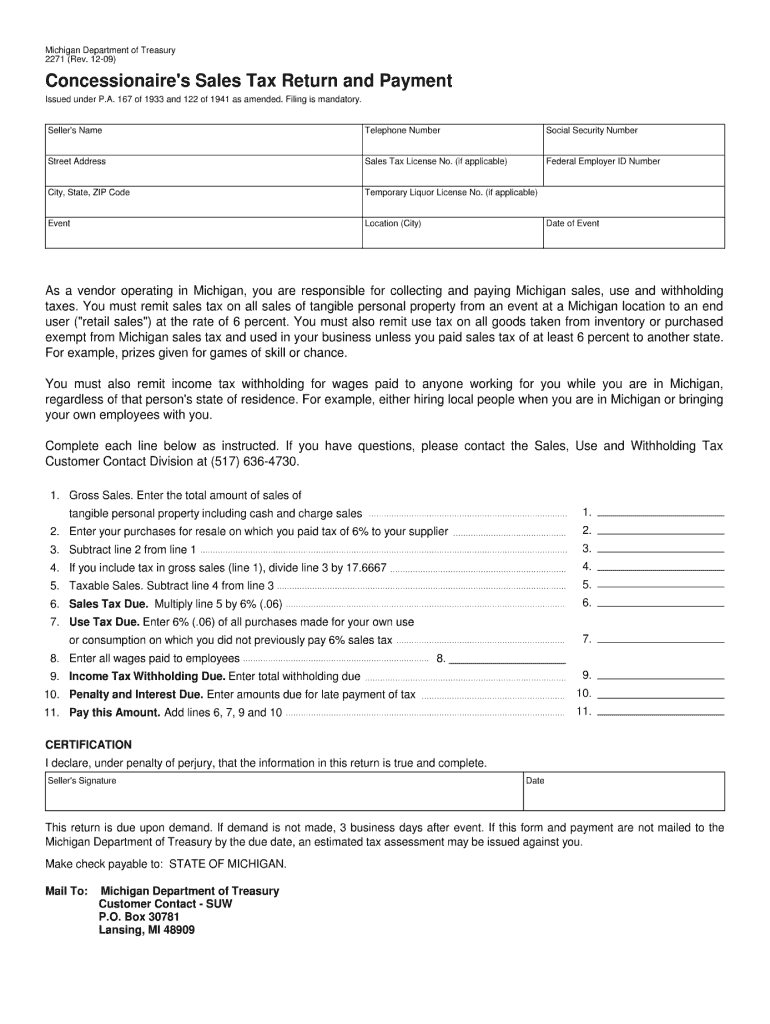
Filling out the MI DoT 5089, also known as the Concessionaire's Sales Tax Return and Payment, is an essential process for vendors operating in Michigan. This guide provides clear, step-by-step instructions to assist you in completing the form accurately online.
Follow the steps to complete the MI DoT 5089 efficiently.
- Press the ‘Get Form’ button to access the document and open it for editing.
- Begin with the 'Seller's Name' field. Enter the full name of the vendor responsible for the sales.
- In the 'Telephone Number' field, provide a contact number where you can be reached.
- Fill in your 'Social Security Number' for identification purposes.
- Enter your address in the 'Street Address' section, ensuring that all information is correct.
- If applicable, include your 'Sales Tax License No.' as well as your 'Federal Employer ID Number.'
- Complete the 'City, State, ZIP Code' section with your location details.
- If relevant, input your 'Temporary Liquor License No.'
- Specify the 'Event' for which the sales tax is being reported.
- Indicate the 'Location (City)' where the event is taking place.
- Enter the 'Date of Event' to indicate when the sales occurred.
- Proceed to the 'Gross Sales' section and input the total amount of sales of tangible personal property.
- In the next field, report your purchases for resale on which you paid tax of 6%.
- Subtract the purchases from the gross sales to arrive at the taxable sales.
- If tax is included in gross sales, calculate the appropriate amount based on the provided formula.
- Multiply the taxable sales by 6% to determine the sales tax due.
- Next, enter the use tax due for any purchases made for personal use without previously paying sales tax.
- Report wages paid to employees who worked during the event.
- Calculate total income tax withholding due based on the wages.
- Include any penalties and interest due for late payments, if applicable.
- Add the totals from the relevant sections to find the total amount due.
- At the end, review the certification statement, provide your signature, and date the document.
- Once completed, you can save changes, download, print, or share the form as necessary.
Complete your documents online today to ensure compliance and accurate reporting.
Experience a faster way to fill out and sign forms on the web. Access the most extensive library of templates available.
Related content
You must remit sales tax on all sales of tangible personal property from an event at a...
by EC Pickering · 1884 · Cited by 1 — ADS Classic is now deprecated. It will be...
Get answers to your most pressing questions about US Legal Forms API.
Where do I file my MI tax return?
You can file your Michigan tax return online through the Michigan Department of Treasury’s e-file system, or you can mail it to the designated processing center. To make the process easier, utilizing the MI DoT 5089 (Formerly 2271) provides clear instructions on where to send your return. For additional assistance, uslegalforms offers helpful resources that can simplify your filing journey.
Do I need to attach my W-2 to my Michigan tax return?
Yes, when you file your Michigan tax return, you must attach your W-2 form. This requirement helps the Michigan Department of Treasury verify your income information. To ensure compliance, using the MI DoT 5089 (Formerly 2271) can be beneficial as it guides you on how to complete your tax documents correctly. Explore uslegalforms to find templates and tips that enhance your filing experience.
Where to file Michigan W2 forms?
You can file your Michigan W2 forms through the Michigan Department of Treasury's online services. Alternatively, you may send them directly to the local tax authority. Using the MI DoT 5089 (Formerly 2271) can facilitate this process, ensuring you meet local regulations accurately and efficiently. Additionally, consider platforms like uslegalforms to access resources that simplify your filing.
How do I calculate Michigan sales tax?
Calculating Michigan sales tax is simple. You need to multiply the sale amount by the current sales tax rate, which is typically 6%. The MI DoT 5089 (Formerly 2271) provides additional resources to help you understand the rates and ensure accurate calculations.
Where do I mail my 1040 if I live in Michigan?
If you live in Michigan, the address for mailing your Form 1040 depends on whether you are including a payment. To avoid mistakes, consult the latest guidance from the MI DoT 5089 (Formerly 2271). This ensures your tax documents reach the right destination.
How do I file form 5081 online in Michigan?
Filing form 5081 online in Michigan is straightforward. You can access the Department of Treasury’s electronic filing platform, where the form is available. Follow the instructions outlined in the MI DoT 5089 (Formerly 2271) to complete your filing efficiently.
Do I have to mail my state tax return?
Whether you need to mail your state tax return depends on your specific situation. In most cases, if you are filing online, you can submit your return electronically without the need to mail it. If you prefer traditional filing, the MI DoT 5089 (Formerly 2271) has all the necessary guidelines.
Where do I mail my Michigan state tax return?
You mail your Michigan state tax return to a designated address provided by the Michigan Department of Treasury. For the most current information, it is best to consult the MI DoT 5089 (Formerly 2271). This will ensure you send your return to the right place and avoid delays.
What address do I mail my tax return to?
The address for mailing your Michigan tax return varies based on your filing status and whether you include a payment. Generally, the Michigan Department of Treasury provides specific addresses for different scenarios. Always refer to the MI DoT 5089 (Formerly 2271) for the most updated mailing information.
How to calculate Michigan withholding tax?
To calculate your Michigan withholding tax, start by determining your gross income and applicable deductions. Use the Michigan withholding tax tables, which you can find in the MI DoT 5089 (Formerly 2271), to get accurate calculations based on your income level. This approach will help you ensure compliance while maximizing your withholdings.
Use professional pre-built templates to fill in and sign documents online faster. Get access to thousands of forms.
If you believe that this page should be taken down, please follow our DMCA take down process here.
This form is available in several versions. Select the version you need from the drop-down list below.