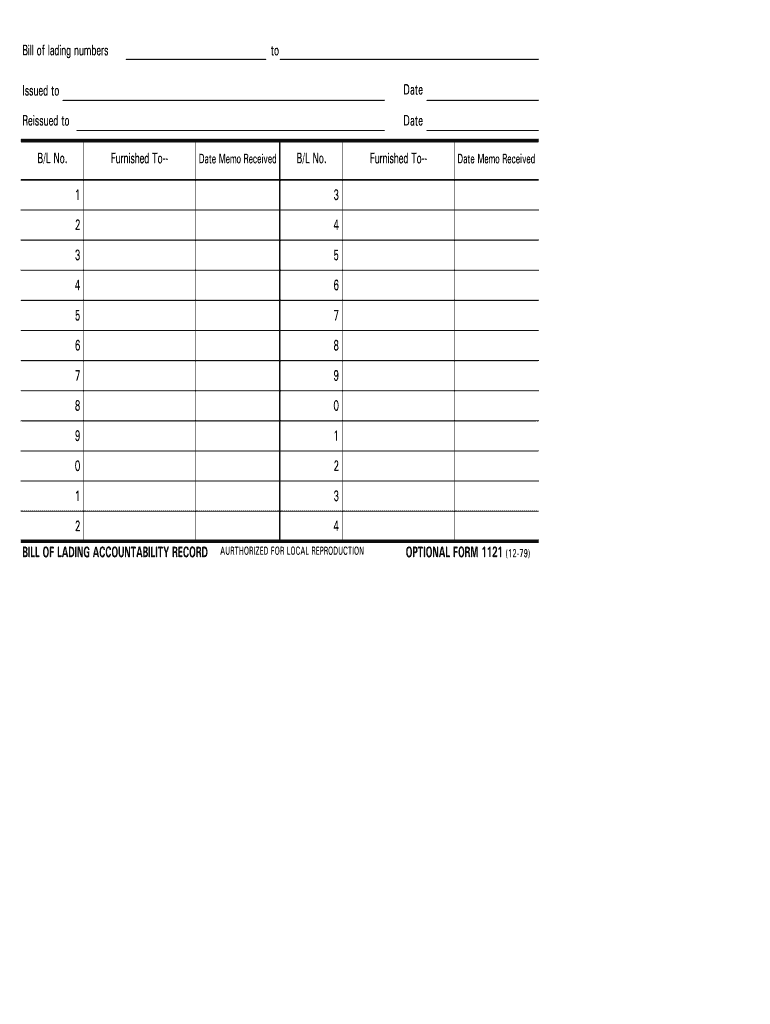
2 BILL OF LADING ACCOUNTABILITY RECORD Date Memo Received 4 AURTHORIZED FOR LOCAL REPRODUCTION OPTIONAL FORM 1121 (12-79) Bill of lading numbers to Issued to Date Reissued to Date B/L No. Furnished To-- Date Memo Received B/L No. Furnished To-- 5 7 6 8 7 9 8 0 9 1 0 2 1 3 2 4 3 5 4 6 5 7 6 8 BILL OF LADING ACCOUNTABILITY RECORD Date Memo Received OPTIONAL FORM 1121 (12-79) BACK.
Loading

Open form follow the instructions

Easily sign the form with your finger

Send filled & signed form or save
How to fill out the GSA OF 1121 online
The GSA OF 1121 is an important document used for tracking bill of lading numbers. This guide provides detailed, step-by-step instructions on how to accurately complete this form online, ensuring all necessary information is captured effectively.
Follow the steps to complete the GSA OF 1121 form accurately online.
- Click ‘Get Form’ button to obtain the form and open it in the editor.
- Identify the section labeled 'Issued to' and enter the name of the individual or organization that the bill of lading is being issued to.
- In the 'Date' field next to 'Issued to', insert the date on which the document is being issued.
- Locate the 'Reissued to' section and provide the name of the individual or organization if the bill of lading is being reassigned.
- Fill in the 'Date' for the reissued section, indicating when the reissuance takes place.
- Enter the 'B/L No.'—this is the unique bill of lading number associated with the shipment.
- In the 'Furnished To—' section, specify the recipient of the information regarding the bill of lading.
- Record the 'Date Memo Received,' noting when the memo regarding the bill of lading was received.
- Repeat steps 6 to 8 for any additional bill of lading numbers that need to be documented.
- Once all relevant fields are completed, review the information for accuracy. Users can then save changes, download, print, or share the form as needed.
Complete your GSA OF 1121 form online now to streamline your documentation process.
Experience a faster way to fill out and sign forms on the web. Access the most extensive library of templates available.
Related content
of1121_e.pdf [PDF - 81 KB ]. PDF versions of forms use Adobe Reader™. Download Adobe...
3. 4. 5. 6. 7. 8. 9. 0. 1. 2. 3. 4. BILL OF LADING ACCOUNTABILITY RECORD. OPTIONAL FORM...
50155* – 55 Gallon Drum. * GSA Available. Company: Sunshine Makers, Inc. ... Urea...
Get answers to your most pressing questions about US Legal Forms API.
How do I find my GSA number?
GSA Number Lookup If you want to find the GSA contract number for any particular vendor, the easiest way to find the GSA number is to go to gsaelibrary.gsa.gov.
What is the role of the GSA?
GSA provides workplaces by constructing, managing, and preserving government buildings and by leasing and managing commercial real estate. GSA's acquisition solutions offer private sector professional services, equipment, supplies, and IT to government organizations and the military.
What is GSA pricing?
GSA relies on historical market pricing to determine what is reasonable for your proposed goods and/or services. This is one of the many reasons doing market research before you submit your offer is important, because it provides a strong basis for your proposal.
What does GSA stand for?
GSA U.S. General Services Administration.
What falls under GSA?
GSA provides workplaces by constructing, managing, and preserving government buildings and by leasing and managing commercial real estate. GSA's acquisition solutions offer private sector professional services, equipment, supplies, and IT to government organizations and the military.
What does GSA mean in contracting?
The GSA Schedule, also known as Federal Supply Schedule, and Multiple Award Schedule (MAS), is a long-term governmentwide contract with commercial companies that provide access to millions of commercial products and services at fair and reasonable prices to the government.
Use professional pre-built templates to fill in and sign documents online faster. Get access to thousands of forms.
If you believe that this page should be taken down, please follow our DMCA take down process here.