Loading
Get Me 1041me 2016
How it works
-

Open form follow the instructions
-

Easily sign the form with your finger
-

Send filled & signed form or save
How to fill out the ME 1041ME online
Filling out the ME 1041ME online can streamline the process of submitting income tax returns for estates and trusts. This guide provides a comprehensive overview of the form's sections and steps to ensure accuracy and efficiency during completion.
Follow the steps to complete the ME 1041ME form effectively.
- Click ‘Get Form’ button to access the necessary form online.
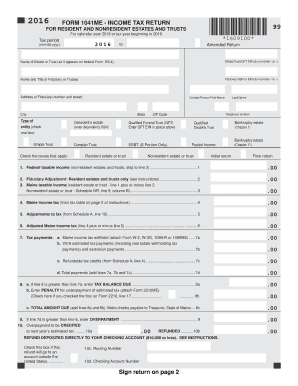
- Enter the tax period at the top of the form, specifying the calendar year or tax year beginning date.
- Provide the name of the estate or trust as it appears on the federal Form SS-4, alongside the Estate/Trust/QFT EIN without any formatting symbols.
- Fill in the name and title of the fiduciary or trustee as well as their Social Security Number (SSN) or EIN.
- Complete the fiduciary’s address, including the number and street, city, state, and ZIP code.
- Indicate whether an amended return is being filed by checking the appropriate box.
- Select the type of entity by checking one of the specified boxes, such as decedent’s estate or complex trust.
- For line 1, enter the federal taxable income, noting that nonresident estates and trusts can skip to line 3.
- If applicable, resident estates and trusts can enter their fiduciary adjustment on line 2.
- Calculate the Maine taxable income based on either line 1 or the Schedule NR.
- Proceed to calculate the Maine income tax as per the tax table, entering the amount on line 4.
- Capture any adjustments to tax on line 5 as indicated from Schedule A.
- Summarize the adjusted Maine income tax calculation on line 6.
- Record any tax payments on lines 7a, 7b, and 7c, and calculate the total on line 7d.
- Calculate the tax balance due or any overpayment as instructed on lines 8 and 9.
- If applicable, indicate whether any refund should be credited to next year’s estimated tax or refunded directly.
- Complete the remainder of schedule sections, including signature areas and any additional schedules necessary.
- Review, save any changes, and decide whether to download, print, or share the completed form.
Get started on completing your ME 1041ME online today for a hassle-free filing experience.
Get form
Experience a faster way to fill out and sign forms on the web. Access the most extensive library of templates available.
The 1041 tax rate primarily depends on the income brackets established by the IRS. Generally, the rate ranges from 10% to 37%, depending on your income level. If you need help navigating these rates while completing the ME 1041ME, consider seeking assistance from uslegalforms for clarity.
Get This Form Now!
Use professional pre-built templates to fill in and sign documents online faster. Get access to thousands of forms.