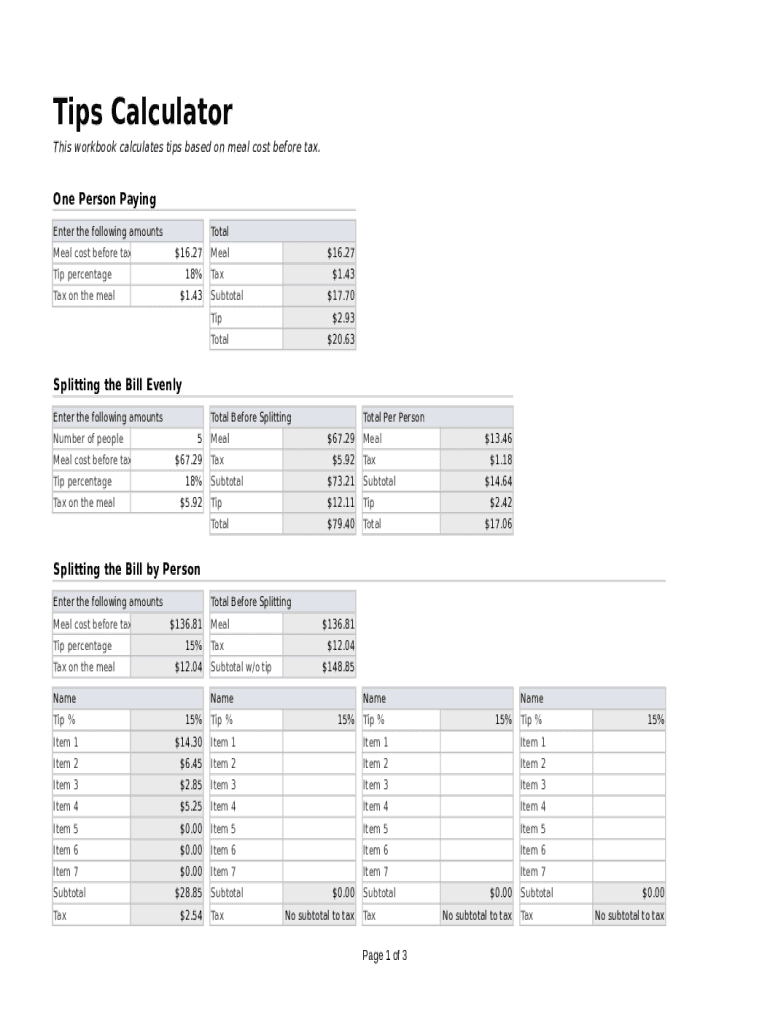
Tips Calculator This workbook calculates tips based on meal cost before tax.One Person Paying Enter the following amounts Meal cost before taxTotal $16.27Tip percentage Tax on the meal18% $1.43Meal$16.27Tax$1.43Subtotal$17.70Tip$2.93Total$20.63Splitting.

Open form follow the instructions

Easily sign the form with your finger

Send filled & signed form or save
How to fill out the Tips Calculator Document online
The Tips Calculator Document is designed to help users accurately calculate tips based on meal costs before tax. This guide will walk you through each section of the document to ensure your calculations are precise and easy to follow.
Follow the steps to complete the Tips Calculator Document.
- Click the ‘Get Form’ button to access the Tips Calculator Document and open it in your preferred editing tool.
- Begin by entering the meal cost before tax in the designated field. For example, you might enter $16.27.
- Next, input the applicable tax amount on the meal in the provided section. For instance, if the tax is $1.43, enter that amount.
- Select the tip percentage you would like to apply. You can input a standard percentage, such as 18%, into the tip percentage field.
- Review the subtotal calculation, which includes the meal cost and the tax. Ensure that the subtotal reflects the correct total before the tip is added.
- Calculate the tip based on the subtotal and your selected tip percentage, then enter this amount in the tip section.
- Finally, review the total amount, which should include the subtotal and the calculated tip, and ensure it is accurate.
- Once completed, you can save changes, download your document, print it for your records, or share it as needed.
Start filling out your Tips Calculator Document online for easy and accurate calculations.
Experience a faster way to fill out and sign forms on the web. Access the most extensive library of templates available.
Related content
Jan 14, 2021 — The employee may use any document that has the above elements such as...
Bulk Upload Tool: This option requires users to input their data in a text document and...
This document provides you with instructions to install the app on your Android device and...
Get answers to your most pressing questions about US Legal Forms API.
How do you calculate a 15% tip?
If you want to leave a 15% tip, use the fact that 15% = 10% + 5%. Calculate 10% of the bill by moving the decimal point one position to the left. Then, take that number, divide it in half, and add the new amount to the original 10%.
How do you calculate a tip?
If you are tipping 15 percent, multiply the pre-tax amount by 10 percent and then add half of that amount. So, if you have a bill for $27.50, 10 percent is $2.75, and half of that amount is roughly $1.38. ... Another easy method is to look at your sales tax amount. ... A 20 percent tip is simple to calculate.
How do you calculate tips without a calculator?
To figure out a tip without a calculator, first remove the pennies amount in the bill. For example, if your bill is $23.76 becomes $23.70. To figure out a 10% tip, move the decimal point one place to the left. So, 23.70 becomes 2.370 or $2.37.
How do you calculate a tip percentage?
In general, the tip amount is the cost times 0. xx and your total including tip, is the cost times 1. xx where xx = the percent you want to leave. If you want to leave a 20% tip, multiply the cost by 0.20 to get the tip amount or multiply the cost by 1.20 to get the total including tip.
How do you find 15 percent of a number on a calculator?
To calculate the percentage of the whole number, you need to first turn the percentage into a decimal as already described. Then simply multiply. To find 15% of 100, rewrite the 15% as 0.15. Then just multiply 0.15 x 100, to get the solution of 15.
What is the formula for calculating a tip?
If you want to leave a 20% tip, multiply the cost by 0.20 to get the tip amount or multiply the cost by 1.20 to get the total including tip. If you want to leave a 18% tip, multiply the cost by 0.18 to get the tip amount or multiply the cost by 1.18 to get the total including tip.
How do you calculate tip in Python?
2:09 4:09 Suggested clip Codecademy Python Lessons- Tip Calculator - YouTubeYouTubeStart of suggested clipEnd of suggested clip Codecademy Python Lessons- Tip Calculator - YouTube
What is tip calculator?
The Shared Bill Tip Calculator considers the cost of the service, number of people, and chosen tip percentage to calculate the tip per person, as well as the total cost per person. A tip or gratuity is an extra sum of money paid to certain service workers for a provided service.
Use professional pre-built templates to fill in and sign documents online faster. Get access to thousands of forms.
If you believe that this page should be taken down, please follow our DMCA take down process here.