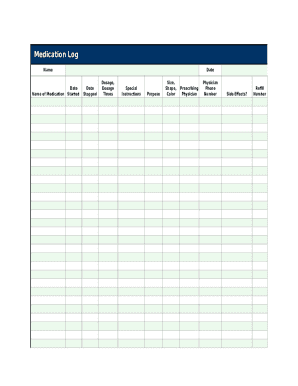
Medication Log NameName of MedicationDateDate StartedDate StoppedDosage, Dosage TimesSpecial InstructionsPurposeSize, Shape, ColorPrescribing PhysicianPhysician Phone NumberSide Effects?Refill NumberPharmacy Phone Number.
Open form follow the instructions
Easily sign the form with your finger
Send filled & signed form or save
How to fill out the Medication Log Template online
Filling out the Medication Log Template accurately is essential for tracking medication usage and ensuring health safety. This guide provides step-by-step instructions for users to complete the form online efficiently.
Follow the steps to fill out the Medication Log Template accurately.
- Click the ‘Get Form’ button to access the Medication Log Template and open it in the online editor.
- In the 'Name' section, input your name or the name of the person for whom the medications are being logged.
- Next, enter the name of each medication in the 'Name of Medication' field. Ensure that these names are spelled correctly.
- Fill in the 'Date Started' field with the date when the medication was first taken and the 'Date Stopped' field if the medication has been discontinued.
- Indicate the dosage and the times the medication is administered in the 'Dosage, Dosage Times' section. Be specific about the amount and frequency.
- Provide any 'Special Instructions' regarding the medication use, such as whether it should be taken with food or at specific times.
- State the purpose for which each medication is prescribed in the 'Purpose' field to help contextualize its use.
- In the 'Size, Shape, Color' section, describe the physical characteristics of the medication to assist in identification.
- Fill in the 'Prescribing Physician' field with the name of the physician who ordered the medication, and include their phone number in the corresponding section.
- Note any known side effects of the medication in the 'Side Effects?' section to monitor for adverse reactions.
- If applicable, include the refill number in the ‘Refill Number’ field to ensure you have enough medication.
- Lastly, enter the pharmacy phone number in the provided field for reference or to facilitate communications if needed.
- Once all sections have been completed, save your changes, and you can choose to download, print, or share the completed Medication Log Template.
Start filling out your Medication Log Template online today to keep track of your medications effectively.
Experience a faster way to fill out and sign forms on the web. Access the most extensive library of templates available.
Related content
MEDICATION COUNT SHEET. ______ ______. ______. Resident. Quantity Date Started Drug...
Medication/. Non-drug Therapy. Indication, Dose (per admin), Dose Units1, Schedule/...
Medicine is the art, science, and practice of caring for a patient and managing the...
Get answers to your most pressing questions about US Legal Forms API.
How do you make a medication chart?
How do you make a medicine chart? The name of the medication you are taking. The dosage you need to take. Time of day you need to take the medication. Any notes or side effects you experience. Whether the medication needs to be taken with food or not.
Is there an app to list my medications?
Download the free MyRxProfile iOS or Android application, and get access to a suite of incredible features: Quickly scan your prescriptions, OTC medications, and supplements. Get instant access to drug information, alerts, and ratings. Identify potential adverse drug reactions.
How do I create a medication list in Excel?
Here's how you make a medication list using the computer program: Start up Excel on your computer. Click on the Create New File button. Organize the cells and columns. Type the name of medicines in the boxes. Include when to take them and the frequency. When done, click Save.
What 4 items do you put on the medication log?
– Name of the person; – Strength and dosage; and – Frequency against the: Medical order; • MAR; AND • Medication container. every time medications are given.
What is a medication template?
What is a Medication List Template? A medication list template is an easy way for you to monitor and keep track of the medications that your patients take. You can manage prescriptions efficiently, as well as reduce the number of errors when it comes to dosages and the exact medications used.
How do I keep track of my medication list?
Pillboxes or pill dispensers are a great way to keep track of all of your daily medications. If you have multiple medications each day, you can put each pill in the box for the corresponding day. Between setting an alarm and using a pillbox, you'll be able to stay on top of your medications and not miss a dose.
How do I make a list of my medications?
How do I make a medication list? Handwriting a simple list on a piece of paper. Using a medication reminder app on a smartphone where you enter in the medications you take. Obtaining a medication list document from a healthcare provider's office. Downloading a blank medication list form online and filling it out.
Use professional pre-built templates to fill in and sign documents online faster. Get access to thousands of forms.
If you believe that this page should be taken down, please follow our DMCA take down process here.