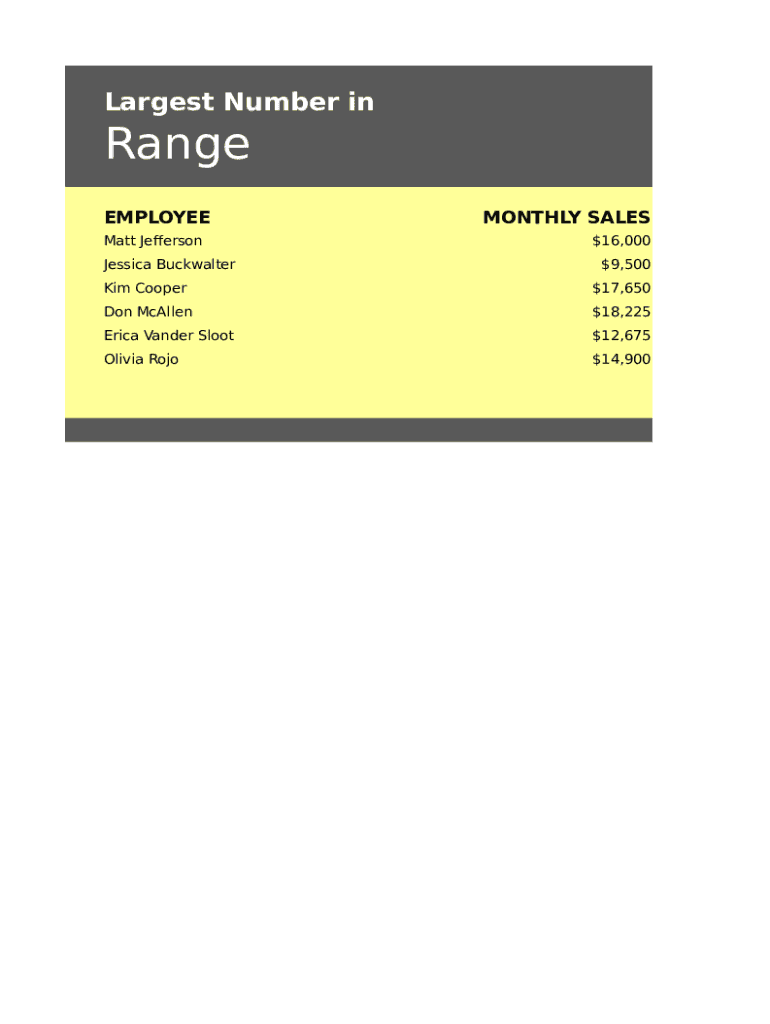
Largest Number inRange EMPLOYEE Matt Jefferson Jessica BuckwalterMONTHLY SALES $16,000 $9,500Kim Cooper$17,650Don McAllen$18,225Erica Vander Sloot$12,675Olivia Rojo$14,900LARGE(C7:C1 LARGE(C7:C1 2,1) 2,1)Finding Finding.
Loading

Open form follow the instructions

Easily sign the form with your finger

Send filled & signed form or save
How to fill out the Get Largest Number In Range online
Filling out the Get Largest Number In Range form enables users to identify the largest number from a range of data effectively. This guide provides easy-to-follow instructions for completing the form online, ensuring a smooth experience for all users.
Follow the steps to fill out the form accurately.
- Click ‘Get Form’ button to access the required document and open it in your preferred online editor.
- Locate the section labeled 'Employee' where you will enter the names of individuals for whom you are tracking sales. Ensure that each entry is accurate to maintain data integrity.
- In the section titled 'Monthly Sales', input the sales figures corresponding to each employee listed. This data will be used to calculate the largest number in the range you've provided.
- To compute the largest sales figure, navigate to the cell where you want the result displayed and enter the formula '=LARGE(C7:C11, 1)'. This formula will return the highest value from the sales list.
- Review all entered data for accuracy before finalizing your form. Double-check names and sales figures.
- Once you are satisfied with your entries, you can save changes, download, print, or share the completed form using the available options in the editor.
Take the next step in document management and complete your documents online!
Experience a faster way to fill out and sign forms on the web. Access the most extensive library of templates available.
Related content
Identifying the range of numbers that rounds to a given place value. Primary SOL: ... Have...
... to find the integer in the range 1 to 10000 that has the largest number of divisors...
max is available as a function in expr or as a command in Tcl 8.5. Given a variable number...
Get answers to your most pressing questions about US Legal Forms API.
Can we find the largest or smallest number of a range of numbers?
The range of a numerical set of data is the difference of the greatest value and the least value. In other words, the largest number minus the smallest number is the range. If we are given a list of data find the largest and smallest number and subtract them. 18 - 11 = 7 Therefore the range is 7.
What largest value means?
Similarly, the maximum and minimum of a function are the largest and smallest value that the function takes at a given point. Together, they are known as the extrema (the plural of extremum). ... You can do more than the minimum, but no less. Maximum means the most you can have of something.
Is Range the smallest number?
The range is the difference between the largest and smallest numbers. The midrange is the average of the largest and smallest number. Practice with this problem.
How do I find a range of numbers?
The Range is the difference between the lowest and highest values. Example: In {4, 6, 9, 3, 7} the lowest value is 3, and the highest is 9. So the range is 9 3 = 6. It is that simple!
What is the largest value in the range?
The Excel MAX function returns the largest numeric value in a range of values. The MAX function ignores empty cells, the logical values TRUE and FALSE, and text values. The largest value in the array. number1 - Number, reference to numeric value, or range that contains numeric values.
What is Max in Excel?
MAX will return the largest value in a given list of arguments. From a given set of numeric values, it will return the highest value. Unlike MAXA function, the MAX function will count numbers but ignore empty cells, text, the logical values TRUE and FALSE, and text values.
How do you find the largest number in an array?
To find the largest element, the first two elements of array are checked and the largest of these two elements are placed in arr[0] the first and third elements are checked and largest of these two elements is placed in arr[0] .
Which is the largest and smallest number?
We know that the largest and the smallest N-digit number is 9999 9, where 9 repeats N-times and 1000 . 0, where 0 repeats N-1 times respectively.
How do you increase number range in Excel?
When you're typing large numbers in cells, you may discover that they don't fit within their cells. If you'd like to make Excel autofit cells, select the range you'd like to autosize, click "Home" and click the "Format" button in the ribbon's Cells section. Click "AutoFit Column Width" to resize your cells.
How do you find the maximum value of a range?
Select a cell below or to the right of the numbers for which you want to find the smallest number. On the Home tab, in the Editing group, click the arrow next to AutoSum. , click Min (calculates the smallest) or Max (calculates the largest), and then press ENTER.
Use professional pre-built templates to fill in and sign documents online faster. Get access to thousands of forms.
If you believe that this page should be taken down, please follow our DMCA take down process here.