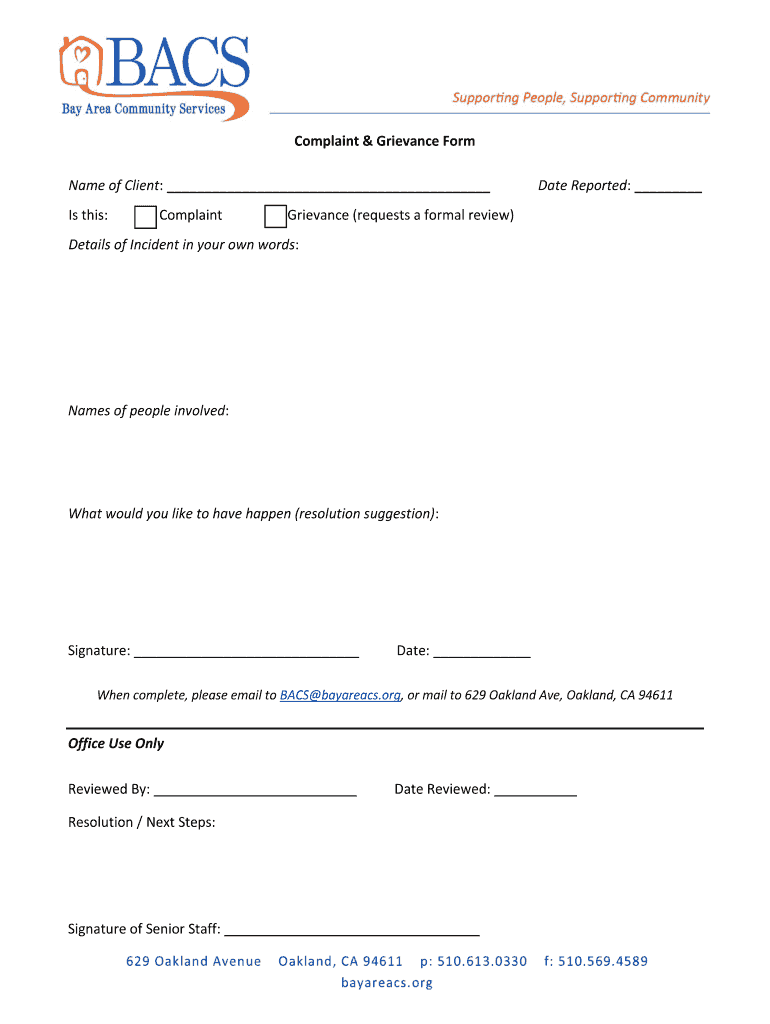
Complaint & Grievance Form Name of Client: Is this:ComplaintDate Reported: Grievance (requests a formal review)Details of Incident in your own words:Names of people involved:What would you like.
Loading

Open form follow the instructions

Easily sign the form with your finger

Send filled & signed form or save
How to fill out the CA BACS Complaint & Grievance Form online
This guide provides clear instructions to help you successfully complete the CA BACS Complaint & Grievance Form online. Follow the step-by-step process to ensure your concerns are effectively communicated.
Follow the steps to fill out the form accurately.
- Click ‘Get Form’ button to access the document and open it in your preferred editor.
- Begin by filling in your name in the 'Name of Client' field provided at the top of the form. Ensure that you enter your full name as it appears on official documents.
- Indicate whether you are submitting a complaint or a grievance by selecting the appropriate option. This can typically be done by checking a box or marking your choice as specified.
- Next, enter the 'Date Reported' in the designated field. Use the format requested on the form to avoid any confusion.
- In the 'Details of Incident in your own words' section, provide a detailed description of the incident you are reporting. Be specific and include relevant information that can help in the review process.
- List the names of the people involved in the incident in the appropriate section. This information may assist in addressing your complaint or grievance.
- In the field labeled 'What would you like to have happen (resolution suggestion)', provide your suggestions for resolving the issue. Be clear about what outcome you hope to see.
- Sign the form in the 'Signature' field to validate your submission. Ensure your signature matches the name you provided earlier.
- Finally, enter the current date in the specified 'Date' section to complete the form.
- When you have filled out the form completely, you can save it, download a copy, print it, or share it as needed. Once finalized, send the completed form via email to BACS@bayareacs.org or mail it to 629 Oakland Ave, Oakland, CA 94611.
Take the next step in addressing your concerns by completing the CA BACS Complaint & Grievance Form online.
Experience a faster way to fill out and sign forms on the web. Access the most extensive library of templates available.
Related content
In California, the Attorney General has primary responsibility for supervising ... This...
DEFINITIONS · 1. Complaint: · 2. Grievant: · 3. Grievance Coordinator (Director of...
sold in Canada, substitute the name “General Motors of. Canada Limited” for Pontiac...
Get answers to your most pressing questions about US Legal Forms API.
How do I report a claim to Medi-Cal?
To file a claim, you must submit a Medi-Cal Claim Form for Beneficiary Reimbursement. The claim form must be filled out in blue or black ink; • The claim form must have an original signature (no copies will be accepted); The Claim Form must include: • A photo copy of your Medi-Cal Beneficiary Identification Card (BIC).
How do I file a complaint with Medi Cal?
Check out the Medi-Cal website. 1-800-300-1506. If you have a Medi-Cal Managed Care plan, you can call the Medi-Cal Managed Care Ombudsman at 1-888-452-8609 for guidance about how to address a problem or complaint. The office is open 8am-5pm/ Monday to Friday.
Who oversees Medi-Cal in California?
The Department of Health Care Services (DHCS) oversees the Medi-Cal program. Your local county office manages most Medi-Cal cases for DHCS. You can reach your local county office online at .benefitscal.com. You can also call your local county office.
How to write a Medi-Cal grievance letter?
Writing an Effective Complaint The effective com- plaint letter is written to the Chief Executive Officer of the hospital or health plan and has four ele- ments: 1) a compliment, 2) detailed description of the event, 3) expression of disappointment, and 4) a proposed resolution.
How do I file a complaint with the Medical Board of California?
IF YOU WISH TO SUBMIT A COMPLAINT, PLEASE SEND EMAIL TO: COMPLAINT@MBC.CA.GOV. The investigation process is lengthy and thorough, and, consistent with due process of law, is conducted in an ethical manner to determine whether the Board can prove that a violation occurred by “clear and convincing evidence.
What is the grievance policy in California?
A formal grievancemay be filed no later than ten work days after the event or circumstances triggering the grievance. The first level of review (Supervisor) shall respond to the grievance in writing within ten work days after the receipt of the formal grievance.
Use professional pre-built templates to fill in and sign documents online faster. Get access to thousands of forms.
If you believe that this page should be taken down, please follow our DMCA take down process here.