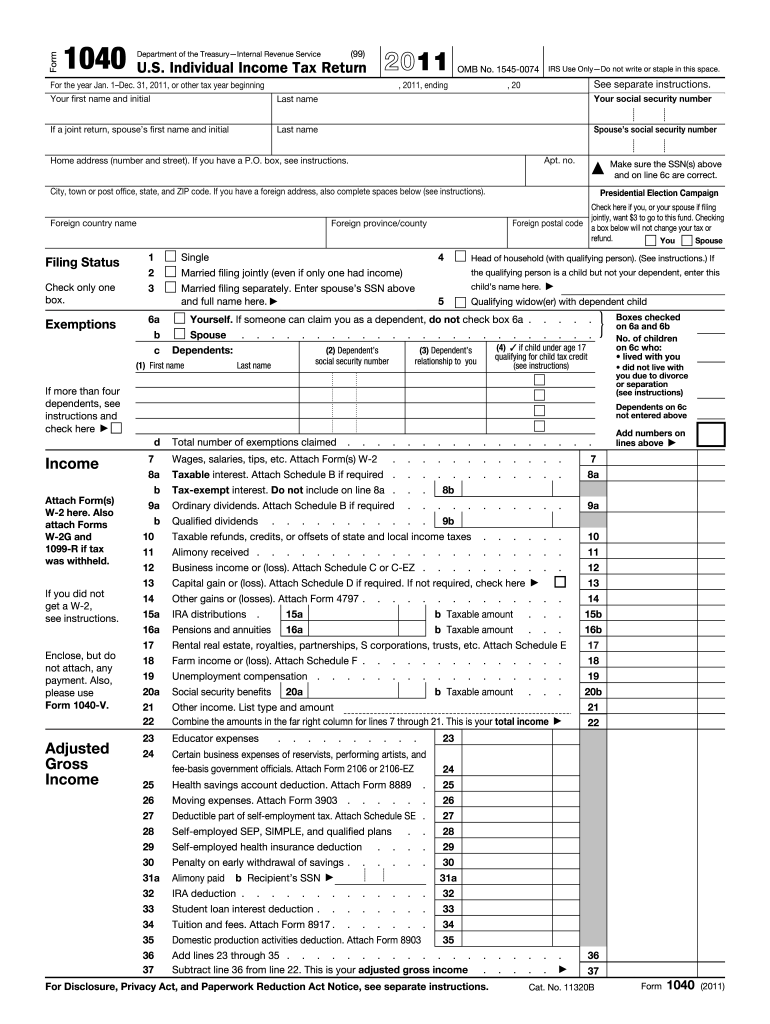
E part of self-employment tax. Attach Schedule SE . Self-employed SEP, SIMPLE, and qualified plans . . 26 27 28 Self-employed health insurance deduction Penalty on early withdrawal of savings . . . . . . . . . . Alimony paid b Recipient s SSN IRA deduction . . . . . . . Student loan interest deduction . . Tuition and fees. Attach Form 8917 . 29 30 31a . . . . . . . . . . . . 32 33 34 Domestic production activities deduction. Attach Form 8903 35 Add lines 23 through 35 . . . .
Loading

Open form follow the instructions

Easily sign the form with your finger

Send filled & signed form or save
How to fill out the IRS 1040 online
Filing your taxes can be a daunting task, but completing the IRS 1040 form online simplifies the process. This guide will provide you with step-by-step instructions to help you accurately fill out the U.S. Individual Income Tax Return online, ensuring you meet all requirements for a successful submission.
Follow the steps to complete the IRS 1040 online form effectively.
- Click ‘Get Form’ button to obtain the form and open it in the editor.
- Begin by entering your personal information at the top of the form. This includes your first name, last name, and social security number. If you are filing jointly, make sure to include your partner's name and social security number.
- Fill in your home address, ensuring you include the apt. number if applicable. If you have a P.O. box, please refer to the instructions for guidance.
- Select your filing status by checking the appropriate box. Options include single, married filing jointly, married filing separately, head of household, and qualifying widow(er).
- List any dependents by providing their names, social security numbers, and relationships to you or your partner. Ensure accuracy in this section.
- Proceed to report your income in the designated sections. This includes wages, interest, dividends, and any other taxable income. Be sure to attach any necessary schedules for specific types of income.
- Calculate your adjusted gross income by including any deductions or exemptions that apply. This is crucial for determining your taxable income.
- Complete the tax and credits section. Ensure you apply any credits you qualify for, which may affect your total tax due.
- Fill out the payments section, detailing any federal income tax withheld and estimated tax payments you've made.
- Review all entries for accuracy. Ensure your social security numbers and all calculations are correct.
- Once everything is completed, save changes to your document and proceed to download, print, or share your form as needed.
Begin filing your IRS 1040 online today for a streamlined tax experience!
Experience a faster way to fill out and sign forms on the web. Access the most extensive library of templates available.
Related content
For Tax Year 2018, you will no longer use Form 1040-A or Form 1040-EZ, but instead will...
Apr 15, 2019 - 1040NR-EZ US Nonresident Alien Income Tax Return for Certain ... The IRS...
Get answers to your most pressing questions about US Legal Forms API.
How do I file taxes for the first time?
Collect required documents such as TDS certificates (Form16/16A), capital gains statements. ... Download and check Form 26AS. ... Rectify the errors in Form 26AS, if any. ... Compute total income for the financial year.
How do I fill out a tax form for work?
Step 1: Your Information. ... Step 2: Your SSN. ... Step 3: Your Marital Status. ... Step 4: Name Changes. ... Step 5: Total Allowances.
What is needed for tax return?
Income documentation The first piece of information you'll need to start preparing your tax return is the total amount of income you earned during the year. Any employer that pays your salary must send you a W-2 form each year that reports your annual income and how much tax was withheld.
How do I fill in my tax return online?
Login to e-Filing website with User ID, Password, Date of Birth /Date of Incorporation and Captcha. Go to e-File and click on "Prepare and Submit ITR Online". ... Select the Income Tax Return Form ITR 1/ITR 4S and the Assessment Year. Fill in the details and click the "Submit" button.
How do I fill in a tax return?
Login to e-Filing website with User ID, Password, Date of Birth /Date of Incorporation and Captcha. Go to e-File and click on "Prepare and Submit ITR Online". ... Select the Income Tax Return Form ITR 1/ITR 4S and the Assessment Year. Fill in the details and click the "Submit" button.
How do you fill out a tax return?
Step 1: Download the Form. Step 2: Fill-in your personal information. ... Step 3: Determine How Many Exemptions You're Eligible For. ... Step 4: Lines 7-22: (Income) Step 5: Lines 23-37 (Deductions to Arrive at Your Adjusted Gross Income ) ... Step 6: Lines 38-55 (Tax and Credits) ... Step 7: Lines 56-60 (Other Taxes)
Which tax form should I use?
If you cannot use Form 1040EZ or Form 1040A, you must use Form 1040 which can include all types of income, deductions, and credits. It may be to your advantage to file a Form 1040 even if you qualify for a different form because it allows you to take itemized deductions, adjustments to income, and credits.
How do you know if you are eligible for a 1040a or 1040ez?
In general, you are eligible to file a 1040A or 1040EZ if you: Make less than $100,000 per year. Do not itemize deductions. Do not receive income from your own business or farm.
What is the difference between the 1040 and the 1040a?
The IRS Form 1040A is one of three forms you can use to file your federal income tax return. Form 1040A is a shorter version of the more detailed Form 1040, but is more complex than the simple 1040EZ form.
What is the difference between Form 1040 and 1040a?
The IRS Form 1040A is one of three forms you can use to file your federal income tax return. Form 1040A is a shorter version of the more detailed Form 1040, but is more complex than the simple 1040EZ form.
Use professional pre-built templates to fill in and sign documents online faster. Get access to thousands of forms.
If you believe that this page should be taken down, please follow our DMCA take down process here.
This form is available in several versions. Select the version you need from the drop-down list below.