Loading
Get Wa Hca Form 02324ump 2019-2026
How it works
-

Open form follow the instructions
-

Easily sign the form with your finger
-

Send filled & signed form or save
How to fill out the WA HCA Form 02324UMP online
Filling out the WA HCA Form 02324UMP online can streamline the process of submitting your vision claim. This guide will walk you through each section of the form, ensuring that you provide all necessary information accurately and efficiently.
Follow the steps to complete the WA HCA Form 02324UMP smoothly.
- Press the ‘Get Form’ button to retrieve the WA HCA Form 02324UMP and open it in the designated editor.
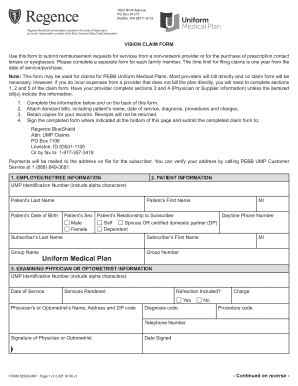
- Begin by filling out the employee or retiree information in section 1. Include the UMP identification number, last name, first name, middle initial, and group information.
- In section 2, provide the patient information. Enter the patient’s name, date of birth, sex, relationship to the subscriber, and daytime phone number.
- Next, move to section 3 where you will need to input the examining physician or optometrist information. Fill in their UMP identification number, date of service, services rendered, and charges, along with the physician's signature.
- Proceed to section 4, which focuses on supplier information. Ensure all sections are completed, including details about the type and number of lenses or glasses ordered, along with the total charges.
- Lastly, complete section 5. This requires the employee/retiree's signature and date, authorizing the release of medical information necessary to process the claim.
- Once all sections are filled out, review your entries for accuracy. Attach any required itemized bills and sign the completed form. You can then save changes, download a copy, or print the form.
Complete your WA HCA Form 02324UMP online today for a smoother claims process.