Loading
Get Co Dr 0122 2014
How it works
-

Open form follow the instructions
-

Easily sign the form with your finger
-

Send filled & signed form or save
How to fill out the CO DR 0122 online
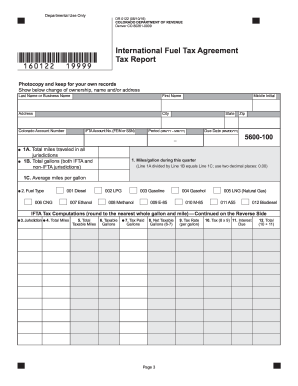
The CO DR 0122 form is required for all IFTA licensees to report their fuel use and mileage for tax purposes. This guide provides a clear and supportive step-by-step approach to help users fill out the form correctly and efficiently online.
Follow the steps to complete the CO DR 0122 form online.
- Press the ‘Get Form’ button to access the form and open it in your preferred editing application.
- Begin by entering the total miles traveled during the reporting period on Line 1A. This amount should be rounded to the nearest whole mile, ensuring that both IFTA and non-IFTA jurisdictions are included.
- On Line 1B, input the total gallons of fuel used in the propulsion tank for all qualified vehicles in your fleet. Again, round to the nearest whole gallon.
- Calculate the average miles per gallon by dividing the value from Line 1A by the value from Line 1B. Record this result on Line 1C, rounding to two decimal places.
- Select the appropriate fuel type on Line 2. Remember that a separate form is needed for each type of fuel used.
- In Column 3, list all IFTA jurisdictions where miles were traveled, using the correct jurisdiction abbreviations. Do not include jurisdictions with zero miles.
- Enter the total miles traveled for each jurisdiction in Column 4, rounding to the nearest whole mile. For non-IFTA jurisdictions, enter total miles below the column totals.
- In Column 5, list the taxable miles for each jurisdiction by subtracting any exempt miles covered by a fuel tax trip permit. Ensure no decimals are used.
- Column 7 requires you to enter total tax-paid gallons of fuel for each jurisdiction, rounding as necessary. Only report gallons used, not those remaining in storage.
- List the tax rates for each IFTA jurisdiction in Column 9 as provided in your quarterly tax report correspondence.
- If your report is submitted late, calculate interest in Column 11 based on the guidelines for late submissions.
- Total the amounts from Columns 10 and 11 in Column 12, ensuring to follow any parenthesis rules for credit amounts.
- Sum the values in Column 10 to finalize your tax amount due on Line 13 or enter the credit amount on Line 14 as applicable.
- Complete the penalty and interest calculations on Lines 15 and 16 as necessary, following the guidance for late filings.
- If applicable, total any amounts on Line 17 for refunds or on Line 18 for total remittance due.
- Ensure all entries are accurate, sign, and date the report before final submission.
Complete your CO DR 0122 form online today to ensure timely filing and avoid penalties.
Get form
Experience a faster way to fill out and sign forms on the web. Access the most extensive library of templates available.
Impact fees in Colorado are charges imposed on developers to help fund public infrastructure improvements. These fees support essential services such as roads, schools, and parks that may be affected by new construction. By understanding impact fees, developers can better plan their projects and contribute to community development. CO DR 0122 offers insight into how these fees are calculated and applied.
Get This Form Now!
Use professional pre-built templates to fill in and sign documents online faster. Get access to thousands of forms.