Loading
Get Gsa Sf 76 2017
How it works
-

Open form follow the instructions
-

Easily sign the form with your finger
-

Send filled & signed form or save
How to fill out the GSA SF 76 online
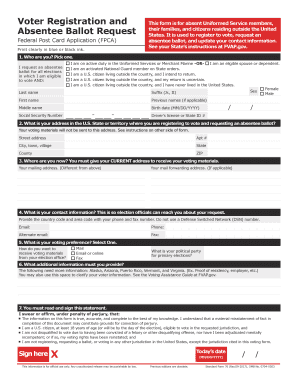
Filling out the GSA SF 76 online can streamline your voter registration and absentee ballot request process. This guide provides step-by-step instructions to help you complete the form accurately and efficiently.
Follow the steps to fill out the GSA SF 76 online.
- Click ‘Get Form’ button to open the GSA SF 76 and view it in your online editor.
- Identify your eligibility by selecting one of the options provided, such as whether you are on active duty or a U.S. citizen living abroad. Fill in your last name, first name, middle name, and sex, and provide your birth date and Social Security number.
- Enter your U.S. address where you are registering to vote. Ensure you use a physical street address and do not include a P.O. Box in this section.
- Provide your current mailing address, which may differ from your U.S. address. Include any mail forwarding address if applicable.
- Enter your contact information, including both your phone and email addresses. Ensure you include the country code and area code.
- Indicate your voting preferences, including how you wish to receive your voting materials and your political party for primary elections.
- If applicable, provide any additional information that may be required by your state or clarify your voter information according to guidelines.
- Read and sign the sworn statement, confirming the accuracy of the information provided. Ensure you include today's date.
- After completing the form, save your changes. You may then choose to download, print, or share the completed GSA SF 76 as needed.
Begin your online application process to ensure your voice is heard in upcoming elections.
Get form
Experience a faster way to fill out and sign forms on the web. Access the most extensive library of templates available.
Related links form
Get This Form Now!
Use professional pre-built templates to fill in and sign documents online faster. Get access to thousands of forms.