Loading
Get Va Dmv Med 2 2020-2026
How it works
-

Open form follow the instructions
-

Easily sign the form with your finger
-

Send filled & signed form or save
How to fill out the VA DMV MED 2 online
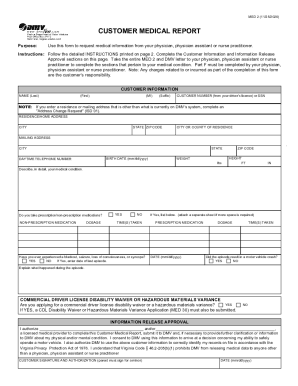
The VA DMV MED 2 is a crucial form for individuals needing to submit a customer medical report to the Virginia Department of Motor Vehicles. This guide provides clear, step-by-step instructions to help users complete the form online with confidence.
Follow the steps to successfully complete the VA DMV MED 2 online.
- Click ‘Get Form’ button to obtain the form and open it in the editor.
- Begin filling out the Customer Information section. Include your name, customer number or social security number, residence address, mailing address, birth date, daytime telephone number, weight, and height.
- In the medical condition section, describe your medical condition in detail. Indicate whether you take prescription or non-prescription medications and provide the necessary details regarding dosages and timings.
- Address the questions about any experiences of blackouts, seizures, or loss of consciousness, detailing any relevant incidents and their dates if applicable.
- If you are applying for a commercial driver license disability waiver or a hazardous materials variance, ensure you note this and be ready to submit additional documentation.
- Complete the Information Release Approval section by authorizing your medical provider to fill out the required portions of the MED 2 form.
- Sign and date the form in the Customer Signature and Authorization section.
- Take the completed form along with the DMV letter to your medical provider for them to complete their sections and return it to the DMV.
- After your medical provider has filled out the necessary sections, ensure to save any changes, download, print, or share the completed form as required.
Start filling out your VA DMV MED 2 online to ensure you meet the compliance requirements for your driving privileges.
Related links form
In order to keep your CDL, some states will allow a CDL holder to certify in a category that does not require a medical certificate e.g. Intrastate Excepted, if they are not currently driving. You will have to check with your State Drivers License Agency (DMV) to see if they permit this option.