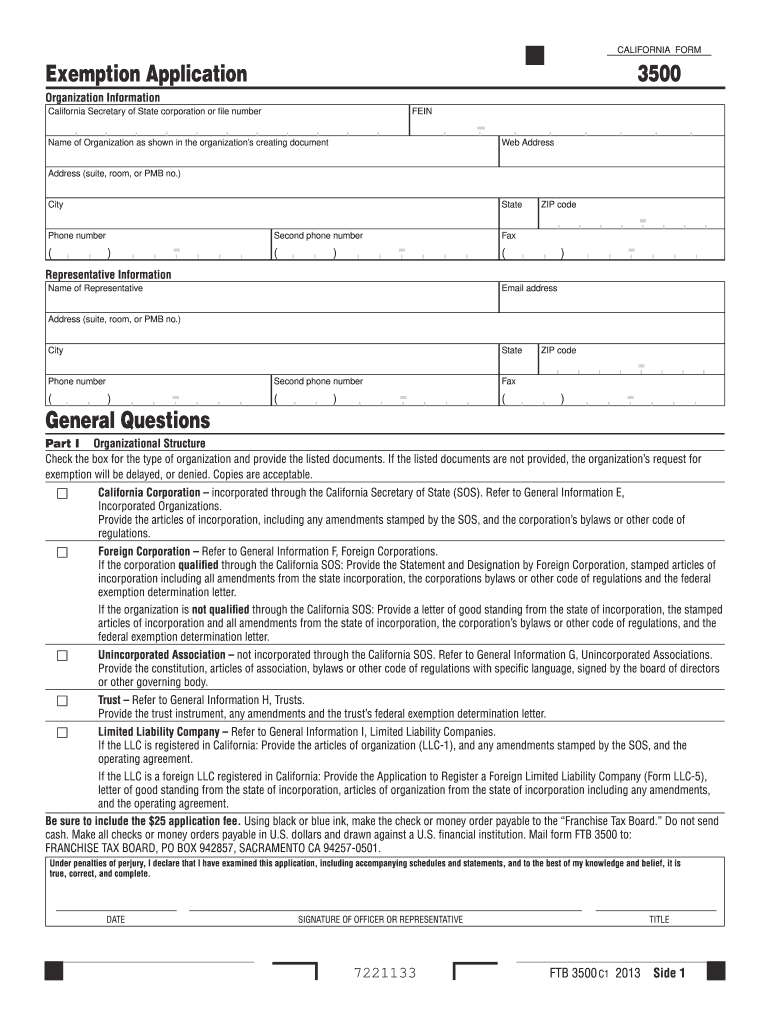
Ation fee. Using black or blue ink, make the check or money order payable to the Franchise Tax Board. Do not send cash. Make all checks or money orders payable in U.S. dollars and drawn against a U.S. financial institution. Mail form FTB 3500 to: FRANCHISE TAX BOARD, PO BOX 942857, SACRAMENTO CA 94257-0501. Under penalties of perjury, I declare that I have examined this application, including accompanying schedules and statements, and to the best of my knowledge and belief, it is t.
Loading

Open form follow the instructions

Easily sign the form with your finger

Send filled & signed form or save
How to fill out the CA FTB 3500 online
Completing the CA FTB 3500 form online is an essential process for organizations seeking tax exemption in California. This guide provides clear, step-by-step instructions to ensure you accurately fill out each section of the form with ease.
Follow the steps to fill out the CA FTB 3500 effectively.
- Click the ‘Get Form’ button to obtain the form and open it in your preferred online editing tool.
- Fill in the organization information section, providing the California Secretary of State corporation or file number, FEIN, name, web address, address details, city, state, ZIP code, and phone number. Ensure all information matches official documents.
- Complete the representative information section, listing the name, email address, address, city, state, ZIP code, and phone numbers of the organization representative.
- Answer the general questions about the organization, including whether it has received tax-exempt status and the California Revenue and Taxation Code section that applies to its activities.
- In Part I, identify your organizational structure by checking the appropriate box and providing the necessary documents for verification, such as articles of incorporation or trust instruments.
- Proceed to Part II and narrate the organization’s activities, detailing past, present, and future initiatives. Be specific about how these activities further the organization’s exempt purpose.
- In Part III, complete the financial data section, providing receipts, expenses, and a balance sheet for the current year and the last three preceding years.
- Part IV requires you to list compensation details for all officers, directors, and trustees, including annual compensation figures.
- Complete Part V, detailing any prior exemption statuses, if applicable, and include corresponding documentation.
- Finish by reviewing all sections for accuracy, and once completed, save changes, download a copy, or print the form for submission.
Begin your journey towards tax-exempt status by filling out the CA FTB 3500 online today!
Experience a faster way to fill out and sign forms on the web. Access the most extensive library of templates available.
Related content
Mail form FTB 3500 to: EXEMPT ORGANIZATIONS UNIT MS F120, FRANCHISE TAX BOARD, PO BOX...
May 2, 2025 — You will need to file Form 3500 and pay a $25 fee · You can apply online...
The FTB–1400 Flow Monitor is a state-of-the-art, digital signal processing flow monitor...
Get answers to your most pressing questions about US Legal Forms API.
How do I request a 501c3 status?
To request 501(c)(3) status, you will need to complete and submit Form 3500 to the California Franchise Tax Board along with the appropriate documentation. This involves providing details about your organization's structure, mission, and financial plans. It's important to prepare all materials accurately, as any mistakes can lead to delays or denials. Platforms like US Legal Forms offer templates and support that can assist you in finding the right information and ensuring your submission meets all necessary requirements.
How long does it take to form a 501c3 in California?
The process of forming a 501(c)(3) in California can take several months, depending on various factors, including the complexity of your organization and the completeness of your application. Typically, you can expect the CA FTB 3500 to be processed within 60 to 90 days once submitted, but delays are not uncommon. To expedite this timeframe, ensure you have all required documentation and information ready before submission. Using a platform like US Legal Forms can provide guidance and resources to help streamline your application process.
Who can use form 3500A?
Form 3500A is available for organizations seeking recognition as a tax-exempt entity under section 501(c)(3) in California. Typically, this form is used by nonprofits, charitable organizations, and other entities that meet the criteria for tax exemption. By utilizing the CA FTB 3500, these organizations can streamline the application process while ensuring compliance with state regulations. If you're looking to establish a nonprofit in California, it's essential to understand this form's requirements and benefits.
Can I file my return electronically?
Yes, you can file your return electronically in California, which includes forms related to the CA FTB 3500. E-filing not only fosters convenience, but it also helps minimize common filing errors. For added ease and guidance, utilize USLegalForms, which offers resources tailored to help you successfully navigate electronic filing.
What is California's e-filing requirement?
California's e-filing requirement states that most taxpayers must file their returns electronically, especially those using the CA FTB 3500 for claiming exemptions. This requirement streamlines the filing process and reduces paperwork for both taxpayers and tax agencies. Understanding this requirement helps you stay compliant and ensures a smoother experience when filing your taxes.
How do I file a property tax exemption in California?
To file a property tax exemption in California, you typically need to complete the CA FTB 3500A form and submit it to your local assessor's office. Make sure you meet the eligibility requirements before filing. For a smoother experience, consider using USLegalForms, which can guide you through the form completion and submission process.
Can California returns be electronically filed?
California returns can indeed be electronically filed, including those associated with the CA FTB 3500. E-filing is now widely supported, making it easier for taxpayers to submit their returns efficiently. This method reduces the chances of errors and provides immediate confirmation, enhancing your overall filing experience.
Is California accepting e-file returns?
Yes, California is currently accepting e-file returns for various tax forms, including those related to the CA FTB 3500. E-filing provides a convenient way to submit your tax documents while ensuring faster processing times. By using e-filing, you can speed up your refund and receive confirmation of submission much quicker than traditional methods.
What is California form 3500A?
California Form 3500A is a crucial document for individuals and businesses seeking to claim a tax exemption. Specifically linked to the CA FTB 3500, this form allows you to apply for a property tax exemption, which can significantly reduce your financial obligations. Submitting this form properly can help ensure you start your exemption process on the right foot.
What is Form 3500 used for?
Form 3500 is primarily used by organizations in California to apply for tax-exempt status. Completing this form ensures compliance with tax regulations and qualifies organizations for specific benefits. By securing tax-exempt status, you can promote better financial management for your organization. To navigate this process efficiently, consider utilizing services like uslegalforms to streamline the filing of CA FTB 3500.
Use professional pre-built templates to fill in and sign documents online faster. Get access to thousands of forms.
If you believe that this page should be taken down, please follow our DMCA take down process here.
This form is available in several versions. Select the version you need from the drop-down list below.