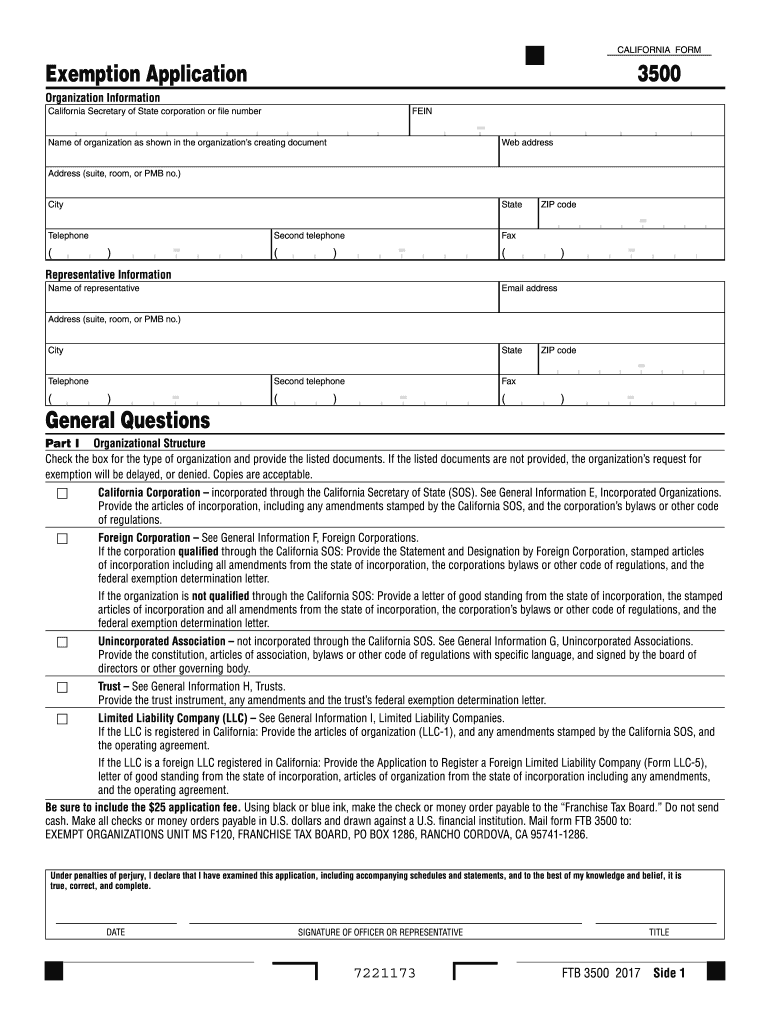
Ent. Be sure to include the $25 application fee. Using black or blue ink, make the check or money order payable to the Franchise Tax Board. Do not send cash. Make all checks or money orders payable in U.S. dollars and drawn against a U.S. financial institution. Mail form FTB 3500 to: FRANCHISE TAX BOARD, PO BOX 942857, SACRAMENTO CA 94257-0501. Under penalties of perjury, I declare that I have examined this application, including accompanying schedules and statements, and to the best o.
Loading

Open form follow the instructions

Easily sign the form with your finger

Send filled & signed form or save
How to fill out the CA FTB 3500 online
The CA FTB 3500 form is essential for organizations seeking tax-exempt status in California. This guide provides a comprehensive, step-by-step approach to filling out the form online, making it accessible for all users, regardless of their legal knowledge.
Follow the steps to complete the CA FTB 3500 form online.
- Click ‘Get Form’ button to obtain the form and access it in the online editor.
- Begin by filling in the organizational information section. Provide the California Secretary of State corporation or file number, FEIN, name of the organization as stated in the creating document, website address, physical address, city, state, ZIP code, and phone numbers.
- In the representative information section, enter the name of the representative, their email address, and their contact details including address and phone numbers.
- Proceed to Part I, where you will check the appropriate box for the type of organization and attach the required documents as specified.
- In Part II, start with the narrative of activities. Answer whether the organization has received tax-exempt status at the federal level, provide the California Revenue and Taxation Code section that aligns with your organization, and fill in the date the organization was formed.
- Continue detailing the organization’s activities in Part II, including whether the organization plans to conduct activities and describe each activity with specific timelines and resources.
- In Part III, complete the financial data. Enter all current receipts and expenses over the specified years, ensuring to analyze whether the organization is financially healthy.
- Proceed to fill out Parts IV to VI as required, detailing compensation of officers, directors, and trustees, as well as the organization’s history and specific activities conducted.
- Once all sections are completed, review the entire form for accuracy and completeness.
- Final step: Save changes, download the form, print it, or share it as needed to ensure submission or storage.
Complete your CA FTB 3500 form online today to streamline your tax-exempt application process.
Experience a faster way to fill out and sign forms on the web. Access the most extensive library of templates available.
Related content
Mail form FTB 3500 to: EXEMPT ORGANIZATIONS UNIT MS F120, FRANCHISE TAX BOARD, PO BOX...
May 2, 2025 — You will need to file Form 3500 and pay a $25 fee · You can apply online...
The FTB–1400 Flow Monitor is a state-of-the-art, digital signal processing flow monitor...
Get answers to your most pressing questions about US Legal Forms API.
How do I request a 501c3 status?
Requesting a 501(c)(3) status involves several steps, starting with understanding the requirements set by the IRS and CA FTB 3500. You must first complete the necessary forms, including the application for recognition of exemption, and then submit them alongside your organization’s governing documents. It's crucial to ensure accuracy in your application to avoid delays. Utilizing online resources can simplify this process, and platforms like uslegalforms can provide the necessary templates and guidance.
Who can use form 3500A?
Form 3500A is designed for organizations seeking tax-exempt status in California. Primarily, nonprofits that are applying for 501(c)(3) status will utilize this form. To qualify, your organization must meet specific guidelines outlined by the CA FTB 3500. By using this form correctly, you can streamline your application process and enhance your chances of obtaining tax-exempt status.
How do I file a California exemption claim?
Filing a California exemption claim requires completing the necessary application forms, including the CA FTB 3500. Make sure to review the eligibility criteria and gather supporting documents that prove your claim. Submit your application to the appropriate county office to ensure timely processing of your exemption benefits.
What is California form 3500A?
California form 3500A is a specific application form used for property tax exclusions. It enables eligible homeowners, especially seniors, to apply for tax exemptions effectively. Understanding this form is critical for anyone seeking tax relief in California, and you can find resources and guidance through the CA FTB 3500.
How do I file a property tax exemption in California?
Filing a property tax exemption in California involves completing the appropriate forms, including the CA FTB 3500. You will need to gather necessary documentation that demonstrates your eligibility. Once you have filled out the forms, submit them to your local assessor's office for processing.
Can California returns be electronically filed?
Yes, California tax returns can be electronically filed, which simplifies the process. Utilize the CA FTB 3500 resources to understand the steps involved in e-filing for an accurate and efficient submission. Many tax software programs support this feature, allowing you to file directly from your home.
How do I apply for property tax exemption in California?
To apply for a property tax exemption in California, you need to complete the necessary forms, which may include the CA FTB 3500. Submit your application to your county assessor's office, along with any required documentation that proves your eligibility. Ensure that you file your application before the deadline to take advantage of the tax benefits.
What age in California do you stop paying property taxes?
In California, property taxes do not automatically stop at a specific age. However, seniors aged 62 and older may qualify for property tax benefits, such as exemptions or deferrals. It is essential to consult the CA FTB 3500 for details on eligibility and application procedures. You can take advantage of these benefits to potentially lower your property tax burden.
How to fill out California resale certificate?
Filling out a California resale certificate requires key information such as your seller's permit number and the name of the seller. You must also specify the reason for the resale exemption, which often links back to CA FTB 3500 requirements. Using a structured approach and consulting resources from platforms like uslegalforms can simplify this process, making compliance easier.
How to fill out CA withholding?
To fill out CA withholding accurately, you should start with the necessary personal information, including your social security number and filing status. Next, ensure to reference the guidelines provided by the franchise tax board and use the CA FTB 3500 as a guide if incorporating tax-exempt details. Completing this correctly ensures compliance, preventing issues with your tax responsibilities.
Use professional pre-built templates to fill in and sign documents online faster. Get access to thousands of forms.
If you believe that this page should be taken down, please follow our DMCA take down process here.
This form is available in several versions. Select the version you need from the drop-down list below.