Loading
Get Uk Tm26r 2020-2026
How it works
-

Open form follow the instructions
-

Easily sign the form with your finger
-

Send filled & signed form or save
How to fill out the UK TM26R online
Filling out the UK TM26R form for rectifying the register can seem daunting. However, with clear guidance, you can complete the process smoothly and effectively.
Follow the steps to accurately complete your online form.
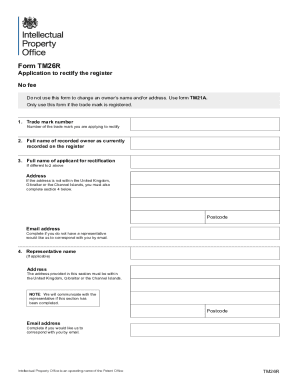
- Click 'Get Form' button to access the TM26R form and open it in your preferred online editing tool.
- Enter the trade mark number you wish to rectify in the designated field.
- Provide your full name as the recorded owner, as it currently appears on the register.
- If you are not the recorded owner, please enter the full name of the applicant for rectification in this section.
- Input your address. If your address is outside the United Kingdom, Gibraltar, or the Channel Islands, ensure to complete section 4.
- Fill in the postcode and optional email address if you would like correspondences sent to you directly without a representative.
- If applicable, provide the representative's name and address. Ensure the address is located within the United Kingdom, Gibraltar, or the Channel Islands.
- In section 5, you must describe the error or omission that needs rectification. Use a continuation sheet if there is insufficient space.
- Complete the declaration by signing, printing your name in block capitals, and dating the form.
- If there are any other changes to the register regarding the trade mark, note them in section 6. Otherwise, proceed to section 7.
- In the final section, provide any reference you wish to use, along with your contact details, including name and daytime telephone number for queries.
- After reviewing all entries for accuracy, you can save your changes, download the completed form, print it, or share it as necessary.
Complete your documents online for a smooth submission process.