Loading
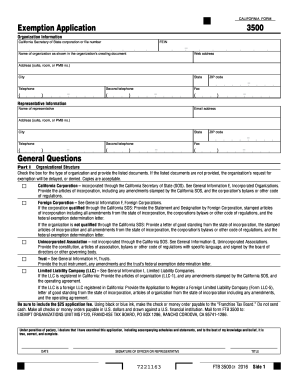
Get Ca Ftb 3500 2016
How it works
-

Open form follow the instructions
-

Easily sign the form with your finger
-

Send filled & signed form or save
How to fill out the CA FTB 3500 online
Filling out the CA FTB 3500 form is an essential step for organizations seeking tax-exempt status in California. This guide provides a clear, step-by-step process to help you navigate the form accurately and efficiently.
Follow the steps to complete the CA FTB 3500 form online.
- Click the ‘Get Form’ button to initiate the download of the CA FTB 3500 form and open it for editing.
- Input your organization information in the designated fields, which include the California Secretary of State corporation or file number, FEIN, and the organization name as shown in your creating document. Additionally, provide the organization's web address, physical address, city, state, telephone numbers, and fax number.
- Enter representative information. This includes the representative's name, email address, physical address, and telephone numbers. Ensure all details are correct to facilitate communication.
- Proceed to Part I, where you will specify your organizational structure. Check the appropriate box that corresponds to your organization type (e.g., California Corporation, Foreign Corporation, etc.). Provide any required documentation, such as articles of incorporation or bylaws, depending on the type selected to avoid delays in processing.
- Complete Part II by answering the general questions about the organization. This section includes inquiries about existing tax-exempt status, formation state, annual accounting period, and planned activities. Ensure your answers are accurate and supported by any necessary explanations.
- In Part III, fill in the financial data section. Provide detailed financial statements, listing receipts and expenses for the current and prior years. Maintain clarity and detail to ensure comprehensive reporting.
- Part IV requires you to list all officers, directors, and trustees along with their total annual compensation. Be transparent about compensation structures to maintain compliance.
- In Part V, answer questions related to the organization’s history, including previous entity ID numbers and any previous exemptions granted or denied.
- If applicable, continue to Part VI and answer specific questions about activities the organization conducts. Be thorough in explanations and provide any additional information if requested.
- Once all sections are completed, review the entire form for accuracy. At the final step, save your changes, and consider downloading, printing, or sharing the completed form as needed.
Complete your documents online to facilitate faster processing and compliance.
Get form
Experience a faster way to fill out and sign forms on the web. Access the most extensive library of templates available.
Related links form
To file a property tax exemption in California, you need to complete the appropriate forms, often including the CA FTB 3500. This process typically involves providing detailed information about the property and its use, as well as your eligibility for the exemption. You can make the process easier by utilizing platforms like uslegalforms to guide you through the paperwork. Always double-check the local requirements to ensure a successful filing.
Get This Form Now!
Use professional pre-built templates to fill in and sign documents online faster. Get access to thousands of forms.