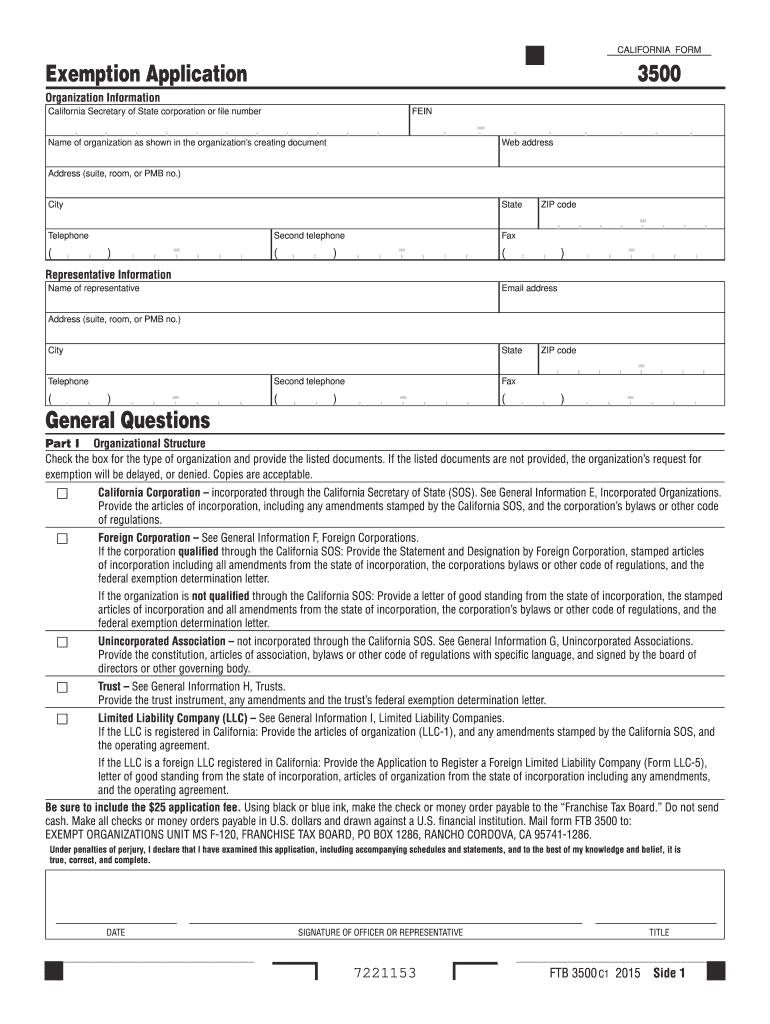
Cument Web address Address (suite, room, or PMB no.) City State ZIP code Telephone ( ) - Second telephone ( ) - Fax ( ) - Representative Information Name of representative Email address Address (suite, room, or PMB no.) City State ZIP code Second telephone Telephone General Questions ( ) ( ) Fax - ( ) - Part I Organizational Structure.
Loading

Open form follow the instructions

Easily sign the form with your finger

Send filled & signed form or save
How to fill out the CA FTB 3500 online
This guide provides a comprehensive overview of the process for completing the CA FTB 3500 exemption application online. Designed for users with varying levels of experience, it breaks down each section of the form in a clear and supportive manner.
Follow the steps to complete your exemption application effectively.
- Press the ‘Get Form’ button to access the CA FTB 3500 online application form.
- Fill in the organization information, including the California Secretary of State corporation or file number, Federal Employer Identification Number (FEIN), name of the organization as indicated in the creating document, web address, address, city, state, ZIP code, primary telephone number, and secondary telephone number.
- Provide representative information by entering the name, email address, mailing address, city, state, ZIP code, and telephone number of the representative for the organization.
- Answer the general questions to assess if the organization has already received federal tax-exempt status and provide the applicable California Revenue and Taxation Code section that fits the organization’s purpose.
- In Part I, select the type of organization by checking the appropriate box. Attach the necessary documents as specified for each organization type, ensuring that all required documents are included to prevent delays.
- Proceed to Part II and provide a detailed narrative of the organization’s activities. This should include descriptions of past, present, and future activities pertinent to the organization’s objectives.
- Complete Part III by filling in the financial data for the current year and for each year you are applying for tax-exempt status, listing all receipts and expenses.
- List the officers, directors, and trustees in Part IV, including their names, titles, mailing addresses, and compensation amounts, if applicable.
- In Part V, provide the organization's history, including any previous California entity ID numbers and any past exemption status granted or denied.
- Complete any applicable specific sections based on the organization's activities outlined in Section D through Section Z.
- Review the entire form for accuracy and completeness to ensure no required information is missing.
- Finally, save your changes, download, print, or share your completed CA FTB 3500 exemption application as needed.
Begin your application process for tax-exempt status using the CA FTB 3500 online today.
Experience a faster way to fill out and sign forms on the web. Access the most extensive library of templates available.
Related content
Mail form FTB 3500 to: EXEMPT ORGANIZATIONS UNIT MS F120, FRANCHISE TAX BOARD, PO BOX...
May 2, 2025 — You will need to file Form 3500 and pay a $25 fee · You can apply online...
The FTB–1400 Flow Monitor is a state-of-the-art, digital signal processing flow monitor...
Get answers to your most pressing questions about US Legal Forms API.
How do I file a property tax exemption in California?
To file a property tax exemption in California, you will typically need to complete the necessary forms, including the CA FTB 3500. Additionally, you may need to submit specific documentation that verifies your eligibility for the exemption. It’s beneficial to utilize platforms like uslegalforms that provide step-by-step guidance, ensuring you understand the process and submit the correct information to maximize your chance of receiving the exemption.
What is California form 3500A?
California form 3500A is a specific form used in conjunction with the CA FTB 3500 for taxpayers seeking to claim tax benefits related to property tax exemptions. This form enables individuals to communicate their eligibility and relevant details to California tax authorities. Properly completing form 3500A can help you protect your rights and receive applicable exemptions, streamlining your tax obligations.
What is California's e filing requirement?
California’s e-filing requirement mandates that certain taxpayers must file their returns electronically, particularly if they are using the CA FTB 3500. This requirement applies to individuals with adjusted gross income exceeding a specific threshold or those who have complex tax situations. Staying informed about these requirements can help you avoid penalties and ensure compliance with state regulations.
Can California returns be electronically filed?
Yes, California returns can be electronically filed, which includes the CA FTB 3500. E-filing offers a secure and efficient way to submit your tax information. It allows for real-time confirmation that your return has been received. Moreover, electronically filed returns typically get processed faster, increasing the likelihood of quicker refunds.
Is California accepting efile returns?
Yes, California is accepting e-file returns, including those filed using the CA FTB 3500. This online submission method benefits taxpayers by reducing paperwork and minimizing errors. It's essential to check that your software is updated and approved by the Franchise Tax Board to ensure smooth processing. Embracing e-filing not only saves time but also makes tax season a little less stressful.
Can I file my return electronically?
Yes, you can file your return electronically using the CA FTB 3500. This method is quick and efficient, allowing you to submit your tax return from the comfort of your home. With electronic filing, you can often expect faster processing times, which means you may receive your refund sooner. It’s a convenient option that simplifies the entire process.
What do you need to qualify as a 501c3?
To qualify as a 501(c)(3), your organization must operate exclusively for charitable, educational, or religious purposes. You will need a clear mission statement, a structured governance framework, and specific operational details to complete the CA FTB 3500 effectively. It is crucial to detail how your activities benefit the public or a specific community. Ensuring compliance with these standards will enhance your likelihood of approval.
How hard is it to get 501c3 status?
Securing 501(c)(3) status can be straightforward if you prepare all required documents thoroughly. The process includes filling out Form 1023 and the CA FTB 3500 carefully to ensure compliance with both federal and state regulations. While it can seem challenging, our platform at uslegalforms offers resources and guidance to simplify this journey. With the right support, you can effectively navigate through the application process more confidently.
Who gives 501c3 status?
The IRS is the primary authority that grants 501(c)(3) status to qualifying organizations. However, in California, the Franchise Tax Board also plays an essential role by processing the CA FTB 3500 form. Obtaining this status requires you to meet specific requirements outlined by both the IRS and California authorities. By following the correct procedures, you can secure this beneficial status for your organization.
How do I request a 501c3 status?
To request 501(c)(3) status, start by completing IRS Form 1023, which is the application for recognition of exemption. After preparing this application, you need to submit it along with the CA FTB 3500 if you are based in California. Including these forms ensures you comply with both federal and state requirements seamlessly. This dual submission facilitates a smoother approval process for gaining 501(c)(3) status.
Use professional pre-built templates to fill in and sign documents online faster. Get access to thousands of forms.
If you believe that this page should be taken down, please follow our DMCA take down process here.
This form is available in several versions. Select the version you need from the drop-down list below.