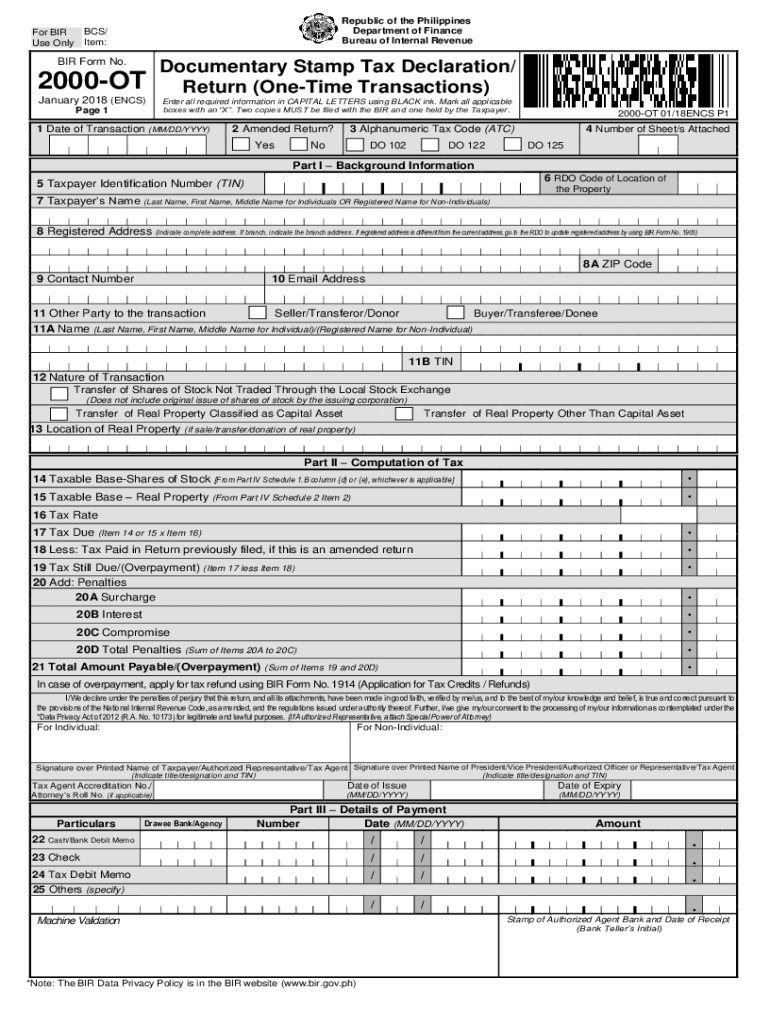
(One-Time Transactions) Enter all required information in CAPITAL LETTERS using BLACK ink. Mark all applicable boxes with an X . Two copies MUST be filed with the BIR and one held by the Taxpayer. 1 Date of Transaction (MM/DD/YYYY) 2 Amended Return? Yes 2000-OT 01/18ENCS P1 3 Alphanumeric Tax Code (ATC) DO 102 No DO 122 4 Number of Sheet/s Attached DO 125 Part I Background Information 6 RDO Code of Location of 5 Taxpayer Identification Number (TIN) the Property 7 Taxpayer.
Loading

Open form follow the instructions

Easily sign the form with your finger

Send filled & signed form or save
How to fill out the PH BIR 2000-OT online
Filling out the PH BIR 2000-OT form, which serves as a declaration for documentary stamp tax for one-time transactions, is an essential process for taxpayers in the Philippines. This guide will provide you with clear and detailed steps to assist you in completing the form accurately and efficiently.
Follow the steps to fill out the PH BIR 2000-OT online.
- Click ‘Get Form’ button to obtain the form and open it in your preferred editor.
- Enter the date of transaction in the format MM/DD/YYYY in the designated field.
- Indicate whether you are filing an amended return by marking the appropriate box for 'Yes' or 'No'.
- Input the alphanumeric tax code (ATC) relevant to your transaction from the provided options.
- Specify the number of sheets you are attaching to this form.
- Complete Part I with your background information, including your taxpayer identification number (TIN), name, registered address, and contact details.
- Provide the information of the other party involved in the transaction, including their TIN and nature of the transaction.
- In Part II, compute the taxable base for shares of stock or real properties as applicable and input the relevant values.
- Calculate the tax due by multiplying the taxable base by the applicable tax rate.
- If this is an amended return, subtract any tax previously paid from the total tax due to determine tax still due or overpayment.
- Complete the penalties section if applicable, indicating any surcharges, interests, or compromises.
- Review your entries for accuracy before finalizing the form.
- Once completed, save your changes, download the form, and prepare it for printing or sharing.
Start completing your PH BIR 2000-OT online today to ensure compliance with your tax obligations.
Experience a faster way to fill out and sign forms on the web. Access the most extensive library of templates available.
Related content
Refers to the version of the BIR forms developed and maintained by the BIR for ... b...
Get answers to your most pressing questions about US Legal Forms API.
How do I submit my Bir 1700 online?
Fill-up applicable fields in the BIR Form No. 1700. Pay electronically by clicking the "Proceed to Payment" button and fill-up the required fields in the "eFPS Payment Form" click "Submit" button. Receive payment confirmation from eFPS-AABs for successful e-filing and e-payment.
How is DST calculated on bank loans?
DST on loan agreements is computed as P1. 00 for every P200. Thus, if the company obtained a loan in the amount of P1,000,000, the DST on the loan agreement is P5,000 (1,000,000 divided by 200).
How do you calculate DST?
To compute DST, multiply the monthly rent by 12 months and then by the number of years stated in the contract. Subtract P2,000.00 and multiply the amount by . 001, then add P3. 00.
How do you accomplish Bir 1700?
Part I - Background Information on Taxpayer. PreWork: ... Part II - Background Information on Spouse. Fill out this part if you are married. Part VI - Schedule. Yes, accomplish Part Six first and you'll find out in a moment why. ... Part V - Computation of Taxes. ... Part III - Total Tax Payable. ... Part VI - Details of Payment.
What is the purpose of BIR Form 1700?
The BIR Form 1700 is the form you file as an employee earning PURELY from your employment.
What is the purpose of BIR Form 1701?
BIR Form 1701, also known as Annual Income Tax Return for Self-Employed Individuals, Estates and Trusts is a tax form which summarizes all the transactions made over the tax calendar year.
Who are not required to file income tax return in the Philippines?
Tax returns need not be filed by the following categories of individual: those earning purely compensation income whose taxable income does not exceed two hundred fifty thousand pesos (250,000.00 Philippine peso (PHP))
What is DST tax in Philippines?
Documentary stamp tax (DST) in the Philippines is generally, a tax imposed on the exercise of certain rights to enter into specific transactions, acts, and deeds relative to business or dealings or properties as manifested by related documents and papers.
How do you fill a 2000 BIR?
To start the document, utilize the Fill & Sign Online button or tick the preview image of the document. The advanced tools of the editor will guide you through the editable PDF template. Enter your official identification and contact details.
How do you calculate DST on a loan?
To compute the DST, divide the loan amount by P200. 00, then round off the amount to next higher number if there are decimals. As a shortcut, multiply the loan amount by . 005 and round off the amount to next higher number if there are decimals.
Use professional pre-built templates to fill in and sign documents online faster. Get access to thousands of forms.
If you believe that this page should be taken down, please follow our DMCA take down process here.