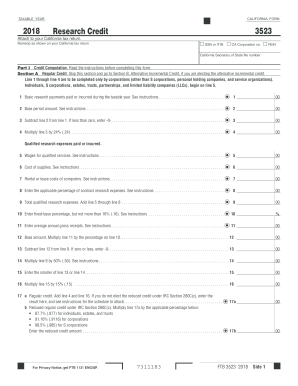
12 00 13 Subtract line 12 from line 9. If zero or less, enter -0- . . . . . . . . . . . . . . . . . . . . . . . . . . . . . . . . . . . . . . . . . . . . . . . . . . . . . . . . . 13 00 14 Multiply line 9 by 50% (.50). See instructions . . . . . . . . . . . . . . . . . . . . . . . . . . . . . . . . . . . . . . . . . . . . . . . . . . . . . . . . . . . . . . 14 00 15 Enter the smaller of line 13 or line 14 . . . . . . . . . . . . . . . . . . . . . . . . . . . . . . . .
Open form follow the instructions
Easily sign the form with your finger
Send filled & signed form or save
How to fill out the CA FTB 3523 online
Completing the CA FTB 3523 form online can streamline your tax return process and ensure that you make the most of available research credits. This guide provides clear and detailed instructions to support you in filling out the form accurately and efficiently.
Follow the steps to complete the CA FTB 3523 online.
- Click the ‘Get Form’ button to access the CA FTB 3523 and open it in an editor.
- Begin with Part I, ensuring to select the correct taxable year and filling in your Social Security number (SSN), Individual Taxpayer Identification Number (ITIN), California Corporation number, or Federal Employer Identification Number (FEIN) where indicated.
- In Section A, Regular Credit, complete Lines 1 through 4 only if you are representing a corporation (other than an S corporation, personal holding company, or service organization). For individuals, S corporations, estates, trusts, partnerships, and limited liability companies (LLCs), start at Line 5.
- Proceed to fill out Lines 1 through 4, where you will provide information about basic research payments, base period amounts, and calculations based on these figures.
- Continue with Lines 5 through 9 in Section A, where you report qualified research expenses, including wages for qualified services, costs of supplies, and rental or lease costs of computers.
- On Lines 10 through 17, calculate your fixed-base percentage, average annual gross receipts, and determine your regular credit or reduced regular credit if applicable.
- If you are completing Section B, Alternative Incremental Credit, skip Section A completely. Start with Line 22 to report basic research payments for the taxable year.
- Complete Lines 22 through 39a by detailing qualified research expenses, additional calculations for gross receipts, and your alternative incremental credit information.
- In Section C, Available Research Credit, fill out Lines 40 through 46. Make sure to summarize any pass-through research credits and calculate your total allowable credit.
- Finally, review all your entries for accuracy and completeness. Once satisfied, save your changes, download, print, or share the completed form as needed.
Complete your CA FTB 3523 online efficiently and ensure you claim your research credits correctly.
Experience a faster way to fill out and sign forms on the web. Access the most extensive library of templates available.
Related content
Use form FTB 3523, Research Credit, to compute and claim the research credit for...
Ensure you accurately complete Form 3523 and provide supporting documentation. Preparing...
Mar 28, 1985 — Thom 8/8K5 damaged FTB for spares. 1.25. Thorn 8/81(5 damaged decoder for...
Get answers to your most pressing questions about US Legal Forms API.
How to fill out form 3532 California?
Filling out Form 3532 for California requires a clear understanding of your financial information and tax details. Ensure you gather all applicable documents beforehand to streamline the process. If you're confused, using resources like USLegalForms can simplify the task of completing the form, including assistance with the CA FTB 3523.
How to check if you qualify for California inflation relief?
You can find out if you qualify for California inflation relief by reviewing the eligibility criteria on the California Franchise Tax Board website. This includes checking income levels and specific residency requirements. Utilizing the CA FTB 3523 can also clarify your eligibility and assist with the necessary documentation.
What is form 3523?
Form 3523, known as the California FTB 3523, is used for representing various tax-related needs in California. This form assists in addressing specific tax credits and payments, facilitating a smoother tax process for residents. Ensure you have all the necessary information before attempting to complete the CA FTB 3523.
Who qualifies for the $350 payment in California?
The $350 payment in California typically qualifies those who meet specific income thresholds and are residents of the state. Additional criteria may include filing status and whether you are a dependent. For detailed eligibility guidelines, reviewing the CA FTB 3523 will provide important insights.
How do I check if I'm getting an inflation relief check?
You can check the status of your inflation relief check through the California Franchise Tax Board’s dedicated portal. This online tool allows you to enter your information to track the status. Utilizing the CA FTB 3523 can also help you understand the related tax implications.
Has anyone received California inflation relief checks?
Yes, many residents of California have successfully received inflation relief checks as part of the state’s initiatives. The distribution has been ongoing, and recipients have reported receiving their payments. If you are unsure about your status, exploring the CA FTB 3523 can help clarify your position.
How do I know if I qualify for the California stimulus check?
To determine your qualification for the California stimulus check, you can check your eligibility on the California Franchise Tax Board’s website. Factors such as income, filing status, and residency will influence your eligibility. If you need assistance, the CA FTB 3523 can provide guidance.
How do I get my covered CA tax form?
You can obtain your Covered California tax form by visiting the official Covered California website. Once there, log into your account, and you will find options to access your tax documents. For any issues, consider using the CA FTB 3523 to ensure your tax requirements are met.
Is California accepting efile returns?
Indeed, California is accepting e-file returns, including updates to the CA FTB 3523 form. The state has embraced electronic filing as a key method for submitting returns smoothly and efficiently. Be sure to use an authorized e-filing service to ensure compliance with state regulations.
Can California returns be electronically filed?
Yes, California allows electronic filing for returns, including those submitted using the CA FTB 3523 form. This option is not just convenient; it significantly speeds up the processing time. Many taxpayers find electronic filing enhances accuracy and provides instant confirmation of submission.
Use professional pre-built templates to fill in and sign documents online faster. Get access to thousands of forms.
If you believe that this page should be taken down, please follow our DMCA take down process here.
This form is available in several versions. Select the version you need from the drop-down list below.