Loading
Form preview
  • US Legal Forms
  • Form Library
  • More Forms
  • More Multi-State Forms
  • Medicare Two Way Claim Form

Get Medicare Two Way Claim Form

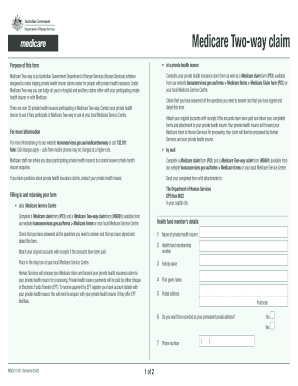
Medicare Two-way claim Purpose of this form at a private health insurer Complete your private health insurance claim form as well as a Medicare claim form (PC1) available from our website humanservices.gov.au/forms.

How it works

  1. Open form

    Open form follow the instructions

  2. Easily sign form

    Easily sign the form with your finger

  3. Share form

    Send filled & signed form or save

How to fill out the Medicare Two Way Claim Form online

Filling out the Medicare Two Way Claim Form online can streamline the process of claiming benefits for your medical expenses. This guide provides a comprehensive overview of each section of the form and offers step-by-step instructions that ensure you complete it accurately.

Follow the steps to complete your Medicare Two Way Claim Form online.

  1. Click ‘Get Form’ button to obtain the form and open it in the editor.
  2. Begin by entering the name of your private health insurer in the designated field. This is crucial as it identifies the health fund you are claiming against.
  3. Next, provide your health fund membership number. Ensure that this number is entered correctly to avoid processing delays.
  4. Input your family name and first given name accurately. These details must match the information registered with your health insurer.
  5. Fill in your postal address, including the postcode. This is necessary for correspondence regarding your claim.
  6. Choose whether to record this address as your permanent postal address by selecting 'Yes' or 'No' in the provided options.
  7. Enter your phone number. This allows for easy communication with your health insurer regarding any queries related to your claim.
  8. Indicate if you wish to claim the fund medical gap benefit by selecting 'Yes' or 'No'. If you choose 'Yes', you may need to provide additional information.
  9. Provide the name of the hospital where you received treatment. Specify whether it was a public hospital by selecting 'Yes' or 'No'.
  10. If treated as a private patient, confirm your choice by selecting 'Yes' or 'No'.
  11. Date of hospitalisation must be entered in the format specified, including the start and end dates.
  12. Fill in ancillary claim details if applicable. Declare if you are making a claim for ancillary services and provide the necessary information.
  13. Review all your entries to ensure accuracy. It is important to check that you have signed and dated the form at the end. This verifies the authenticity of the claim.
  14. Finally, save your changes, then proceed to download, print, or share the completed form as necessary.

Take the first step towards your claim by completing the Medicare Two Way Claim Form online today.

Get form

Experience a faster way to fill out and sign forms on the web. Access the most extensive library of templates available.
Get form

Related content

How do I file a claim? | Medicare
If your claims aren't being filed in a timely way: Contact your doctor or supplier, and...
Learn more
How do I file a claim? | Medicare
If your claims aren't being filed in a timely way: Contact your doctor or supplier, and...
Learn more
2017 General Instructions for Forms W-2 and W-3...
May 2, 2017 — Medicare tax withholding for a household employee. If the above conditions...
Learn more

Related links form

CA FTB 3500 2016 CA FTB 3500 2015 CA FTB 3500 2014 CA FTB 3500 2013

Questions & Answers

Get answers to your most pressing questions about US Legal Forms API.

Contact support

The CMS-1500 form is the standard claim form used by a non-institutional provider or supplier to bill Medicare carriers and durable medical equipment regional carriers (DMERCs) when a provider qualifies for a waiver from the Administrative Simplification Compliance Act (ASCA) requirement for electronic submission of ...

Billing Provider Information & Phone Number – name, address, and phone number of provider requesting to be paid for services rendered. Billing provider address on both a CMS 1500 and UB must be the physical location; not a PO Box.

The CMS-1500 claim form is used to submit non-institutional claims for health care services to many private payers, Medicare, Medicaid and other government health insurance programs. (Most institution-based claims are submitted using a UB-04 form.)

What are the 837P and Form CMS-1500? The 837P (Professional) is the standard format used by health care professionals and suppliers to transmit health care claims electronically. The Form CMS-1500 is the standard paper claim form to bill Medicare Fee-For-Service (FFS) Contractors when a paper claim is allowed.

Sign in to myGov and select Medicare. If you're using the app, open it and enter your myGov PIN. On your homepage, select Make a claim. Make sure you have details of the service, cost and amount paid to continue your claim.

A claim form is the document used to start proceedings and contains information relevant to the proceedings including the court reference number to be used on all subsequent court documents, the parties to the proceedings, what is being claimed, particulars of the claim including any claim for interest and contact ...

The two most common claim forms are the CMS-1500 and the UB-04.

When a physician has a private practice but performs services at an institutional facility such as a hospital or outpatient facility, the CMS-1500 form would be used to bill for their services. The UB-04 (CMS-1450) form is the claim form for institutional facilities such as hospitals or outpatient facilities.

Get This Form Now!

Use professional pre-built templates to fill in and sign documents online faster. Get access to thousands of forms.
Get form
If you believe that this page should be taken down, please follow our DMCA take down processhere.
Get Medicare Two Way Claim Form
Get form
  • Adoption
  • Bankruptcy
  • Contractors
  • Divorce
  • Home Sales
  • Employment
  • Identity Theft
  • Incorporation
  • Landlord Tenant
  • Living Trust
  • Name Change
  • Personal Planning
  • Small Business
  • Wills & Estates
  • Packages A-Z
  • Affidavits
  • Bankruptcy
  • Bill of Sale
  • Corporate - LLC
  • Divorce
  • Employment
  • Identity Theft
  • Internet Technology
  • Landlord Tenant
  • Living Wills
  • Name Change
  • Power of Attorney
  • Real Estate
  • Small Estates
  • Wills
  • All Forms
  • Forms A-Z
  • Form Library
  • Legal Hub
  • About Us
  • Help Portal
  • Legal Resources
  • Blog
  • Affiliates
  • Contact Us
  • Delete My Account
  • Site Map
  • Industries
  • Forms in Spanish
  • Localized Forms
  • State-specific Forms
  • Forms Kit
  • Real Estate Handbook
  • All Guides
  • Notarize
  • Incorporation services
  • For Consumers
  • For Small Business
  • For Attorneys
  • USLegal
  • FormsPass
  • pdfFiller
  • signNow
  • altaFlow
  • DocHub
  • Instapage
Form Packages
  • Adoption
  • Bankruptcy
  • Contractors
  • Divorce
  • Home Sales
  • Employment
  • Identity Theft
  • Incorporation
  • Landlord Tenant
  • Living Trust
  • Name Change
  • Personal Planning
  • Small Business
  • Wills & Estates
  • Packages A-Z
Form Categories
  • Affidavits
  • Bankruptcy
  • Bill of Sale
  • Corporate - LLC
  • Divorce
  • Employment
  • Identity Theft
  • Internet Technology
  • Landlord Tenant
  • Living Wills
  • Name Change
  • Power of Attorney
  • Real Estate
  • Small Estates
  • Wills
  • All Forms
  • Forms A-Z
  • Form Library
Customer Service
  • Legal Hub
  • About Us
  • Help Portal
  • Legal Resources
  • Blog
  • Affiliates
  • Contact Us
  • Delete My Account
  • Site Map
  • Industries
  • Forms in Spanish
  • Localized Forms
  • State-specific Forms
  • Forms Kit
Legal Guides
  • Real Estate Handbook
  • All Guides
Prepared for you
  • Notarize
  • Incorporation services
Our Customers
  • For Consumers
  • For Small Business
  • For Attorneys
Our Sites
  • USLegal
  • FormsPass
  • pdfFiller
  • signNow
  • altaFlow
  • DocHub
  • Instapage
Social Media
Call us now toll free:
+1 833 426 79 33
As seen in:
© Copyright 1999-2026 airSlate Legal Forms, Inc. 3720 Flowood Dr, Flowood, Mississippi 39232
  • Your Privacy Choices
  • Terms of Service
  • Privacy Notice
  • Content Takedown Policy
  • Bug Bounty Program