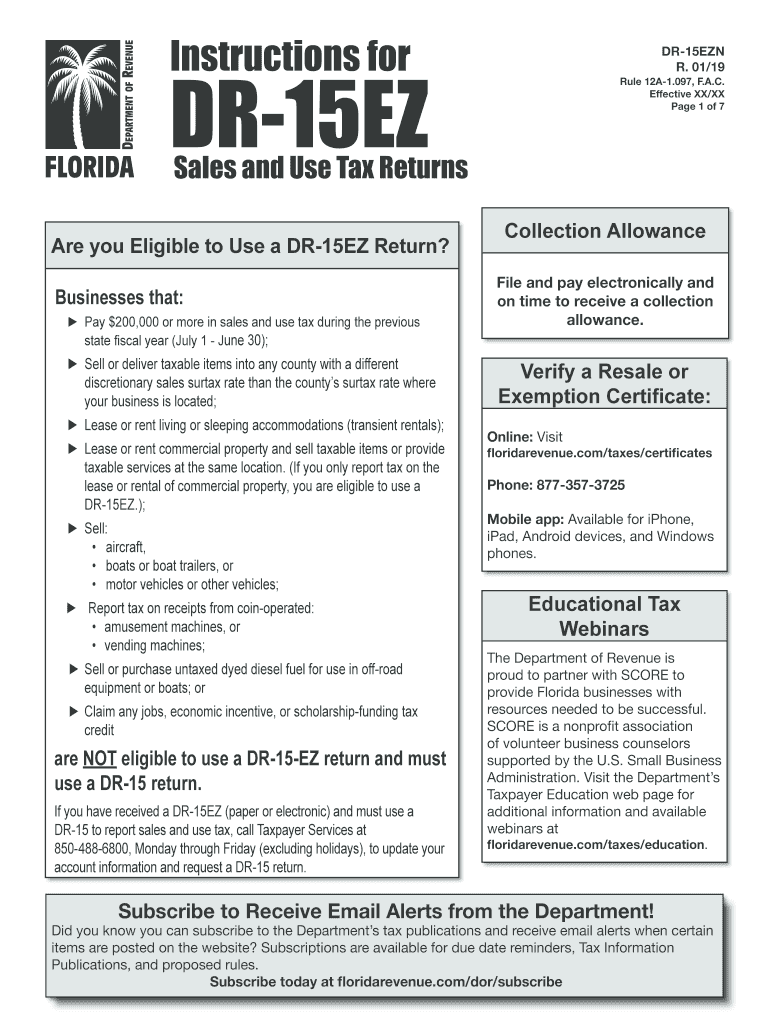
00 or more in sales and use tax during the previous state fiscal year (July 1 - June 30); Sell or deliver taxable items into any county with a different discretionary sales surtax rate than the county s surtax rate where your business is located; Lease or rent living or sleeping accommodations (transient rentals); Lease or rent commercial property and sell taxable items or provide taxable services at the same location. (If you only report tax on the lease or rental of commercial p.

Open form follow the instructions

Easily sign the form with your finger

Send filled & signed form or save
How to fill out the FL DR-15EZN online
The FL DR-15EZN form is essential for businesses in Florida to report sales and use tax accurately. This guide provides a straightforward process for filling out the form online, ensuring that users can easily navigate each step of the process.
Follow the steps to fill out the FL DR-15EZN form online.
- Press the ‘Get Form’ button to access the FL DR-15EZN form and open it in the editor.
- Begin by completing the back of the return. Start with Line 1 for Gross Sales: enter the total amount of sales before tax, ensuring tax is not included.
- Next, on Line 2 for Exempt Sales, include the total for any exempt sales that were part of your gross sales, entering '0' if there are none.
- For Line 3, calculate Taxable Sales/Purchases by subtracting Line 2 from Line 1 and including any taxable purchases not previously listed.
- Proceed to Line 4 for Total Tax Due: enter the total tax including discretionary sales surtax from Line B.
- On Line 5, report Less Lawful Deductions, entering any allowable deductions from your tax liability.
- For Line 6, report any sales tax credit memos issued to you by the Department of Revenue.
- Calculate Line 7 for Net Tax Due by subtracting Lines 5 and 6 from Line 4.
- On Line 8, address Less Collection Allowance or Plus Penalty and Interest, applying the applicable collection allowance if filing electronically.
- Finally, determine the Amount Due With Return on Line 9 by making any necessary adjustments based on electronic filing and any penalties.
- Once all sections are filled, ensure your details are accurate, then save your changes, download, print, or share the completed form as required.
To ensure compliance and accuracy, complete your FL DR-15EZN form online today.
Experience a faster way to fill out and sign forms on the web. Access the most extensive library of templates available.
Related content
... (DR-15, DR-15EZ, or equivalent) submitted to the Department of Revenue per Chapter...
When is Discretionary Sales Surtax Due? Discretionary sales surtax is reported with sales...
Get answers to your most pressing questions about US Legal Forms API.
What is the assignment of rights to refund of sales tax in Florida?
The assignment of rights to refund of sales tax in Florida allows a taxpayer to transfer their rights to a refund to another party. This process can be efficient, particularly if a business owes a refund to a vendor or vice versa. Understanding how to navigate this assignment requires attention to detail, and resources like uslegalforms can provide valuable guidance.
Who is required to collect Florida sales tax?
In Florida, any business that sells tangible personal property or certain services is required to collect sales tax. This requirement extends to individuals and organizations that meet specific revenue thresholds. Make sure your business complies with state laws by obtaining the appropriate sales tax number and understanding your responsibilities in collecting sales tax.
Can you get reimbursed for sales tax?
Yes, you can receive reimbursement for sales tax under specific conditions, such as errors in charging the tax or qualifying for exemptions. To initiate this process, you would typically need to complete the FL DR-15EZN form. Take care to provide accurate information and document your claim so that the reimbursement process goes smoothly.
How to get a Florida state sales tax number?
Acquiring a Florida state sales tax number involves registering with the Florida Department of Revenue. You can easily apply online through their website, filling out the required forms, including the FL DR-1 form. Once approved, you will receive your sales tax number, allowing you to collect and remit sales tax on your transactions.
Can you amend Florida sales tax return?
Yes, you can amend your Florida sales tax return by submitting the FL DR-15EZN again with the correct figures. When amending, be sure to indicate that the return is an amendment to avoid confusion. Supporting documentation should accompany your submission to justify the changes made. For seamless handling, consider resources available through uslegalforms.
What is the collection allowance for Dr 15 in Florida?
The collection allowance for DR-15 in Florida is generally established by the Department of Revenue. This allowance allows sellers to retain a percentage of sales tax collected, rewarding compliance and efficient tax filing. The specific rates can vary, so it is beneficial to refer to the FL DR-15EZN guidelines for the latest information. Staying informed can enhance your financial management.
How do I amend an LLC operating agreement in Florida?
Amending an LLC operating agreement in Florida involves drafting an amendment that outlines the changes you wish to make. Ensure all members agree to the proposed changes and sign the document. Afterward, it’s crucial to uphold compliance with state regulations. For ease of use, uslegalforms offers templates to help you structure your amendment.
How do I amend a will in Florida?
To amend a will in Florida, you generally need to create a new document that clearly states it amends the previous one. This document must be signed and witnessed according to Florida law. Making sure the new will complies with the requirements helps in avoiding complications. Using the services of uslegalforms can simplify this process for you.
What is the surtax for over $5000 in Florida?
In Florida, when transactions exceed $5,000, a surtax may apply depending on your county. Generally, this surtax is a percentage added to the base sales tax rate. It's essential to check local regulations as they vary by location. The FL DR-15EZN offers clarity on how to apply these rates effectively.
How do I calculate Florida collection allowance for sales tax?
To calculate the Florida collection allowance for sales tax, you can refer to the Department of Revenue's guidelines. Typically, this allowance is a percentage of the sales tax collected, and the details can be found in the FL DR-15EZN instructions. It is important to keep thorough records of all transactions. Consult with a professional if you have any specific questions.
Use professional pre-built templates to fill in and sign documents online faster. Get access to thousands of forms.
If you believe that this page should be taken down, please follow our DMCA take down process here.
This form is available in several versions. Select the version you need from the drop-down list below.