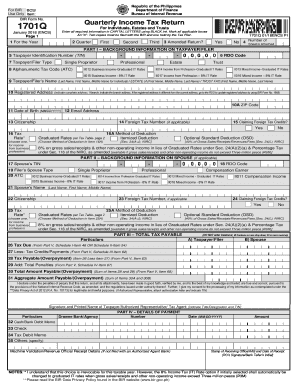
Republic of the Philippines Department of Finance Bureau of Internal RevenueFor BIR BCS/ Use Only Item: BIR Form No.Quarterly Income Tax Return1701QFor Individuals, Estates and TrustsJanuary 2018.

How it works
  • Open form

    Open form follow the instructions

  • Easily sign form

    Easily sign the form with your finger

  • Share form

    Send filled & signed form or save

How to fill out the PH BIR 1701Q online

The PH BIR 1701Q is an essential form for individuals, estates, and trusts to report quarterly income tax returns. This guide will provide clear, step-by-step instructions on how to fill out the form online, ensuring a smooth and efficient filing process.

Follow the steps to complete your PH BIR 1701Q online.

  1. Click ‘Get Form’ button to obtain the PH BIR 1701Q and access the form in the online editor.
  2. Select the correct year for the tax return by entering the year in the designated field. Ensure that the date reflects the relevant tax year applicable.
  3. Indicate the quarter for which you are filing the return by marking the appropriate box: First, Second, or Third.
  4. If this is an amended return, select ‘Yes’ or ‘No’ in the section provided.
  5. Provide your Taxpayer Identification Number (TIN). Make sure to enter it correctly, separating the numeric portions as instructed.
  6. Select your taxpayer/filer type by marking the appropriate box for Professional, Single Proprietor, Estate, or Trust.
  7. Complete the Alphanumeric Tax Code (ATC) by entering the relevant code according to your income type.
  8. Enter your name as follows: Last Name, First Name, and Middle Name for individuals, or ESTATE/ TRUST FAO with the name as appropriate.
  9. Fill in your registered address, including the ZIP code. If your registered address differs from your current address, update this with the relevant tax authority.
  10. Provide additional information including your date of birth, email address, and citizenship. Ensure all fields are filled accurately.
  11. Indicate if you are claiming foreign tax credits and enter your foreign tax number if applicable.
  12. Select your tax rate and the method of deduction, choosing between graduated rates or an optional standard deduction as per your eligibility.
  13. If applicable, complete the details for your spouse, using their TIN, RDO code, and relevant information regarding their income type and tax deductions.
  14. Proceed to compute the total tax payable by filling in the necessary details based on your income and deductions as guided in the form.
  15. Carefully review your entries for accuracy. After ensuring all information is correct, save your changes.
  16. Once satisfied, download, print, or share your completed form using the options available in the editor.

Complete your PH BIR 1701Q online and ensure timely filing to avoid penalties.

Get form

Experience a faster way to fill out and sign forms on the web. Access the most extensive library of templates available.

Related content

federal account symbols and titles - Bureau of the...

12 U.S.C. 1701q-5. 086X4041 ... Defense Cooperation Account, Defense, Philippines...

Learn more
(PDF) BIR FORM 1701Q | jowie arepentido...

... P 500,000 BIR Form 1701Q -Quarterly Income Tax Return GUIDELINES AND ... in trade...

Learn more
Questions & Answers

Get answers to your most pressing questions about US Legal Forms API.

Contact support

What is the difference between 2551q and 1701q?

2551Q is for the percentage tax; 1701Q is for the income tax.

One of your major responsibilities as a freelancer or sole proprietor is filing your BIR Form 1701Q. This form is also known as the Quarterly Income Tax Return For Individuals, Estates and Trusts. This is submitted quarterly for the first, second, and third quarters.

Pay the annual registration fee of PHP 500, BIR-printed receipt/invoice, PHP 15 certification fee, and PHP 15 documentary tax to any authorized bank. Submit the BIR Form No. 0605 when making your payment.

BIR Registration Form (Form 1901) BIR Payment Form (Form 0605) BIR Authority to Print Form (1906) NSO Birth Certificate. Barangay Certification. Cedula. TIN Number/Card. Books of account (ledger/journal/expenses book)

How to Calculate Quarterly Percentage Tax? Your quarterly percentage tax is calculated by multiplying 3% to your quarterly gross income receipts. By Gross Receipts , this would mean all the earnings or revenues you have actually received from your client/business.

Step 1: Register your Tax Identification Number (TIN) in the BIR eFPS website. ... Step 2: Wait for the Enrollment Confirmation from BIR. ... Step 3: File your tax return at the BIR eFPS website. ... Step 4: Pay your tax return via BPI Online Banking.

Step 1: Go to the Income Tax India website and log in. Step 2: Select the 'View Returns/ Forms' option to see e-filed tax returns. Step 3: Click on the acknowledgement number to download your ITR-V.. ... Step 4: Select 'ITR-V/Acknowledgement' to begin the download.

Tax returns need not be filed by the following categories of individual: those earning purely compensation income whose taxable income does not exceed two hundred fifty thousand pesos (250,000.00 Philippine peso (PHP))

The Commissioner of Internal Revenue has issued Revenue Memorandum Order (RMO) No. 28-2018 dated 20 April 2018 to create and modify Alphanumeric Tax Code (ATC) in order to facilitate the proper identification and monitoring of tax collection from individual income tax in BIR Form Nos.

Get This Form Now!

Use professional pre-built templates to fill in and sign documents online faster. Get access to thousands of forms.

If you believe that this page should be taken down, please follow our DMCA take down process here.

Get PH BIR 1701Q