Loading
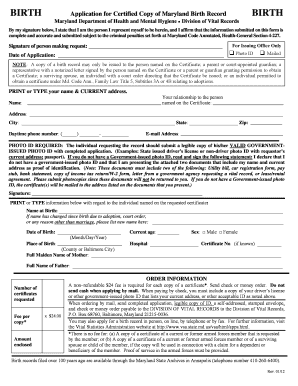
Get Md Health Birth Form 2012-2026
How it works
-

Open form follow the instructions
-

Easily sign the form with your finger
-

Send filled & signed form or save
How to fill out the MD Health Birth Form online
Completing the MD Health Birth Form online can streamline the process of obtaining a certified copy of a birth record. This guide assists users in understanding each section and field of the form, ensuring accurate completion for a successful application.
Follow the steps to fill out the MD Health Birth Form online effectively.
- Click the ‘Get Form’ button to obtain the MD Health Birth Form and open it in your selected editor.
- Begin by entering your name and current address. This information should be printed or typed for clarity. Ensure that the name you provide aligns with the records.
- Indicate your relationship to the individual named on the certificate by selecting the appropriate option from the provided list.
- Fill in the daytime phone number and email address for any correspondence related to your application.
- Remember to attach a legible copy of your valid government-issued photo ID. If you do not possess one, sign the alternate identification statement and provide two documents as proof of identification.
- Complete the section regarding the individual named on the requested certificate. This includes their name at birth, any changes in name, date of birth, current age, sex, hospital name, and place of birth.
- Specify the number of certificates you wish to request and calculate the total fee by multiplying the number of copies by $24. Prepare the payment in the form of a check or money order.
- Conclude by mailing the completed application along with the required documents (ID, payment, and self-addressed stamped envelope) to the Division of Vital Records. Ensure all documents are photocopies, as originals will not be returned.
- Once everything is submitted, you may want to confirm that your application was received and is being processed.
Complete your MD Health Birth Form online today and ensure a smooth application process.
Filling up a PSA birth certificate form includes providing essential information about the newborn and parents. You'll typically need to include details such as the baby's name, the exact date of birth, and parents' information. For a seamless experience, consider using the MD Health Birth Form as a guide and ensure all the information is accurate and complete.