NCE THE TIME YOU BECAME DISABLED UNTIL THE PRESENT. 9. Do you have any children born after December 31, 1958? Yes No If yes, complete the provided "Canada Pension Plan Child Rearing Provision" form (ISP 1640) and return it with this application. CHILDREN UNDER AGE 18 10. Do you have children under the age of 18 in your custody and control? Yes No If yes, provide the following information for each child. First Child's First Name and Initial Natural Child Legally Adopted Other (Explain .
Loading

Open form follow the instructions

Easily sign the form with your finger

Send filled & signed form or save
How to fill out the Canada SC ISP-1151 online
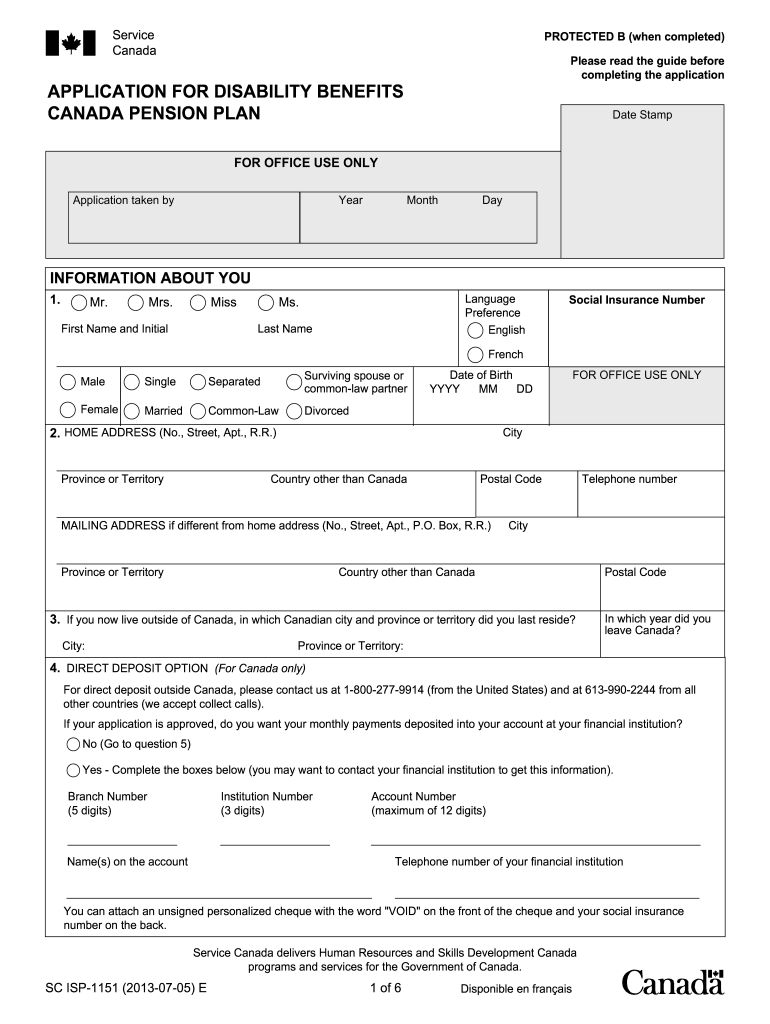
This guide provides a clear, step-by-step approach to completing the Canada SC ISP-1151 form for disability benefits online. Whether you are familiar with disability applications or this is your first time, this guidance is designed to support you through the process.
Follow the steps to successfully complete your application.
- Click the ‘Get Form’ button to obtain the form and access it in the online editor.
- Begin by filling out your personal information in the 'Information About You' section. Include your full name, preference for language (English or French), social insurance number, and date of birth. Make sure the details are accurate and up to date.
- Next, provide your home address, ensuring to include the city, province or territory, and postal code. If applicable, complete the mailing address section with different contact information.
- If you currently reside outside Canada, indicate the last Canadian city and province or territory where you lived. You'll also need to enter your telephone number and the year you left Canada.
- Choose your direct deposit option. If you would like your payments deposited into your account, complete the required fields including your financial institution's branch number, institution number, and account number.
- Provide information regarding your last name at birth and whether you have ever lived or worked in another country. If yes, list the details in the spaces provided.
- Indicate whether you have applied for or received any other benefits such as Canada Pension Plan, Quebec Pension Plan, or Old Age Security.
- Complete details about your spouse or common-law partner, including their full name and social insurance number if available.
- In the ‘Information About Your Children’ section, provide details about each child born after December 31, 1958. Fill out if any of them are under 18 or if they are in your custody.
- Review the declaration section. Ensure you understand the information you provided is accurate and complete before signing.
- If you're signing this form with a mark, a witness must complete their section. Otherwise, providing just your signature is sufficient.
- Once all fields are completed, save changes, download the form, and print a copy for your records. You can also share it if necessary.
Complete your Canada SC ISP-1151 application online today!
Experience a faster way to fill out and sign forms on the web. Access the most extensive library of templates available.
Related content
May 8, 2022 — My home is within seven miles of the Interim Storage Partners' (“ISP”)...
by A Minor · 2020 · Cited by 30 — Abstract: Since the creation of Bitcoin in 2009, the...
1151-Serial Port A Address Conflict. Detected ... If you encounter Internet access...
Get answers to your most pressing questions about US Legal Forms API.
Who is eligible for the Canada disability benefit?
Eligibility for Canada disability benefits varies depending on the specific program. Generally, to qualify for the Canada SC ISP-1151, you must demonstrate that your disability significantly restricts your ability to work. You also need to have contributed to the social security system. If you meet these criteria, you can access much-needed support to help you navigate daily challenges.
What is the most approved disability in Canada?
Typically, the most approved disabilities in Canada include conditions like mental health disorders, musculoskeletal disorders, and neurological conditions. Under the Canada SC ISP-1151, various disabilities are recognized and eligible for benefits, but approval depends on meeting certain criteria. Thus, it’s crucial to have comprehensive documentation and a thorough understanding of your condition. Engaging with healthcare professionals can strengthen your claim.
How to apply for $40,000 disability in Canada?
To apply for a disability benefit of $40,000 in Canada, you need to gather necessary documents to support your claim. Start by filling out the application forms specific to the Canada SC ISP-1151 program. Next, provide evidence of your disability, including medical reports and financial details. Consider using the US Legal Forms platform, which offers templates and guidance to ease your application process.
What is the highest disability monthly payment?
The maximum disability monthly payment can vary based on several factors, including the type of program. For example, under the Canada SC ISP-1151, the highest payment you can expect is tailored to support individuals in need. It’s important to check current rates as they might change annually. Additionally, factors such as your work history and contributions to the system may influence your payment amount.
How to calculate Canada pension plan?
Calculating your Canada Pension Plan benefits involves several steps, including assessing your contribution history and the years you have worked. Most individuals can use the Canada SC ISP-1151 as a framework to understand how benefits are computed. Various calculators and resources provided by the government can help visualize your potential payouts. By exploring these resources, you can plan for your future more effectively.
Does everyone get the $2500 death benefit in Canada?
The $2500 death benefit in Canada is not automatically given to everyone; it is generally available to the families of individuals who have made contributions to the Canada Pension Plan. Eligibility for this benefit may depend on specific circumstances surrounding the individual’s death. To better understand your standing, refer to the Canada SC ISP-1151 guidelines. It's wise to check if you meet the necessary requirements to access this benefit.
Who is eligible for child rearing benefit in Canada?
Child rearing benefits in Canada are available to those who are raising children under the age of 18. Eligibility often depends on various factors, including income and family structure. The Canada SC ISP-1151 program outlines the criteria in detail, making it easier for families to understand their benefits. Accessing this information can help parents make informed decisions about their entitlements.
How to apply for orphan benefits in Canada?
To apply for orphan benefits in Canada, you must complete the application process as dictated by the Canada SC ISP-1151. This typically requires documentation proving the loss of a parent and your current living situation. It's crucial to submit your application in a timely manner to ensure you receive the benefits you're entitled to. Consider using platforms like uslegalforms to simplify the application process.
How to apply for child benefit in Canada?
Applying for child benefits in Canada involves filling out a form provided by the Canada Revenue Agency. You will need to provide your personal information, including your child's details. The Canada SC ISP-1151 guidelines can help you understand the income thresholds and eligibility criteria. Make sure to gather all necessary documents to streamline your application process.
Who is eligible for orphan benefits in Canada?
In Canada, orphan benefits are available to children who have lost a parent due to death or certain other circumstances. These benefits ensure that children receive financial support during a difficult time. It's important to understand the criteria set out by the Canada SC ISP-1151 program to see if you qualify. Families can find the application process straightforward with the right guidance.
Use professional pre-built templates to fill in and sign documents online faster. Get access to thousands of forms.
If you believe that this page should be taken down, please follow our DMCA take down process here.
This form is available in several versions. Select the version you need from the drop-down list below.