If an extension of time to file is being requested or if due date determined by extension of time to file Federal Estate Tax Return, check box and attach explanation for extension request or a copy of the Federal extension request. If based upon a Federal extension request, file a copy of approved extension request when available. This extension request should be filed within 9 months of date of death. The undersigned declare, under penalties of perjury, that they have examined this return, incl.

Open form follow the instructions

Easily sign the form with your finger

Send filled & signed form or save
How to fill out the IL 700 online
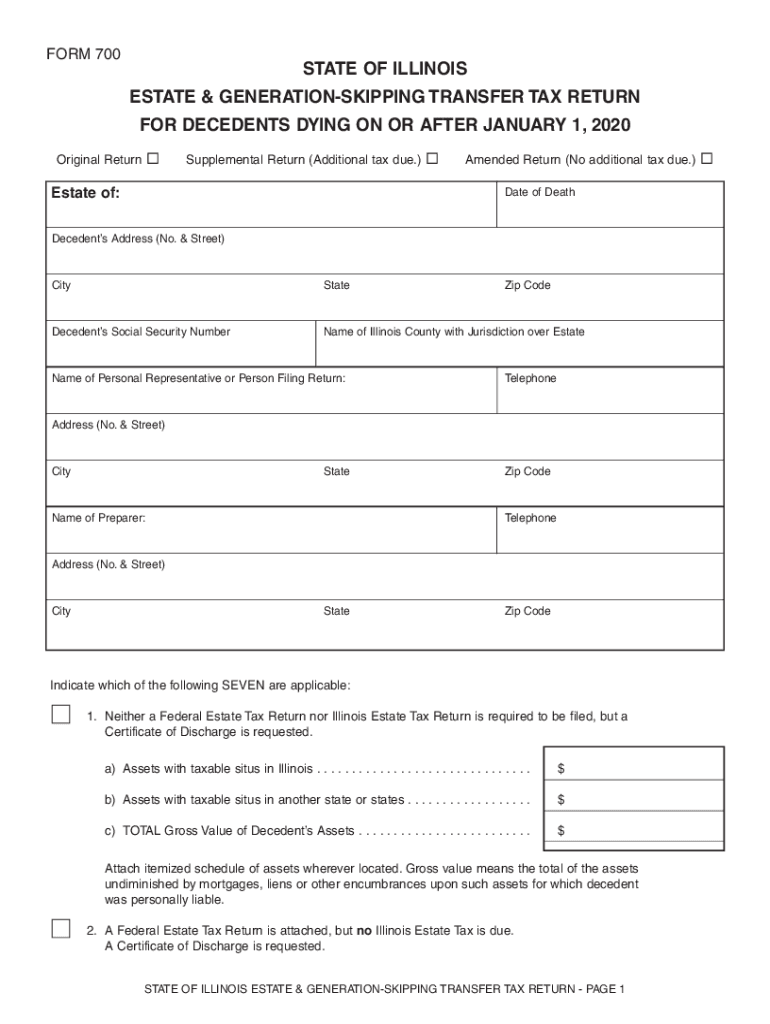
Filling out the IL 700 form online can streamline the process of reporting estate and generation-skipping transfer taxes. This guide will provide you with clear, step-by-step instructions to ensure that you can complete the form accurately and efficiently.
Follow the steps to complete your IL 700 form online.
- Click the ‘Get Form’ button to obtain the form and open it in the editor.
- Begin by selecting the type of return you are filing: original, amended, or supplemental. Indicate the applicable option by checking the appropriate box.
- Enter the estate details, including the name of the deceased, date of death, and their address including city, state, and zip code.
- Provide the decedent’s Social Security number and the name of the Illinois county that has jurisdiction over the estate.
- List the name, address, and contact information of the personal representative or person filing the return.
- Select the appropriate options indicating which of the seven relevant provisions apply to the estate and provide the corresponding financial information.
- If applicable, indicate election statuses such as the Illinois QTIP election and provide the necessary amounts and social security numbers.
- If requesting an extension for filing, ensure that you check the box and attach the necessary documentation.
- Review the undersigned declaration and sign the form as required by the personal representative and the preparer.
- Once all sections are completed, save your changes, and choose the options to download, print, or share the form as needed.
Complete your IL 700 form online today to ensure timely and accurate reporting.
Experience a faster way to fill out and sign forms on the web. Access the most extensive library of templates available.
Related content
2015 Decedents, 2014 Decedents, 2013 Decedents, 2012 Decedents. 2011 Decedents, 2010...
4/20/2015. Hinsdale Central (unlimited division), Vernon Hills (700 division), University...
Il est strictement interdit d'utiliser des antennes ayant un gain sup_rieur ˆ 6 dBi avec...
Get answers to your most pressing questions about US Legal Forms API.
What is the tax withholding rate in Illinois?
Generally, the rate for withholding Illinois Income Tax is 4.95 percent. For wages and other compensation, subtract any exemptions from the wages paid and multiply the result by 4.95 percent.
What is the inheritance tax threshold for 2019?
IHT thresholds and rates 2019-20. Everyone in the 2019-20 tax year has a tax-free inheritance tax allowance of £325,000 known as the nil-rate band. The allowance has remained the same since 2010-11. The standard inheritance tax rate is 40% of anything in your estate over the £325,000 threshold.
How much money can you inherit before you have to pay taxes on it?
The federal government doesn't impose an inheritance tax, and inheritances generally aren't subject to income tax. If your aunt leaves you $50,000, that's not considered income so the cash is tax-free at least as far as the IRS is concerned.
Which states have estate taxes 2019?
The U.S. states that collect an inheritance tax as of 2019 are Iowa, Kentucky, Maryland, Nebraska, New Jersey, and Pennsylvania.
Does Illinois have an estate tax or inheritance tax?
An inheritance tax is imposed on someone who actually receives an inheritance. But there's no federal or Illinois tax on inheritances. ... So, to summarize so far, there's a chance of a federal and state estate tax for Illinois residents, but no chance of any inheritance tax.
What is the state of Illinois estate tax exemption?
Illinois Estate Tax Exemption The estate tax threshold for Illinois is $4 million. This means that if you die and your total estate is worth less than $4 million, the estate won't owe anything to the state of Illinois.
What is a taxable estate in 2018?
It's official. For 2018, the estate and gift tax exemption is $5.6 million per individual, up from $5.49 million in 2017. That means an individual can leave $5.6 million to heirs and pay no federal estate or gift tax.
What is the Illinois estate tax rate 2018?
The Illinois estate tax rate is graduated and goes up to 16%. It is applied on estates worth more than $4 million.
What is the Illinois estate tax exemption for 2018?
The Illinois exemption continues at $4 million as of 2018 tax year. Estates are valued after all applicable tax deductions have been made, such as the costs associated with settling the estate. The Illinois estate tax exemption the amount of value of each estate that's tax-free was $2 million in 2009.
What is an estate tax exemption?
The federal estate tax is collected on the transfer of a person's assets to heirs and beneficiaries after death. ... An estate valued at $10,000 more than the 2019 federal estate tax exemption is taxed at a rate of 18%, while an estate that exceeds the exemption amount by $1 million or more is taxed at 40%.
Use professional pre-built templates to fill in and sign documents online faster. Get access to thousands of forms.
If you believe that this page should be taken down, please follow our DMCA take down process here.
This form is available in several versions. Select the version you need from the drop-down list below.