Loading
Form preview
  • US Legal Forms
  • Other Templates
  • Executive Forms
  • Executive Department DOD Forms
  • Epsq Sf86 2005

Get Epsq Sf86 2005-2026

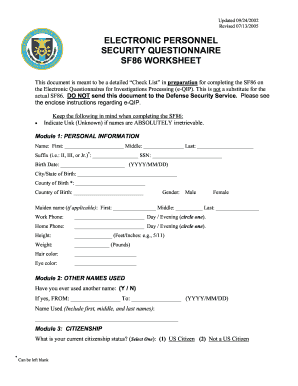
Ctronic Questionnaires for Investigations Processing (e-QIP). This is not a substitute for the actual SF86. DO NOT send this document to the Defense Security Service. Please see the enclose instructions regarding e-QIP. • Keep the following in mind when completing the SF86: Indicate Unk (Unknown) if names are ABSOLUTELY irretrievable. Module 1: PERSONAL INFORMATION Name: First: ______________________ Middle: _______________ Last: _____________________ Suffix (i.e.: II, III, or Jr.)*: _______.

How it works

  1. Open form

    Open form follow the instructions

  2. Easily sign form

    Easily sign the form with your finger

  3. Share form

    Send filled & signed form or save

How to fill out the EPSQ SF86 online

Completing the EPSQ SF86 online can seem daunting, but it is a straightforward process when broken down into manageable steps. This guide is designed to support you through each section of the form, ensuring that you provide all necessary information accurately.

Follow the steps to complete your EPSQ SF86 form online.

  1. Press the ‘Get Form’ button to acquire the form and open it in the designated editor.
  2. Begin with Module 1: Personal Information. Enter your legal name, Social Security Number, date of birth, and place of birth. Ensure accuracy in every detail.
  3. Proceed to Module 2: Other Names Used. If you have ever used a different name, indicate 'Yes' and provide the required details including the time period during which you used that name.
  4. Move on to Module 3: Citizenship. Select your current citizenship status and complete the additional questions based on your previous responses.
  5. Continue to Module 4: Where You Have Lived. List your residences over the past ten years, ensuring you provide accurate dates and addresses. If any residence is difficult to find, explain why.
  6. In Module 5: Where You Went to School, indicate your educational history over the past five years, including the type of education and institution attended.
  7. Fill in Module 6: Your Employment Activities. Provide detailed employment information for the last ten years, including any military service, job titles, and supervisor contact details.
  8. Review Module 7: People Who Know You Well. Enter the names and contact details of three individuals who can vouch for your identity, avoiding relatives.
  9. Complete Modules 8 through 43 as applicable, covering details about your marital history, relatives, military history, foreign activities, financial record, and any criminal history.
  10. After filling out all relevant modules, review your entries for accuracy. Once confirmed, save your changes, and choose to download, print, or share the completed form as needed.

Start filling out your EPSQ SF86 online today to facilitate the security clearance process.

Get form

Experience a faster way to fill out and sign forms on the web. Access the most extensive library of templates available.
Get form

Related content

Standard Form 86 - Questionnaire for National...
This form will be used by the United States (U.S.) Government in conducting background...
Learn more
EPSQ SF86 Worksheet
The Standard Form 86 is used to request a Personnel Security Investigation (PSI) on Navy...
Learn more
什么是.zdb文件,如何打开它?...
美国军方和国防部用于电子个人安全调查表(EPSQ)文件的加密文件格式;...
Learn more

Related links form

OK OW-8-ES 2020 IN EIC Worksheets 2020 OR DAS 1099-MISC Training 2020 GA IT 511 2020

Questions & Answers

Get answers to your most pressing questions about US Legal Forms API.

Contact support

The SF-86 Q clearance refers to the security clearance acquired through the SF-86 form but specific to areas involving nuclear technologies and controls. This clearance allows individuals to manage sensitive work concerned with national security regarding energy programs. For anyone pursuing a role in this field, the EPSQ SF86 form is essential for initiating the security clearance process.

The Q security clearance is a specific designation used within the Department of Energy for those who need access to classified nuclear-related information. This clearance level is distinct from others in the federal system, focusing primarily on the protection of sensitive materials and technologies. If you’re exploring security clearances, understanding the EPSQ SF86 process is important for your application.

Accessing your e-QIP is straightforward. You need to visit the e-QIP website and log in using your established credentials. If you're unfamiliar with the process, the EPSQ SF86 can guide you through creating your account and locating your application, ensuring you stay on track.

QIP, or electronic Questionnaire for Investigations Processing, is the online platform that facilitates the completion of the SF86 form. ssentially, eQIP simplifies the process of filling out the SF86, making it easier and more efficient for applicants. If you are looking to streamline your application using the PSQ SF86, accessing eQIP is the best way to go.

The SF86 form is used to apply for a security clearance believed to be required for access to classified information. Primarily, this form is associated with positions that demand a Top Secret clearance, which is essential for roles in national security. By completing the EPSQ SF86, you initiate the process for background investigations that are crucial for obtaining this level of clearance.

The foreign contact question on the SF-86 asks you to disclose any associations you have with foreign nationals. This includes friends, colleagues, or anyone else you have had contact with who holds citizenship in another country. Full disclosure is critical to ensure your application moves smoothly through the evaluation process. For insights on effectively addressing this part of the form, check out the resources on the US Legal Forms platform.

When filling out the SF-86, you should list all relatives who are relevant to the security clearance process, including parents, siblings, and any other immediate family members. Ideally, provide details on their citizenship status and residency. This thorough approach helps security officials evaluate any potential risks. If you need clarity on what to include, US Legal Forms can be an excellent source of information.

Several factors can disqualify you on the SF-86, including undisclosed foreign contacts, a history of illegal drug use, or financial irresponsibility. Inaccuracies in your application can also lead to disqualification. It's important to present complete and truthful information to avoid negative repercussions. If you're unsure about any aspect of the form, US Legal Forms is a great resource for support.

Yes, the SF-86 is required when applying for a secret clearance. This form collects vital information that helps security officials assess your eligibility. Completing the EPSQ SF86 accurately is essential to ensure that your application is processed without delays. For assistance with this form, US Legal Forms provides useful templates and guidance.

Yes, a dual citizen can be considered a foreign contact if their citizenship status includes a country other than the U.S. When filling out the SF-86, it's important to identify dual citizens appropriately, as this may impact your clearance. Ensuring accurate disclosure is critical for a smooth evaluation process. For help with this, consider referring to the resources available on the US Legal Forms platform.

Get This Form Now!

Use professional pre-built templates to fill in and sign documents online faster. Get access to thousands of forms.
Get form
If you believe that this page should be taken down, please follow our DMCA take down processhere.
Get EPSQ SF86
Get form
  • Adoption
  • Bankruptcy
  • Contractors
  • Divorce
  • Home Sales
  • Employment
  • Identity Theft
  • Incorporation
  • Landlord Tenant
  • Living Trust
  • Name Change
  • Personal Planning
  • Small Business
  • Wills & Estates
  • Packages A-Z
  • Affidavits
  • Bankruptcy
  • Bill of Sale
  • Corporate - LLC
  • Divorce
  • Employment
  • Identity Theft
  • Internet Technology
  • Landlord Tenant
  • Living Wills
  • Name Change
  • Power of Attorney
  • Real Estate
  • Small Estates
  • Wills
  • All Forms
  • Forms A-Z
  • Other Templates
  • Legal Hub
  • About Us
  • Help Portal
  • Legal Resources
  • Blog
  • Affiliates
  • Contact Us
  • Delete My Account
  • Site Map
  • Industries
  • Forms in Spanish
  • Localized Forms
  • State-specific Forms
  • Forms Kit
  • Real Estate Handbook
  • All Guides
  • Notarize
  • Incorporation services
  • For Consumers
  • For Small Business
  • For Attorneys
  • USLegal
  • FormsPass
  • pdfFiller
  • signNow
  • altaFlow
  • DocHub
  • Instapage
Form Packages
  • Adoption
  • Bankruptcy
  • Contractors
  • Divorce
  • Home Sales
  • Employment
  • Identity Theft
  • Incorporation
  • Landlord Tenant
  • Living Trust
  • Name Change
  • Personal Planning
  • Small Business
  • Wills & Estates
  • Packages A-Z
Form Categories
  • Affidavits
  • Bankruptcy
  • Bill of Sale
  • Corporate - LLC
  • Divorce
  • Employment
  • Identity Theft
  • Internet Technology
  • Landlord Tenant
  • Living Wills
  • Name Change
  • Power of Attorney
  • Real Estate
  • Small Estates
  • Wills
  • All Forms
  • Forms A-Z
  • Other Templates
Customer Service
  • Legal Hub
  • About Us
  • Help Portal
  • Legal Resources
  • Blog
  • Affiliates
  • Contact Us
  • Delete My Account
  • Site Map
  • Industries
  • Forms in Spanish
  • Localized Forms
  • State-specific Forms
  • Forms Kit
Legal Guides
  • Real Estate Handbook
  • All Guides
Prepared for you
  • Notarize
  • Incorporation services
Our Customers
  • For Consumers
  • For Small Business
  • For Attorneys
Our Sites
  • USLegal
  • FormsPass
  • pdfFiller
  • signNow
  • altaFlow
  • DocHub
  • Instapage
Social Media
Call us now toll free:
+1 833 426 79 33
As seen in:
© Copyright 1999-2026 airSlate Legal Forms, Inc. 17 Station Street, Suite 303, Brookline, MA 02445
  • Your Privacy Choices
  • Terms of Service
  • Privacy Notice
  • Content Takedown Policy
  • Bug Bounty Program