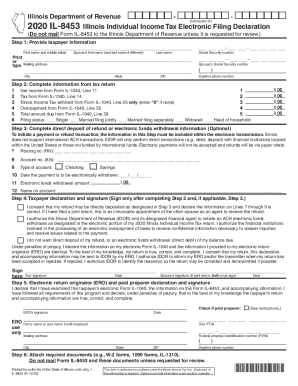
Is Individual Income Tax Electronic Filing Declaration (Do not mail Form IL-8453 to the Illinois Department of Revenue unless it is requested for review.) Step 1: Provide taxpayer information First name and middle initial Spouse s first name (and last name if different) Last name Print or Mailing.
Open form follow the instructions
Easily sign the form with your finger
Send filled & signed form or save
How to fill out the IL DoR IL-8453 online
Filling out the IL DoR IL-8453 form is essential for individuals filing their Illinois Individual Income Tax electronically. This guide will help you navigate the online process, providing clear instructions for each component of the form.
Follow the steps to complete the form accurately.
- Click ‘Get Form’ button to obtain the form and open it in the editor.
- Begin with Step 1 by providing taxpayer information. Enter the first name, middle initial, and last name of the taxpayer, as well as the spouse's name if applicable, followed by the mailing address including city, state, and ZIP code. Input the Social Security numbers of both the taxpayer and the spouse along with daytime phone number.
- In Step 2, complete the information from your tax return: input net income from Form IL-1040 Line 11, tax from Line 14, Illinois Income Tax withheld from Line 25 (enter '0' if none), overpayment from Line 35, and total amount due from Line 39. Select the appropriate filing status.
- Step 3 involves completing direct deposit of refund or electronic funds withdrawal information. Enter the routing number and account number accurately, check the type of account (checking or savings), provide the date for electronic withdrawal, and ensure to mention the withdrawal amount and the name on the account.
- In Step 4, sign the taxpayer declaration. This involves confirming you consent to direct deposit and that the information provided is correct. If filing a joint return, ensure both taxpayer and spouse sign.
- Step 5 requires the electronic return originator (ERO) or paid preparer's declaration and signature. Ensure details are filled correctly and signatures obtained.
- Finally, Step 6 requires attaching any required documents, such as W-2 forms and 1099 forms. Ensure these are properly included as specified before submission.
- Once completed, save changes, download the form, or print it for your records. If necessary, you can share the form with relevant parties.
Complete your documents online and ensure your tax return is correctly filed.
Experience a faster way to fill out and sign forms on the web. Access the most extensive library of templates available.
Related content
Name, Description. IL-8453, Illinois Individual Income Tax Electronic Filing Declaration...
present in the U.S. during 2018; a nonresident alien; present in the U.S. under F-1, F-2...
... 881 873 865 857 2,039 2,029 2,018 2,008 1,997 0 0 0 0 0 1,049 1,041 1,033 1,025 1,017...
Get answers to your most pressing questions about US Legal Forms API.
Why would you be exempt from federal taxes?
When you file exempt with your employer for federal tax withholding, you do not make any tax payments during the year. Without paying tax, you do not qualify for a tax refund unless you qualify to claim a refundable tax credit, like the Earned Income Tax Credit.
Is it OK to claim yourself on taxes?
No. You cannot claim yourself as a dependent on taxes. Dependency exemptions are applicable to your qualifying dependent children and qualifying dependent relatives only. You can, however, claim a personal exemption for yourself on your return.
What qualifies you to be tax exempt?
Certain groups of people who meet specific criteria don't have to pay income taxes. For example, if you're single, under the age of 65, and your yearly income is less than $12,000, or married, under 65, with income less than $24,000, you're exempt from paying taxes. ... (These figures are for 2019 or the 2018 tax year.)
Should you exempt yourself on taxes?
When you file exempt with your employer for federal tax withholding, you do not make any tax payments during the year. Without paying tax, you do not qualify for a tax refund unless you qualify to claim a refundable tax credit, like the Earned Income Tax Credit.
Do I have to file an extension for Illinois state taxes?
Filing an Extension in Illinois You are automatically allowed an extension of up to six months to file your tax return without filing an extension form. An extension to file your return is not an extension of time to pay your taxes.
How do I file sales tax in Illinois?
File online - File online at MyTax Illinois. ... File by mail - You can use Form ST-1 and file and pay through the mail.
Is the state of Illinois accepting tax returns yet?
SPRINGFIELD The Illinois Department of Revenue ( IDOR ) will begin accepting 2018 state individual income tax returns on Monday, January 28, the same date that the Internal Revenue Service ( IRS ) begins accepting federal individual income tax returns.
When can I file my 2018 taxes Illinois?
The due date for filing your 2018 Form IL-1040 and paying any tax you owe is April 15, 2019.
When can I file Illinois taxes?
Automatic Illinois State Tax Extension The extended tax return due date is October 15, 2019. If you expect to owe income taxes, you should submit your payment with payment voucher Form IL-505-I, Automatic Extension Payment for Individuals, by April 15, 2019.
What is Illinois taxable income?
The state of Illinois has a flat income tax, which means that everyone, regardless of income, is taxed at the same rate. That makes it relatively easy to predict the income tax you will have to pay. The income tax rate in Illinois is 4.95%, after an increase (from 3.75%) in 2017.
Use professional pre-built templates to fill in and sign documents online faster. Get access to thousands of forms.
If you believe that this page should be taken down, please follow our DMCA take down process here.
This form is available in several versions. Select the version you need from the drop-down list below.