Loading
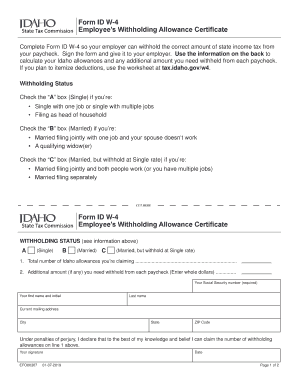
Get Form Id W-4, Employee's Withholding Allowance Certificate
How it works
-

Open form follow the instructions
-

Easily sign the form with your finger
-

Send filled & signed form or save
How to use or fill out the Form ID W-4, Employee's Withholding Allowance Certificate online
Completing the Form ID W-4 is essential for ensuring the appropriate amount of state income tax is withheld from your paycheck. This guide provides step-by-step instructions to help you fill out the form easily and accurately online.
Follow the steps to complete your Form ID W-4 online
- Click ‘Get Form’ button to obtain the form and open it in the editor.
- Review the Withholding Status section. Determine your eligibility and check the appropriate box: 'A' for Single, 'B' for Married, or 'C' for Married but withholding at the Single rate.
- Enter the total number of Idaho allowances you're claiming in the space provided. Refer to the guidelines to calculate this accurately.
- If you need to withhold an additional amount from each paycheck, enter that amount in the designated field next to the 'Additional amount' prompt.
- Provide your required personal information, including your Social Security number, first name, last name, current mailing address, city, state, and ZIP code.
- Read the declaration statement and then sign and date the form, confirming that the information you provided is correct.
- Review your completed form carefully. When satisfied, save your changes. You can download, print, or share the form as needed.
Complete your Form ID W-4 online today to ensure accurate tax withholding!
Complete Form W-4 so that your employer can withhold the correct federal income tax from your pay. Consider completing a new Form W-4 each year and when your personal or financial situation changes.