Loading
Get Uk Nhs Aw8p 2011
How it works
-

Open form follow the instructions
-

Easily sign the form with your finger
-

Send filled & signed form or save
How to fill out the UK NHS AW8P online
Completing the UK NHS AW8P form online can seem daunting, but this guide provides clear instructions for each section. By following these steps, you can ensure your application is completed accurately and submitted successfully.
Follow the steps to complete the AW8P form online.
- Click ‘Get Form’ button to obtain the AW8P form and open it in your editor.
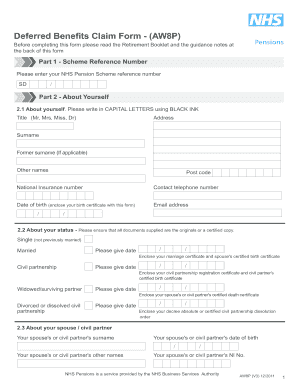
- In Part 1, enter your NHS Pension Scheme reference number in the specified format (e.g., 50/123456) if known; if not, leave it blank.
- In Part 2, provide your personal details. Fill in your title, address, surname, former surname (if applicable), other names, postcode, national insurance number, contact telephone number, date of birth (attach a birth certificate), and email address, using capital letters and black ink.
- For Part 2.2, indicate your marital status by selecting the appropriate option (single, married, civil partnership, widowed/surviving partner, or divorced/dissolved civil partnership). Attach required documents, including marriage or death certificates, if applicable.
- In Part 2.3, provide details of your spouse or civil partner, including their surname, date of birth, other names, and national insurance number.
- In Part 2.4, state if you have any dependent children. If yes, provide the required details for each child, including names, gender, and date of birth.
- In Part 3, specify the type of pension and retirement lump sum you are claiming. Indicate reasons for claiming deferred benefits and select the relevant NHS Pension Scheme sections.
- In Part 4, respond to HM Revenue and Customs questions accurately to avoid delays. Provide information regarding any additional pension arrangements, expected annual pension amounts, and protection certificates.
- In Part 5, decide if you wish to allocate part of your pension for survivor benefits and provide any relevant documentation.
- Fill in your employment details in Part 6, including your last NHS employer and job title. Note your intent to work in the NHS after retirement.
- In Part 7, provide your bank or building society account details for pension payments, ensuring to specify the account type.
- Finally, in Part 8, carefully read the declaration, and sign in the presence of an appropriate witness. Ensure both parties complete their information accurately.
- After completing all sections, review your form for accuracy, then save changes, and consider downloading or printing the form for your records.
Start filling out your UK NHS AW8P form online now to ensure a smooth application process.
Get form
Experience a faster way to fill out and sign forms on the web. Access the most extensive library of templates available.
Related links form
To request medical retirement, start by discussing your situation with your manager or HR representative. Gather supporting medical documents and complete the AW8P form to reinforce your application. Clear communication with your NHS administration team will facilitate understanding and ensure you're prepared for the process.
Get This Form Now!
Use professional pre-built templates to fill in and sign documents online faster. Get access to thousands of forms.