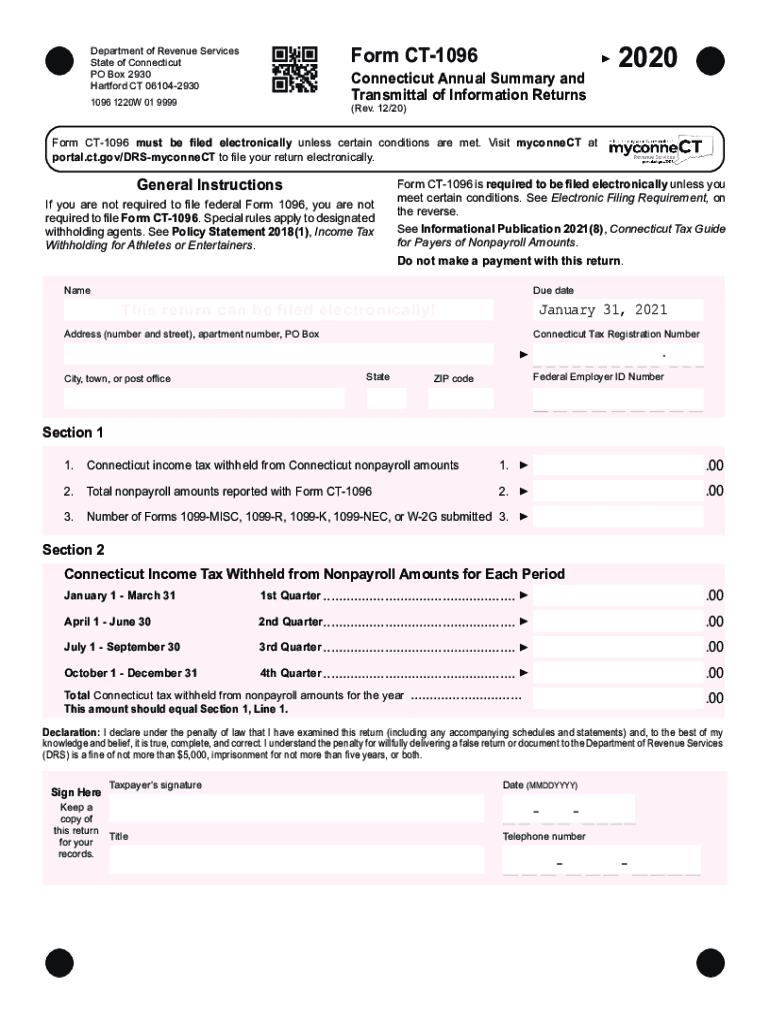
(Rev. 12/20) Form CT 1096 must be filed electronically unless certain conditions are met. Visit myconneCT at portal.ct.gov/DRS-myconneCT to file your return electronically. General Instructions If you are not required to file federal Form 1096, you are not required to file Form CT-1096. Special rules apply to designated withholding agents. See Policy Statement 2018(1), Income Tax Withholding for Athletes or Entertainers. Form CT-1096 is required to be filed electronically unless you meet.
Loading

Open form follow the instructions

Easily sign the form with your finger

Send filled & signed form or save
How to fill out the CT DRS CT-1096 online
Completing the CT DRS CT-1096 form online is essential for reporting Connecticut income tax withheld from nonpayroll amounts. This guide provides clear instructions to assist you through the filling process, ensuring compliance with state regulations.
Follow the steps to complete your CT DRS CT-1096 online.
- Press the ‘Get Form’ button to access the CT-1096 form in your online editor.
- Enter the name and address information accurately in the designated fields, including the Connecticut Tax Registration Number and Federal Employer ID Number.
- In Section 1, fill in the total Connecticut income tax withheld from nonpayroll amounts, ensuring the figure reflects the correct amount collected during the previous calendar year.
- Also in Section 1, report the total nonpayroll amounts that you are submitting with this form and the number of 1099 forms submitted.
- Proceed to Section 2 and input the Connecticut income tax withheld from nonpayroll amounts for each quarter. Ensure that the total aligns with the figures reported in Section 1.
- Complete the declaration section by providing your signature, date, title, and telephone number. This affirms that all provided information is accurate to the best of your knowledge.
- After ensuring all sections are complete and accurate, you can save your changes. The options to download, print, or share your completed form will be available to finalize your submission.
Complete your CT DRS CT-1096 form online today to ensure timely filing.
Experience a faster way to fill out and sign forms on the web. Access the most extensive library of templates available.
Related content
Jan 31, 2020 — If you are required to file federal Form 1096, you must file Form...
remit such Connecticut income tax withholding to. DRS. For information on reporting and...
Palliative care is an interdisciplinary medical caregiving approach aimed at optimizing...
Use professional pre-built templates to fill in and sign documents online faster. Get access to thousands of forms.
If you believe that this page should be taken down, please follow our DMCA take down process here.