Loading
Form preview
  • US Legal Forms
  • Other Templates
  • Foreign Forms
  • Foreign Canada Immigration Forms
  • Canada Pptc 482 2014

Get Canada Pptc 482 2014

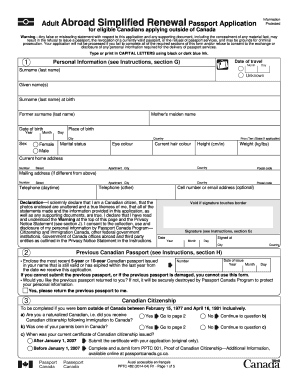
Cation and any supporting document, including the concealment of any material fact, may result in the refusal to issue a passport, the revocation of a currently valid passport, or the refusal of passport services, and may be grounds for criminal prosecution. Your application will not be processed if you fail to complete all of the required sections of this form and/or refuse to consent to the exchange or disclosure of any personal information required for the delivery of passport services. Type.

How it works

  1. Open form

    Open form follow the instructions

  2. Easily sign form

    Easily sign the form with your finger

  3. Share form

    Send filled & signed form or save

How to fill out the Canada PPTC 482 online

This guide provides clear and detailed instructions on completing the Canada PPTC 482 form, which is for eligible Canadians applying for a passport renewal while abroad. Follow this guide to efficiently navigate each section of the online form.

Follow the steps to fill out the Canada PPTC 482 form online.

  1. Click 'Get Form' button to obtain the form and open it in the editor.
  2. Begin by entering the date of travel in the designated fields, specifying the month, day, and year.
  3. Provide your personal information, including your surname (last name), given name(s), date of birth, place of birth, and mother's maiden name.
  4. Indicate your current home address. If your mailing address differs, enter that information as well.
  5. Fill out your physical characteristics such as eye color, hair color, height, and weight.
  6. Review the declaration statement and sign it. Make sure to date the signature appropriately.
  7. Provide details about your previous Canadian passport, including date of issue and passport number.
  8. If applicable, complete the Canadian citizenship section if you were born outside Canada during the specified period.
  9. Select the desired period of validity for your new passport, choosing between 5 years or 10 years.
  10. Complete the additional personal information section, providing addresses in the last two years as needed.
  11. Provide references who have known you for at least two years, including their contact information.
  12. Optionally, provide an emergency contact who will not be traveling with you.
  13. Once all sections are filled out, review your form for accuracy before proceeding to submit.
  14. Finally, save your changes, download, print, or share your completed form as necessary.

Complete your passport application online today to ensure a smooth renewal process.

Get form

Experience a faster way to fill out and sign forms on the web. Access the most extensive library of templates available.

Related content

FEDERAL REGISTER
Agencies in this issue—. Agricultural Research Service. Agricultural Stabilization and...
Learn more
PPTC 140 - ADULT PASSPORT APPLICATION
Original proof of Canadian citizenship (no copies or notarized copies). Any Canadian...
Learn more

Related links form

Canada PPTC 192 Form 2020 Canada IMM 5650 E 2020 Canada EMP5571 2020 Canada SST-NOA-GD-IS 2020

Questions & Answers

Get answers to your most pressing questions about US Legal Forms API.

Contact support

In your passport application, specifically the Canada PPTC 482, include personal details such as full name, date of birth, address, and occupation. If you're applying without traditional employment, terms like 'Unemployed' or 'Retired' are perfect. For any assistance, consider using USLegalForms, which can guide you through the passport application process step by step.

Under the occupation field in the Canada PPTC 482 passport application, enter your current job or professional status. If you have retired, just write 'Retired'. Using a clear and accurate description allows for a smoother application review, ensuring all information is easy to understand.

To fill out the occupation section of your Canada PPTC 482 passport application, clearly state your job title or status. If you are currently not employed, the term 'Unemployed' or your last occupation followed by 'Retired' works well. Keeping your response precise will help streamline your application.

When it comes to filling out forms related to the Canada PPTC 482, state your current position or status. If you are unemployed or retired, use those terms. Always remember to keep the description straightforward; it helps reduce any uncertainty and makes the processing of documents more efficient.

To fill out the Expression of Interest (EOI) for Canada, visit the official immigration website to access the Canada PPTC 482 application guidelines. Provide accurate personal details, including your work experience and education. Ensure you properly express your intent and eligibility for immigration, as this information plays a crucial role in your application process.

When filling out the Canada PPTC 482 passport application, you can simply write 'Retired' in the occupation section. It is important to reflect your current status accurately. If you had a prior profession that is relevant, you may also choose to include that before stating 'Retired'. This ensures clarity for the authorities reviewing your application.

A guarantor for a Canadian travel document must meet specific criteria, including being a Canadian citizen and holding a valid passport. They should also have known the applicant for at least two years. It’s essential that your guarantor meets these requirements to successfully validate your application. The Canada PPTC 482 outlines these guidelines clearly to assist you.

Yes, both parents generally need to be present when applying for a child's passport in Canada. This requirement ensures that both legal guardians consent to the passport issuance. If one parent cannot attend, other legal documentation must be provided to confirm consent. The Canada PPTC 482 covers all necessary details regarding this process.

PPTC 326 is the form specifically designed for declaring identity when applying for a Canadian travel document, particularly if a guarantor cannot be used. This form allows applicants to provide detailed information to verify their identity effectively. Understanding this form is crucial for ensuring a smooth application process. Look into how the Canada PPTC 482 can assist you in this context.

A Statutory Declaration in lieu of guarantor is a formal statement made by an applicant when they cannot find a qualified guarantor. It serves to confirm the applicant's identity for obtaining a Canadian travel document. This declaration is essential in instances where meeting the guarantor requirement poses difficulties. For guidance through this process, explore the Canada PPTC 482.

Get This Form Now!

Use professional pre-built templates to fill in and sign documents online faster. Get access to thousands of forms.
If you believe that this page should be taken down, please follow our DMCA take down processhere.
Get Canada PPTC 482
  • Adoption
  • Bankruptcy
  • Contractors
  • Divorce
  • Home Sales
  • Employment
  • Identity Theft
  • Incorporation
  • Landlord Tenant
  • Living Trust
  • Name Change
  • Personal Planning
  • Small Business
  • Wills & Estates
  • Packages A-Z
  • Affidavits
  • Bankruptcy
  • Bill of Sale
  • Corporate - LLC
  • Divorce
  • Employment
  • Identity Theft
  • Internet Technology
  • Landlord Tenant
  • Living Wills
  • Name Change
  • Power of Attorney
  • Real Estate
  • Small Estates
  • Wills
  • All Forms
  • Forms A-Z
  • Other Templates
  • Legal Hub
  • About Us
  • Help Portal
  • Legal Resources
  • Blog
  • Affiliates
  • Contact Us
  • Delete My Account
  • Site Map
  • Industries
  • Forms in Spanish
  • Localized Forms
  • State-specific Forms
  • Forms Kit
  • Real Estate Handbook
  • All Guides
  • Notarize
  • Incorporation services
  • For Consumers
  • For Small Business
  • For Attorneys
  • USLegal
  • FormsPass
  • pdfFiller
  • signNow
  • altaFlow
  • DocHub
  • Instapage
Form Packages
  • Adoption
  • Bankruptcy
  • Contractors
  • Divorce
  • Home Sales
  • Employment
  • Identity Theft
  • Incorporation
  • Landlord Tenant
  • Living Trust
  • Name Change
  • Personal Planning
  • Small Business
  • Wills & Estates
  • Packages A-Z
Form Categories
  • Affidavits
  • Bankruptcy
  • Bill of Sale
  • Corporate - LLC
  • Divorce
  • Employment
  • Identity Theft
  • Internet Technology
  • Landlord Tenant
  • Living Wills
  • Name Change
  • Power of Attorney
  • Real Estate
  • Small Estates
  • Wills
  • All Forms
  • Forms A-Z
  • Other Templates
Customer Service
  • Legal Hub
  • About Us
  • Help Portal
  • Legal Resources
  • Blog
  • Affiliates
  • Contact Us
  • Delete My Account
  • Site Map
  • Industries
  • Forms in Spanish
  • Localized Forms
  • State-specific Forms
  • Forms Kit
Legal Guides
  • Real Estate Handbook
  • All Guides
Prepared for you
  • Notarize
  • Incorporation services
Our Customers
  • For Consumers
  • For Small Business
  • For Attorneys
Our Sites
  • USLegal
  • FormsPass
  • pdfFiller
  • signNow
  • altaFlow
  • DocHub
  • Instapage
Social Media
Call us now toll free:
+1 833 426 79 33
As seen in:
© Copyright 1999-2026 airSlate Legal Forms, Inc. 17 Station Street, Suite 303, Brookline, MA 02445
  • Your Privacy Choices
  • Terms of Service
  • Privacy Notice
  • Content Takedown Policy
  • Bug Bounty Program
Canada PPTC 482
This form is available in several versions.
Select the version you need from the drop-down list below.
2022 Canada PPTC 482
Select form
  • 2022 Canada PPTC 482
  • 2020 Canada PPTC 482
  • 2014 Canada PPTC 482
  • 2013 Canada PPTC 482
  • PPTC 482 E. Adult Abroad Simplified Renewal Passport Application For Canadians Applying Outside Of
Select form