Loading
Get Ct Drs Tpg-189 2020-2026
How it works
-

Open form follow the instructions
-

Easily sign the form with your finger
-

Send filled & signed form or save
How to fill out the CT DRS TPG-189 online
Filling out the CT DRS TPG-189 form online can streamline your process of appointing a new administrator for your Taxpayer Service Center or myconneCT account. This guide provides clear, step-by-step instructions to help you complete the form accurately and efficiently.
Follow the steps to complete the CT DRS TPG-189 form online.
- Press the ‘Get Form’ button to access the CT DRS TPG-189 form and open it in your preferred editor.
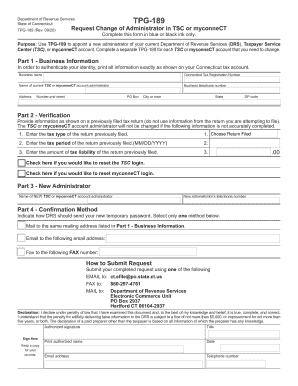
- In Part 1, provide your business information. Enter your business name exactly as shown on your Connecticut tax account, your Connecticut Tax Registration Number, the name of the current TSC or myconneCT account administrator, and your business telephone number. Include your complete address, ensuring to specify the number and street, optional PO Box, city or town, state, and ZIP code.
- In Part 2, complete the verification section. Enter the tax type of the return you previously filed, the tax period (formatted as MM/DD/YYYY), and the amount of tax liability from that return. Select the boxes if you want to reset the TSC or myconneCT login.
- For Part 3, fill in the name and telephone number of the new TSC or myconneCT account administrator.
- In Part 4, choose the confirmation method for receiving the new temporary password; select one option: mail, email, or fax.
- After completing the form, review all the information to ensure its accuracy. Then, submit your completed form via email, fax, or mail as instructed at the end of the form.
- Finally, ensure to sign the form in the declaration section, providing your title, printed name, date, email address, and telephone number.
Complete your CT DRS TPG-189 online today to streamline your administrative changes.