Loading
Form preview
  • US Legal Forms
  • Other Templates
  • More Forms
  • More Uncategorized Forms
  • Ifmms Supplier Record Requests / Revisions (word Version, 2 Pages). Demandes / Rvisions Concernant

Get Ifmms Supplier Record Requests / Revisions (word Version, 2 Pages). Demandes / Rvisions Concernant

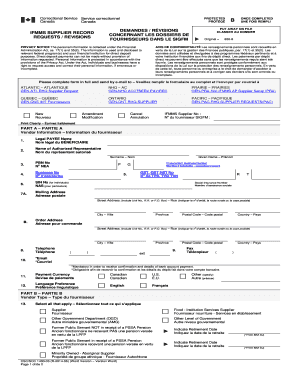
Correctional Service Service correctionnel Canada CanadaPROTECTED PROTGDEMANDES / RVISIONS CONCERNANT LES DOSSIERS DE FOURNISSEURS DANS LE SIGFMIFMMS SUPPLIER RECORD REQUESTS / REVISIONSPRIVACY NOTICE.

How it works

  1. Open form

    Open form follow the instructions

  2. Easily sign form

    Easily sign the form with your finger

  3. Share form

    Send filled & signed form or save

How to fill out the IFMMS Supplier Record Requests / Revisions (Word Version, 2 Pages). Demandes / Rvisions Concernant online

This guide provides users with a clear and systematic approach to completing the IFMMS Supplier Record Requests / Revisions form. Whether you are a new vendor or making necessary updates, this document will help streamline the process.

Follow the steps to accurately complete your supplier record request or revision.

  1. Use the ‘Get Form’ button to obtain the IFMMS Supplier Record Requests / Revisions form. Open it in your preferred document editor to begin completing the required fields.
  2. In Part A, provide your vendor information. Fill in your legal payee name, authorized representative’s name, and identification numbers. Ensure that your contact details, such as address and email, are clearly stated.
  3. Cautiously complete Part B by selecting the appropriate vendor type. This section allows you to indicate whether you are a supplier, food service provider, or other relevant classifications.
  4. In Part C, specify the organization type and input either corporation, individual, or partnership details as applicable. This helps classify your business for processing.
  5. For Part D, identify the purpose of the site, such as purchasing or payments. You may also indicate if it is a new or revised site for your services.
  6. Part E requires you to provide banking information. Attach a void cheque or a bank attestation to ensure accurate direct deposit setup.
  7. Finally, in Part F, read and acknowledge the consent statement. Your authorized representative should sign and date the form, confirming the authorization for direct deposit payments.
  8. Once completed, review your form for accuracy and save your changes. You can then download, print, or share the form as needed.

Start your supplier record request or revision online today to ensure timely processing.

Get form

Experience a faster way to fill out and sign forms on the web. Access the most extensive library of templates available.
Get form

Related links form

Financial Aid Satisfactory Academic Progress Appeal-Undergraduate Physicians Medical Group Of San Jose, Inc Maombi Ya Uhamishaji Fedha Mombasa Technical Training Institute Diploma 2006

Get This Form Now!

Use professional pre-built templates to fill in and sign documents online faster. Get access to thousands of forms.
Get form
If you believe that this page should be taken down, please follow our DMCA take down processhere.
Get IFMMS Supplier Record Requests / Revisions (Word Version, 2 Pages). Demandes / Rvisions Concernant
Get form
  • Adoption
  • Bankruptcy
  • Contractors
  • Divorce
  • Home Sales
  • Employment
  • Identity Theft
  • Incorporation
  • Landlord Tenant
  • Living Trust
  • Name Change
  • Personal Planning
  • Small Business
  • Wills & Estates
  • Packages A-Z
  • Affidavits
  • Bankruptcy
  • Bill of Sale
  • Corporate - LLC
  • Divorce
  • Employment
  • Identity Theft
  • Internet Technology
  • Landlord Tenant
  • Living Wills
  • Name Change
  • Power of Attorney
  • Real Estate
  • Small Estates
  • Wills
  • All Forms
  • Forms A-Z
  • Other Templates
  • Legal Hub
  • About Us
  • Help Portal
  • Legal Resources
  • Blog
  • Affiliates
  • Contact Us
  • Delete My Account
  • Site Map
  • Industries
  • Forms in Spanish
  • Localized Forms
  • State-specific Forms
  • Forms Kit
  • Real Estate Handbook
  • All Guides
  • Notarize
  • Incorporation services
  • For Consumers
  • For Small Business
  • For Attorneys
  • USLegal
  • FormsPass
  • pdfFiller
  • signNow
  • altaFlow
  • DocHub
  • Instapage
Form Packages
  • Adoption
  • Bankruptcy
  • Contractors
  • Divorce
  • Home Sales
  • Employment
  • Identity Theft
  • Incorporation
  • Landlord Tenant
  • Living Trust
  • Name Change
  • Personal Planning
  • Small Business
  • Wills & Estates
  • Packages A-Z
Form Categories
  • Affidavits
  • Bankruptcy
  • Bill of Sale
  • Corporate - LLC
  • Divorce
  • Employment
  • Identity Theft
  • Internet Technology
  • Landlord Tenant
  • Living Wills
  • Name Change
  • Power of Attorney
  • Real Estate
  • Small Estates
  • Wills
  • All Forms
  • Forms A-Z
  • Other Templates
Customer Service
  • Legal Hub
  • About Us
  • Help Portal
  • Legal Resources
  • Blog
  • Affiliates
  • Contact Us
  • Delete My Account
  • Site Map
  • Industries
  • Forms in Spanish
  • Localized Forms
  • State-specific Forms
  • Forms Kit
Legal Guides
  • Real Estate Handbook
  • All Guides
Prepared for you
  • Notarize
  • Incorporation services
Our Customers
  • For Consumers
  • For Small Business
  • For Attorneys
Our Sites
  • USLegal
  • FormsPass
  • pdfFiller
  • signNow
  • altaFlow
  • DocHub
  • Instapage
Social Media
Call us now toll free:
+1 833 426 79 33
As seen in:
© Copyright 1999-2026 airSlate Legal Forms, Inc. 17 Station Street, Ste. 203, Brookline, MA 02445
  • Your Privacy Choices
  • Terms of Service
  • Privacy Notice
  • Content Takedown Policy
  • Bug Bounty Program