Loading
Get Construction Loan Payment Request Form. - Me Bank
How it works
-

Open form follow the instructions
-

Easily sign the form with your finger
-

Send filled & signed form or save
How to fill out the Construction Loan Payment Request Form - ME Bank online
This guide offers step-by-step instructions for completing the Construction Loan Payment Request Form provided by ME Bank. Whether you are a licensed builder or an owner-builder, this comprehensive overview will help you navigate the form effectively.
Follow the steps to fill out the Construction Loan Payment Request Form seamlessly.
- Click ‘Get Form’ button to obtain the form and open it in your editing tool.
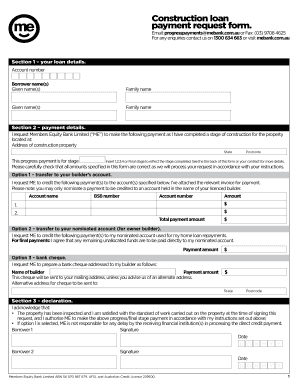
- In Section 1, provide your loan details. Enter your account number, and the full names (given and family names) of all borrowers.
- Move to Section 2 and input the address of the construction property, including the state and postcode. Indicate the stage of construction completed by selecting from 1, 2, 3, 4, or Final stage.
- Under Option 1, if you are nominating a payment to your builder, provide their account name, BSB number, and account number along with the payment amounts for each requested payment.
- If you are an owner-builder, use Option 2 to enter your nominated account for home loan repayments and specify any payment amounts required.
- For Option 3, if you prefer a bank cheque, enter the appropriate details for the builder and the address where the cheque should be sent.
- In Section 3, read and acknowledge the declaration, signing and dating the form where indicated for both borrowers.
- Once all sections are completed, review the form for accuracy. Save your changes, and then download, print, or share the completed form as necessary.
Start completing your Construction Loan Payment Request Form online today.