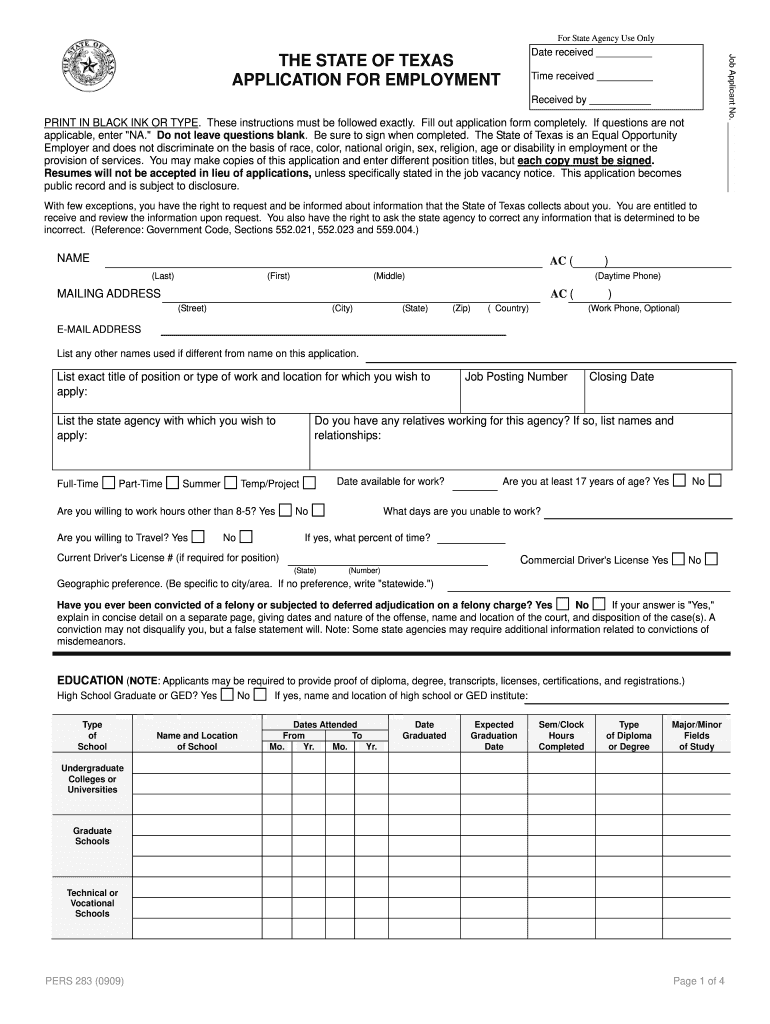
Followed exactly. Fill out application form completely. If questions are not applicable, enter "NA." Do not leave questions blank. Be sure to sign when completed. The State of Texas is an Equal Opportunity Employer and does not discriminate on the basis of race, color, national origin, sex, religion, age or disability in employment or the provision of services. You may make copies of this application and enter different position titles, but each copy must be signed. Resumes will not be accepted .

Open form follow the instructions

Easily sign the form with your finger

Send filled & signed form or save
How to fill out the TX TDCJ PERS 283 online
This guide provides clear and detailed instructions for completing the TX TDCJ PERS 283 application for employment. Using this guide will help ensure you fill out the form accurately and completely, allowing you to present your best self to prospective employers.
Follow the steps to successfully complete your application.
- Press the ‘Get Form’ button to access the TX TDCJ PERS 283 document. This will open the form for you to begin filling it out.
- Begin by entering your full name in the designated fields: Last name, First name, and Middle name. Ensure you provide the name as it appears on legal documents.
- Next, fill out your mailing address, which includes the street address, city, state, and zip code. If applicable, provide your daytime and optional work phone numbers.
- You will be asked to provide an email address. Make sure to enter a valid and frequently checked email.
- List any other names you may have used, if different from the name provided in the previous step.
- Indicate the exact job title and the agency you wish to apply for. Specify if you are applying for full-time, part-time, or temporary/project positions.
- Answer the questions regarding your willingness to travel, availability for work, and whether you have relatives employed by the agency. Be precise in your responses.
- Complete the education section by entering your highest level of education, including your school name, dates attended, major, and type of diploma or degree obtained.
- In the employment history section, provide details of all previous employment. Include the employer’s name, your title, duration of employment, and a summary of your duties.
- If applicable, fill out the sections regarding licenses, certifications, military service, and any special skills or training relevant to the job position.
- Review the certification statements at the end of the application to ensure you understand and accept the conditions stated. Sign the application where indicated.
- Finally, you will be prompted to save changes, download, print, or share the completed form. Ensure you keep a copy for your records.
Start completing your TX TDCJ PERS 283 application online now to take the first step in your career journey.
Experience a faster way to fill out and sign forms on the web. Access the most extensive library of templates available.
Related content
Apr 30, 2025 — Correctional Officer/Parole Officer Applicants must also complete the...
Fill out application form completely. If questions are not applicable, enter "NA." Do not...
This search retrieves two hits, one in the TX schedule, one in TP. Both have the caption...
Get answers to your most pressing questions about US Legal Forms API.
What TDCJ units are shutting down?
Recently, TDCJ has announced the closure of several units due to budget constraints and declining inmate populations. Specifically, units that have faced closures include the Dawson State Jail and the Central Unit. Understanding these changes is vital for families and advocates involved with the TDCJ. For detailed information on the implications of TX TDCJ PERS 283, staying updated on unit statuses can be beneficial.
What is the biggest TDCJ unit in Texas?
The largest TDCJ unit in Texas is the Estelle Unit, which has a significant capacity for inmates. This unit features multiple facilities that cater to various security levels. With its extensive resources and programs, the Estelle Unit plays a crucial role in the rehabilitation and management of inmates. If you are looking into the TX TDCJ PERS 283, the Estelle Unit's size and facilities might offer valuable insights.
What unit is death row in TDCJ?
In the Texas Department of Criminal Justice (TDCJ), death row is located at the Polunsky Unit. This facility specifically houses inmates sentenced to death. The conditions and regulations at the Polunsky Unit focus on maintaining security and ensuring the legal rights of inmates. For individuals seeking information about TX TDCJ PERS 283, understanding the layout and operations of the Polunsky Unit is essential.
How to become a co in Texas?
To become a Correctional Officer (CO) in Texas, you need to meet the minimum qualifications, including age and educational requirements. Start by completing the application process with TDCJ, where you can find details related to TX TDCJ PERS 283. After applying, you will undergo training and background checks. Additionally, utilize platforms like uslegalforms to access resources that can assist you along the way, ensuring you meet all necessary criteria for this essential role.
Can a convicted felon work for TDCJ?
A convicted felon may seek employment with TDCJ, but certain restrictions apply. Individuals must complete their sentence and meet specific eligibility criteria outlined by TX TDCJ PERS 283. Employers at TDCJ assess each application on a case-by-case basis. It's beneficial to review the TDCJ hiring policies and connect with resources that provide guidance for felons seeking employment in correctional facilities.
How to get a hardship transfer in TDCJ?
To request a hardship transfer in TDCJ, you must submit a written application demonstrating your unique circumstances. Outline the reasons for your request, attaching any relevant documentation to support your case. Be sure to reference TX TDCJ PERS 283 in your application, as it showcases the considerations within the Texas Department of Criminal Justice. Additionally, consider seeking assistance from organizations that specialize in inmate support to strengthen your application.
Does TDCJ hire ex felons?
TDCJ does consider hiring ex-felons, contingent on the nature of their past offenses and other mitigating factors. The department aims to offer second chances, aligning with community reintegration needs. If you fall under TX TDCJ PERS 283, stay informed and prepare your application thoughtfully to maximize your opportunity for employment.
What is an i60 form in TDCJ?
The i60 form is a document used within TDCJ to request various services or report issues. Inmates complete this form to seek assistance or communicate specific needs to the administration. Understanding the i60 form process is important for those involved with the TDCJ system and can enhance your experience while engaging with TX TDCJ PERS 283.
Is it hard for felons to get a job in Texas?
Getting a job in Texas can pose challenges for felons, but it is not impossible. Many employers are willing to consider candidates who have shown rehabilitation and a commitment to moving forward. Utilizing resources like TX TDCJ PERS 283 can provide guidance and support for those navigating the job market after a felony conviction.
Can you work at a detention center with a felony?
Working at a detention center with a felony record is possible, but it varies based on the nature of the felony and the specific facility's policies. Each detention center may have different standards in place regarding employment under TX TDCJ PERS 283. To increase your chances, focus on obtaining relevant certifications and being involved in rehabilitation programs.
Use professional pre-built templates to fill in and sign documents online faster. Get access to thousands of forms.
If you believe that this page should be taken down, please follow our DMCA take down process here.