Get Ph Sss R-3 1999-2026
How it works
-

Open form follow the instructions
-

Easily sign the form with your finger
-

Send filled & signed form or save
How to fill out the PH SSS R-3 online
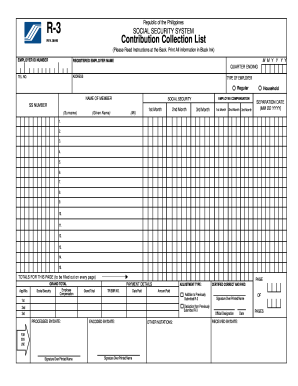
Filling out the PH SSS R-3 form correctly is essential for employers to ensure that their contributions to the Social Security System are properly documented. This guide provides step-by-step instructions to help users navigate each section of the form efficiently.
Follow the steps to complete the PH SSS R-3 form easily.
- Click ‘Get Form’ button to obtain the form and open it in the editor.
- Begin by entering your employer ID number at the top of the form. This number is essential for identifying your business within the Social Security System.
- Fill in the registered employer name, ensuring that it matches the official name of your business as registered with the relevant authorities.
- Indicate the quarter ending by writing the month and year in the provided space. Make sure this corresponds to the applicable quarter (March, June, September, or December).
- Provide your business address and telephone number, which are necessary for communication purposes.
- Select the type of employer by marking the appropriate box (Regular or Household).
- In the section for the name of the member, write the employee’s surname, given name, and middle initial. Follow the guidance for formatting family names and suffixes correctly.
- Complete the employee compensation sections for the three months specified, recording the necessary Social Security and Employee Compensation contributions. Calculate these based on total actual remuneration.
- If applicable, enter the separation date of any employees who have left your company.
- Fill out the totals for that page and ensure that the Grand Total is correct at the end of the form.
- Ensure that you write 'Nothing Follows' in the line immediately after the last employee to signal the end of the list.
- Review the completed form for any errors before saving your changes. You can download, print, or share the completed form as required.
Complete your PH SSS R-3 form online today for accurate and efficient submission of contributions.
SSS form 3C is a specific document used for claiming maternity benefits under the SSS program. It captures essential information required to process your maternity benefit claims accurately. Ensuring that you fill out this form correctly can speed up the approval process, allowing you to receive your benefits promptly. Utilizing the PH SSS R-3 ensures thorough understanding and proper use of such forms.