Loading
Form preview
  • US Legal Forms
  • Other Templates
  • Foreign Forms
  • Foreign Philippines Other Forms
  • Ph Smd-0002 2009

Get Ph Smd-0002 2009-2026

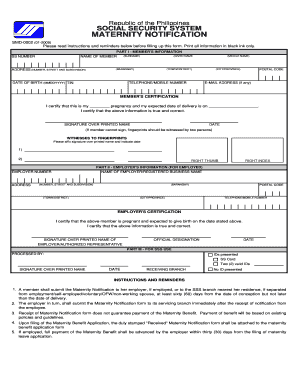
Ck ink only. PART I - MEMBER'S INFORMATION SS NUMBER (SURNAME) NAME OF MEMBER ADDRESS (NUMBER, STREET AND SUBDIVISION) (GIVEN NAME (BARANGAY) DATE OF BIRTH (MMDDYYYY) TIN (MIDDLE NAME) (TOWN/DISTRICT) TELEPHONE/MOBILE NUMBER (CITY/PROVINCE) POSTAL CODE E-MAIL ADDRESS (if any) MEMBER'S CERTIFICATION I certify that this is my ________ pregnancy and my expected date of delivery is on ____________________. I certify that the above information is true and correct. SIGNATURE OVER PRINTED.

How it works

  1. Open form

    Open form follow the instructions

  2. Easily sign form

    Easily sign the form with your finger

  3. Share form

    Send filled & signed form or save

How to fill out the PH SMD-0002 online

Filling out the PH SMD-0002 online is an important step for members seeking maternity benefits. This guide provides clear instructions on how to complete each section of the form effectively.

Follow the steps to complete the PH SMD-0002 online.

  1. Press the ‘Get Form’ button to access the maternity notification form and open it in the editor.
  2. Fill in the member's information in Part I. Provide details such as the Social Security (SS) number, surname, given name, middle name, address (including number, street, subdivision, barangay, town/district, city/province, and postal code), date of birth (MMDDYYYY), Tax Identification Number (TIN), telephone/mobile number, and email address (if any).
  3. In the member's certification section, indicate the number of the pregnancy and the expected date of delivery. Certify that the information provided is true and correct, and sign over your printed name. If you are unable to sign, a fingerprint should be obtained in the presence of two witnesses who will also sign.
  4. For employed members, complete Part II by filling in the employer's information. Include the employer number, employer name or registered business name, address, telephone/mobile number, and certify the member's pregnancy and expected delivery date with the employer's signature, printed name, and official designation.
  5. In Part III, leave the section for SSS use blank, as it will be completed by the SSS processing team.
  6. After completing all sections, review the form for accuracy. Save your changes and ensure all digital signatures are correctly added. You may download, print, or share the completed form as required.

Complete your PH SMD-0002 online today to ensure timely processing of your maternity benefits.

Get form

Experience a faster way to fill out and sign forms on the web. Access the most extensive library of templates available.
Get form

Related content

Amniotic fluid soluble myeloid differentiation-2...
by AT Dulay · 2015 · Cited by 10 — TLR4 mediates host responses to pathogens through a...
Learn more
Add new comment | International Office
Aug 10, 2025 — The St. Augustine Campus has a range of student exchange agreements that...
Learn more
The DatasheetArchive - Datasheet Search Engine
Frequency Stability: ±100ppm (-10°C to. +70°C) • Operating Temperature Range: -10°C...
Learn more

Related links form

RRB SI-1a 2001 RRB W-4P 2014 SBA 1010 2010 SBA 1086 2002

Questions & Answers

Get answers to your most pressing questions about US Legal Forms API.

Contact support

The SSS maternity benefit for voluntary members is calculated based on their contributions and average daily salary credit. This ensures that benefits align with the member's financial contributions. Understanding this calculation is important, especially within the framework of PH SMD-0002.

Proof of pregnancy for SSS generally consists of a medical certificate or any relevant documentation issued by a healthcare provider. This proof confirms your eligibility for maternity benefits. Ensuring accuracy in your documentation under the PH SMD-0002 guidelines is crucial for a successful claim.

Yes, you can file your SSS maternity notification online through the SSS website. This feature allows members to easily manage their contributions and claims from home. Utilizing PH SMD-0002 for this purpose streamlines your application process.

Voluntary members must file their SSS maternity claim by submitting the appropriate documents, including proof of contributions and a medical certificate. The submission can be done online or at an SSS office, depending on your preference. Following the PH SMD-0002 guidelines will facilitate a smoother claim process.

The amount given by SSS for a miscarriage typically varies based on the member's contributions and specific circumstances. It's best to refer to the guidelines outlined in PH SMD-0002 for detailed information. This helps in understanding the support available during a difficult time.

To claim maternity benefits from SSS, you need to complete the required application forms and submit them along with proof of pregnancy. This process may differ for voluntary members, but PH SMD-0002 provides clear instructions. Filing your claim accurately will ensure timely processing.

A miscarriage is generally not considered part of maternity leave under SSS guidelines. However, mothers may be eligible for certain benefits in this situation. Understanding the specifics of PH SMD-0002 will help clarify your rights and entitlements.

Applying for voluntary contributions in SSS online is straightforward. You simply need to log into your SSS account, select the voluntary contribution option, and complete the forms. This digital feature enhances accessibility, making it easier for members to stay compliant with PH SMD-0002.

To file a miscarriage with SSS, you should prepare the necessary documents and complete the required forms. Documentation usually includes medical certificates and proof of the incident. By following the procedures set forth in PH SMD-0002, you can navigate this sensitive process more easily.

Yes, a voluntary SSS member can apply for maternity benefits. To be eligible, you must meet certain contribution requirements and follow the application process defined by SSS. This ensures that you receive the benefits you deserve under the PH SMD-0002 guidelines.

Get This Form Now!

Use professional pre-built templates to fill in and sign documents online faster. Get access to thousands of forms.
Get form
If you believe that this page should be taken down, please follow our DMCA take down processhere.
Get PH SMD-0002
Get form
  • Adoption
  • Bankruptcy
  • Contractors
  • Divorce
  • Home Sales
  • Employment
  • Identity Theft
  • Incorporation
  • Landlord Tenant
  • Living Trust
  • Name Change
  • Personal Planning
  • Small Business
  • Wills & Estates
  • Packages A-Z
  • Affidavits
  • Bankruptcy
  • Bill of Sale
  • Corporate - LLC
  • Divorce
  • Employment
  • Identity Theft
  • Internet Technology
  • Landlord Tenant
  • Living Wills
  • Name Change
  • Power of Attorney
  • Real Estate
  • Small Estates
  • Wills
  • All Forms
  • Forms A-Z
  • Other Templates
  • Legal Hub
  • About Us
  • Help Portal
  • Legal Resources
  • Blog
  • Affiliates
  • Contact Us
  • Delete My Account
  • Site Map
  • Industries
  • Forms in Spanish
  • Localized Forms
  • State-specific Forms
  • Forms Kit
  • Real Estate Handbook
  • All Guides
  • Notarize
  • Incorporation services
  • For Consumers
  • For Small Business
  • For Attorneys
  • USLegal
  • FormsPass
  • pdfFiller
  • signNow
  • altaFlow
  • DocHub
  • Instapage
Form Packages
  • Adoption
  • Bankruptcy
  • Contractors
  • Divorce
  • Home Sales
  • Employment
  • Identity Theft
  • Incorporation
  • Landlord Tenant
  • Living Trust
  • Name Change
  • Personal Planning
  • Small Business
  • Wills & Estates
  • Packages A-Z
Form Categories
  • Affidavits
  • Bankruptcy
  • Bill of Sale
  • Corporate - LLC
  • Divorce
  • Employment
  • Identity Theft
  • Internet Technology
  • Landlord Tenant
  • Living Wills
  • Name Change
  • Power of Attorney
  • Real Estate
  • Small Estates
  • Wills
  • All Forms
  • Forms A-Z
  • Other Templates
Customer Service
  • Legal Hub
  • About Us
  • Help Portal
  • Legal Resources
  • Blog
  • Affiliates
  • Contact Us
  • Delete My Account
  • Site Map
  • Industries
  • Forms in Spanish
  • Localized Forms
  • State-specific Forms
  • Forms Kit
Legal Guides
  • Real Estate Handbook
  • All Guides
Prepared for you
  • Notarize
  • Incorporation services
Our Customers
  • For Consumers
  • For Small Business
  • For Attorneys
Our Sites
  • USLegal
  • FormsPass
  • pdfFiller
  • signNow
  • altaFlow
  • DocHub
  • Instapage
Social Media
Call us now toll free:
+1 833 426 79 33
As seen in:
© Copyright 1999-2026 airSlate Legal Forms, Inc. 17 Station Street, Suite 303, Brookline, MA 02445
  • Your Privacy Choices
  • Terms of Service
  • Privacy Notice
  • Content Takedown Policy
  • Bug Bounty Program