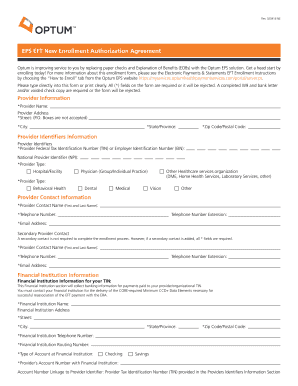
Account Number Linkage to Provider Identifier: National Provider Identifier (NPI) Financial Institution Information for your NPI: This financial Institution section will collect banking information for payments made to your provider/organizational NPI. An NPI Bank Account is only required if you want deposits directed to an account different than the one assigned at the TIN level. *Financial Institution Name: Financial Institution Address *Street: *City: *State/Province: *Zip Code/Postal Co.

How it works
  • Open form

    Open form follow the instructions

  • Easily sign form

    Easily sign the form with your finger

  • Share form

    Send filled & signed form or save

How to fill out the Eps Eft User Authorization Agreement online

This guide provides comprehensive and user-friendly instructions on completing the Eps Eft User Authorization Agreement online. By following these steps, users can ensure they accurately fill out the necessary sections of the form and submit it correctly.

Follow the steps to complete the Eps Eft User Authorization Agreement.

  1. Press the ‘Get Form’ button to access the Eps Eft User Authorization Agreement form and open it in your document editor.
  2. Begin by entering provider information. Fill out the required provider name, address (street, city, state, and zip code), and ensure all marked fields are completed.
  3. In the provider identifiers information section, provide the Federal Tax Identification Number (TIN) or Employer Identification Number (EIN), National Provider Identifier (NPI), and select the provider type from the given options.
  4. Complete the provider contact information. Input the primary contact's name, telephone number, email address, and any optional secondary contact information if applicable.
  5. Fill in the financial institution information. Provide the name, address, and contact number of the bank, as well as the routing number and type of account (checking or savings). Enter your account number with the institution.
  6. For the submission, indicate if you will provide a voided check or bank letter for verification. Ensure you tape the voided check or attach a copy of the bank letter as required.
  7. Sign and date the authorization agreement in the designated areas. Include your printed name, title, phone number, and email address.
  8. Finally, submit the completed form along with the voided check or bank letter. You can either fax or mail the documents as provided in the agreement instructions. Make sure to retain a copy for your records.

Start filling out your Eps Eft User Authorization Agreement online today for a smooth enrollment experience.

Get form

Experience a faster way to fill out and sign forms on the web. Access the most extensive library of templates available.

Related content

EPS EFT new enrollment authorization agreement...

EPS EFT new enrollment authorization agreement ... Your user ID and password will be...

Learn more
Forms | Accounting and Financial Management (AFM)...

Use this form to request direct deposit for your student and scholarship/fellowship funds...

Learn more
CareCentrix Provider Manual (EDRC 746 01242018) VT...

User Manual: VT 9241. ... KEY PHONE NUMBERS: AUTHORIZATION, RE-AUTHORIZATION...

Learn more
Questions & Answers

Get answers to your most pressing questions about US Legal Forms API.

Contact support

What does EPS mean billing?

Electronic Payments and Statements (EPS) is a practical solution to provide electronic delivery of payments and electronic remittance advices (ERA) to physicians, hospitals and other health care professionals.

If you select “Pay Provider”, we will send a payment directly to your provider. If you select “Reimburse Myself”, we will send payment to you. Simply enter a few pieces of information about your claim, including date of service, provider, amount, who received the service, your service category and type.

Please fax the signed enrollment form, a copy of a bank letter or voided check(s) and your completed W-9 to Attn: Processing Manager (800) 765-6766. Or, if you prefer, you can mail all the required and signed forms to: Optum EPS, Attn: Processing Manager, P.O.Box 30777, Salt Lake City, UT 84130-0777.

Use it at the pharmacy, pay at the doctor's office or write your payment card number on your provider bill. Just remember to keep your receipt, because transactions may have to be validated or substantiated per IRS guidelines.

A health care payment delivery solution designed to boost efficiency and improve cash flow, Optum Pay® empowers providers to choose how to receive payments across a broad network of health care payers.

With Electronic Funds Transfer (EFT), Medicare can send payments directly to a provider's financial institution whether claims are filed electronically or on paper. All Medicare providers may apply for EFT.

Get This Form Now!

Use professional pre-built templates to fill in and sign documents online faster. Get access to thousands of forms.

If you believe that this page should be taken down, please follow our DMCA take down process here.

Get Eps Eft User Authorization Agreement