Loading
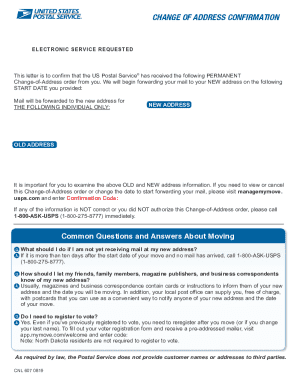
Get Manage My Move Usps
How it works
-

Open form follow the instructions
-

Easily sign the form with your finger
-

Send filled & signed form or save
How to fill out the Manage My Move USPS online
This guide provides clear and detailed instructions for users on how to fill out the Manage My Move USPS form online. Whether you want to update, change, or cancel your address, the following steps will assist you in navigating the process effectively.
Follow the steps to successfully manage your USPS change of address.
- Click ‘Get Form’ button to obtain the form and open it in the editor.
- Enter your new 5-digit ZIP code into the designated field. This is critical for processing your address change.
- Input your 16-digit confirmation code in the next field. This code is provided to you via email upon your initial request to forward your mail.
- Review the information you have entered to ensure accuracy. Verification is important before submitting the information.
- Click the ‘Submit’ button to process your request. Make sure to wait for any confirmation on whether the process has been successful.
- After submission, you will have options to save changes, download the document, or print it for your records.
Get started with your address change by submitting your USPS documents online today.
Go to USPS.com/move to change your address online. This is the fastest and easiest way, and you immediately get an email confirming the change.
Industry-leading security and compliance
US Legal Forms protects your data by complying with industry-specific security standards.
-
In businnes since 199725+ years providing professional legal documents.
-
Accredited businessGuarantees that a business meets BBB accreditation standards in the US and Canada.
-
Secured by BraintreeValidated Level 1 PCI DSS compliant payment gateway that accepts most major credit and debit card brands from across the globe.