Loading
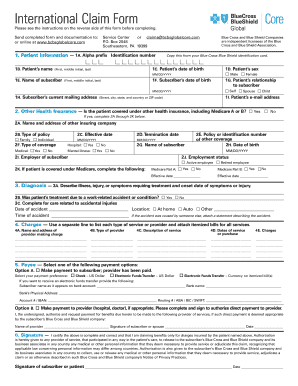
Get Bcbsglobalcore International Claim Form
How it works
-

Open form follow the instructions
-

Easily sign the form with your finger
-

Send filled & signed form or save
How to fill out the Bcbsglobalcore International Claim Form online
Completing the Bcbsglobalcore International Claim Form online is a straightforward process that allows users to efficiently submit their claims for services received outside the United States. This guide will provide clear instructions on each section of the form to ensure an accurate submission.
Follow the steps to complete your claim form online.
- Press the ‘Get Form’ button to access the claim form and open it for editing.
- In section 1, provide Patient Information. Enter the patient's name, date of birth, sex, relationship to the subscriber, and email address. Ensure accuracy, especially with the identification number taken from the Blue Cross Blue Shield card.
- Move to section 2 to indicate Other Health Insurance. If the patient holds other insurance, select 'Yes' and fill in details such as the name of the other insurance company, policy type, and termination date. If not, select 'No'.
- In section 3, describe the Diagnosis. Provide relevant details about the illness or injury, treatment required, and the onset date. If applicable, state whether treatment was due to a work-related accident.
- Proceed to section 4 to list the Charges for services provided. For each service, include the provider’s name, type of service, description, dates, and charges. Attach itemized bills to support your claims.
- In section 5, select your payment preference under Payee. You can opt for payment to the subscriber or the provider. If choosing the subscriber option, specify the method of payment and provide necessary bank information if applicable.
- Finally, in section 6, ensure the form is signed and dated by the subscriber, which confirms all information provided is complete and correct.
- Once the form is completed, save your changes and download, print, or share the form as needed for submission.
Complete your claim form online quickly and easily today!
Availity provides administrative services to BCBSTX....How to access and use Availity's Claim Submission tool: Log in to Availity. Select Claims & Payments from the navigation menu. Select Professional Claim or Facility Claim. Within the tool, select your Organization, Transaction Type and Payer. Complete the required fields.