Loading
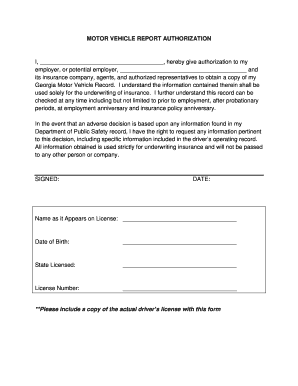
Get Motor Vehicle Report Authorization I, , Hereby Give ...
How it works
-

Open form follow the instructions
-

Easily sign the form with your finger
-

Send filled & signed form or save
How to fill out the MOTOR VEHICLE REPORT AUTHORIZATION I, , Hereby Give ... online
This guide provides a clear and supportive overview for filling out the Motor Vehicle Report Authorization form online. By following the steps outlined below, users can complete their authorization request smoothly and efficiently.
Follow the steps to complete the authorization form easily
- Click the ‘Get Form’ button to access the Motor Vehicle Report Authorization form and open it in your preferred editor.
- Fill in your name in the space provided, as it appears on your driver’s license. This ensures that the record accurately reflects your identity.
- Identify and enter the name of your employer or potential employer in the designated field. This information is crucial for their authorized access to your motor vehicle record.
- Acknowledge the terms by reading through the statement indicating that the information is solely for underwriting insurance. Make sure you understand the implications of this authorization.
- Provide your date of birth in the specified area. This helps verify your identity in conjunction with the license information.
- Indicate the state where you hold your driving license in the designated field. Accurate state identification is essential for the proper retrieval of your motor vehicle record.
- Enter your license number in the appropriate section. This unique identifier is critical for accessing your driving record.
- Sign and date the form in the designated areas. Your signature validates the authorization and acknowledges your understanding of the process.
- Prepare to attach a copy of your actual driver’s license with this form, as it is required for the verification process.
- Once all fields are completed, review your entries for accuracy. After confirming all information, you can save the changes, download, print, or share the form as needed.
Complete your MOTOR VEHICLE REPORT AUTHORIZATION form online now to facilitate the process.
How to Delete Drivers. Manage drivers directly from your online EPN account dashboard. If you don't have online access, complete a Commercial Employer Pull Notice Enrollment or Deletion of Drivers and Instructions (INF 1100) and mail it to the address on the form.
Industry-leading security and compliance
US Legal Forms protects your data by complying with industry-specific security standards.
-
In businnes since 199725+ years providing professional legal documents.
-
Accredited businessGuarantees that a business meets BBB accreditation standards in the US and Canada.
-
Secured by BraintreeValidated Level 1 PCI DSS compliant payment gateway that accepts most major credit and debit card brands from across the globe.