Loading
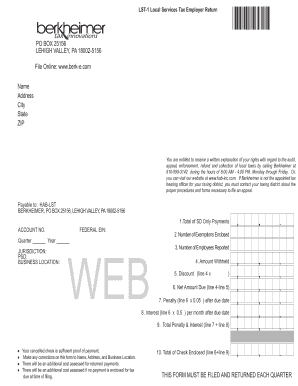
Get Lst-1 Local Services Tax Employer Return
How it works
-

Open form follow the instructions
-

Easily sign the form with your finger
-

Send filled & signed form or save
How to fill out the LST-1 Local Services Tax Employer Return online
Filling out the LST-1 Local Services Tax Employer Return is an important responsibility for employers. This guide will serve as a comprehensive framework to help you navigate the required fields and sections of the form effectively, ensuring an accurate submission.
Follow the steps to complete your online LST-1 form easily.
- Click ‘Get Form’ button to obtain the LST-1 Local Services Tax Employer Return and open it in your preferred editing interface.
- Begin by entering your name in the designated field, followed by your mailing address, including city, state, and ZIP code.
- Locate the 'Quarter' and 'Year' sections. Fill in the appropriate quarter and year for which you are filing the return.
- In the 'Jurisdiction' section, indicate the jurisdiction under which you are filing the tax return, ensuring it aligns with your designated area.
- Enter your unique 'Federal EIN', which is crucial for identifying your business with federal tax authorities.
- Proceed to the payment information section, starting with 'Total of SD Only Payments'. Input the total amount of service tax payments made.
- Fill in the 'Number of Exemptions Enclosed' and the 'Number of Employees Reported' to help compute your tax obligations accurately.
- In the 'Amount Withheld' field, specify the amount of tax that has already been withheld from employees' wages.
- Calculate the discount by multiplying line 4 (amount withheld) by the designated percentage, and document this in the corresponding field.
- Determine the 'Net Amount Due' by subtracting the discount from the amount withheld and enter this value.
- If applicable, compute any penalty due after the due date by multiplying the net amount due by 0.05 and write it in the penalty field.
- Calculate any interest due per month post due date, using a rate of 0.5%, and enter the result.
- Summarize the total penalty and interest by adding the figures from the previous two lines and input the amount.
- Total the amount of your check enclosed by adding the net amount due and the total penalty and interest, and write that figure clearly.
- Review your completed form for any mistakes. Make necessary corrections to your name, address, and business location if applicable.
- Once you affirm that all information is accurate, save your changes, download, print, or share the completed LST-1 form as required.
Complete your LST-1 Local Services Tax Employer Return online today to ensure compliance and avoid any penalties.
Pennsylvania Cities Local Services Tax (LST) Information CityState/City CodesAnnual Tax AmountPittsburgh42/6600$52Plains42/6615$52Reading42/6900$52Scranton42/7460$15617 more rows
Industry-leading security and compliance
US Legal Forms protects your data by complying with industry-specific security standards.
-
In businnes since 199725+ years providing professional legal documents.
-
Accredited businessGuarantees that a business meets BBB accreditation standards in the US and Canada.
-
Secured by BraintreeValidated Level 1 PCI DSS compliant payment gateway that accepts most major credit and debit card brands from across the globe.