Loading
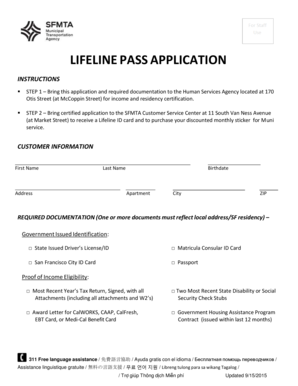
Get Lifeline Pass Application - San Francisco Municipal Railway
How it works
-

Open form follow the instructions
-

Easily sign the form with your finger
-

Send filled & signed form or save
How to fill out the LIFELINE PASS APPLICATION - San Francisco Municipal Railway online
Filling out the Lifeline Pass Application for the San Francisco Municipal Railway is a straightforward process that allows eligible users to access discounted transportation services. This guide provides clear and detailed instructions to facilitate your online application experience.
Follow the steps to successfully complete the Lifeline Pass Application online.
- Click the ‘Get Form’ button to obtain the application form and view it in the online editor.
- Begin by entering your personal information in the customer information section. Fill in your first name, last name, address, birthdate, apartment number, city, and ZIP code accurately.
- Review the required documentation section. Select one or more government-issued identification options that provide proof of your local address and San Francisco residency. Ensure you have your ID ready, as you will need it for verification.
- Provide proof of income eligibility by selecting one of the listed documents. This could include your most recent year's tax return or social security check stubs. Ensure that the document you choose clearly demonstrates your income eligibility.
- Once all fields are filled, save your changes to your application. You may then download or print the completed form for submission.
- Bring the completed application along with the required documentation to the Human Services Agency located at 170 Otis Street for income and residency certification.
- After receiving certification, take the certified application to the SFMTA Customer Service Center at 11 South Van Ness Avenue to receive your Lifeline ID card and purchase your discounted monthly sticker for Muni service.
Complete your LIFELINE PASS APPLICATION online today to take advantage of discounted Muni services.
Show the activated Clipper card to Muni operator or Station Agent at a Metro booth or, if unattended, proceed through the fare gate closest to the booth. Note: Customers do not need to "tag" out of Muni Metro to exit. Fare gates have motion sensors and will open automatically. Simply walk through.
Industry-leading security and compliance
US Legal Forms protects your data by complying with industry-specific security standards.
-
In businnes since 199725+ years providing professional legal documents.
-
Accredited businessGuarantees that a business meets BBB accreditation standards in the US and Canada.
-
Secured by BraintreeValidated Level 1 PCI DSS compliant payment gateway that accepts most major credit and debit card brands from across the globe.