Loading
Get Bca Directo App
How it works
-

Open form follow the instructions
-

Easily sign the form with your finger
-

Send filled & signed form or save
How to fill out the Bca Directo App online
Filling out the Bca Directo App can be a straightforward process when you have a clear understanding of each section and field in the form. This guide provides step-by-step instructions to help you complete the application efficiently.
Follow the steps to fill out the Bca Directo App accurately
- Click the ‘Get Form’ button to access the application form and open it in the designated editor.
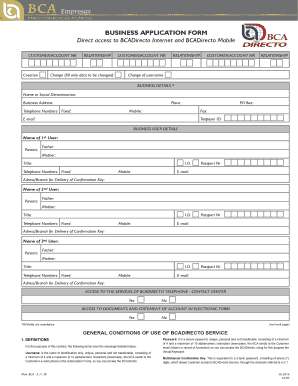
- Begin by entering your customer or account number along with the relationship type you wish to establish. Make sure to fill in all required fields.
- In the business details section, provide the full name or social denomination of your business. Include the business address, contact numbers, email, and taxpayer ID.
- Input the details for the first business user. This includes their full name, parents' names, title, identification number, and contact details. Repeat for the second and third users, if applicable.
- Indicate your preference for access to the Bca Directo services by selecting 'Yes' or 'No' for telephone and document access options.
- Review all information entered to ensure accuracy. Make any necessary corrections at this stage.
- Once all sections are completed and verified, save your changes. You can then download the form, print it out, or share it as needed.
Complete your documents online today to streamline your business operations.