Loading
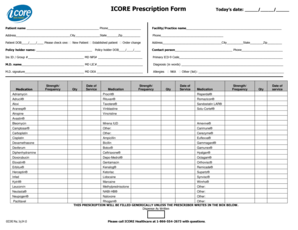
Get Icore Prescription Form - Carefirstcom
How it works
-

Open form follow the instructions
-

Easily sign the form with your finger
-

Send filled & signed form or save
How to fill out the ICORE Prescription Form - Carefirstcom online
Filling out the ICORE Prescription Form - Carefirstcom online is a straightforward process designed to streamline prescription submissions. This guide provides step-by-step instructions to help users correctly and efficiently complete the form.
Follow the steps to successfully fill out the ICORE Prescription Form.
- Press the ‘Get Form’ button to acquire the prescription form and open it in your document editor.
- Enter the current date in the designated field at the top of the form.
- Fill in the patient's name and phone number in the respective fields below the date.
- Input the facility or practice name, followed by the complete address, including city, state, and ZIP code.
- Provide the facility's phone number in the corresponding area.
- Enter the patient's date of birth in the prescribed format and check the appropriate status box indicating if they are a new or established patient or if this is an order change.
- Fill in the policyholder's name and date of birth.
- Include the contact person's name and their phone number.
- Input the insurance ID and group number along with the physician's NPI number.
- Enter the primary ICD-9 code as well as the physician's name and license number.
- Provide a diagnosis in words as requested.
- The medical doctor should sign and include their DEA number in the designated sections.
- Indicate any allergies by checking 'NKA' for no known allergies or listing other allergies in the space provided.
- Complete the medication section by listing the medication names, their strengths/frequencies, quantities, and dates of service required.
- If there are medications not listed, write them in the 'Other' section and provide the necessary details.
- Finalize your submission by saving, downloading, printing, or sharing the completed form as needed.
Start completing your ICORE Prescription Form online today for a hassle-free experience.
0:23 1:01 Word Table Move Column (2020) - YouTube YouTube Start of suggested clip End of suggested clip We click into the first cell of the column d. And then we press ctrl. And v on our keyboard. And nowMoreWe click into the first cell of the column d. And then we press ctrl. And v on our keyboard. And now we already moved the column.