Loading
Get Trico Online Biz
How it works
-

Open form follow the instructions
-

Easily sign the form with your finger
-

Send filled & signed form or save
How to fill out the Trico Online Biz online
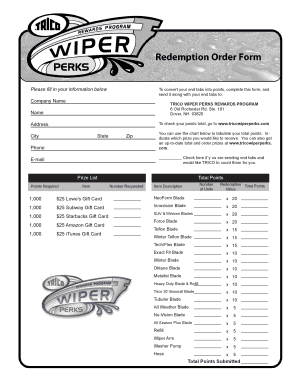
Filling out the Trico Online Biz form is an essential step for users looking to convert their end tabs into points. This guide provides a detailed, step-by-step approach to ensure that you complete the form accurately and efficiently.
Follow the steps to fill out the Trico Online Biz form successfully.
- Press the ‘Get Form’ button to access the Trico Online Biz form and open it in your preferred editor.
- Enter your name in the designated field to identify your submission.
- Provide your address, including the city, state, and zip code, to ensure correspondence reaches you.
- Fill in your phone number to facilitate contact regarding your points submission.
- Indicate your email address for updates and confirmations.
- Refer to the points chart and calculate your total points based on end tabs submitted.
- Check the box if you would like Trico to count your end tabs for you.
- Select the prizes you wish to receive by specifying the number of units next to each item based on your total points.
- At the end, review all entries for accuracy and completeness.
- Save your changes, then download, print, or share the completed form as needed.
Complete your Trico Online Biz form today and unlock your rewards online!