Get Form Tm.47
How it works
-

Open form follow the instructions
-

Easily sign the form with your finger
-

Send filled & signed form or save
How to fill out the Form TM.47 online
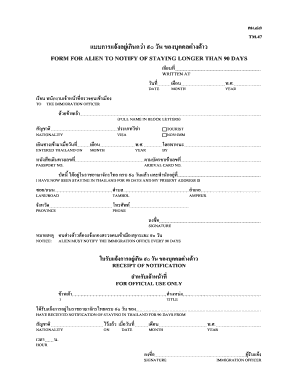
Filling out Form TM.47 is essential for individuals who need to notify immigration authorities of their extended stay in Thailand. This guide will provide clear, step-by-step instructions to ensure a smooth online submission process.
Follow the steps to complete Form TM.47 online.
- Use the ‘Get Form’ button to access the form and open it in the online editing tool.
- In the first section, enter the date when the form is being filled out, including the month and year.
- Provide your full name in block letters in the designated field.
- Indicate your nationality as required.
- Select the type of visa you hold, such as tourist or non-immigrant.
- Enter the date you entered Thailand, including the month and year.
- Specify the mode of transportation you used to enter Thailand.
- Fill in your passport number in the appropriate field.
- Provide your arrival card number as it appears in your documents.
- Indicate your current address in Thailand, including street name, sub-district, district, and province.
- Add your contact phone number where you can be reached.
- Finally, sign the form to confirm the accuracy of the information provided.
- Once you have completed all sections, you can save your changes, download, print, or share the form.
Complete your Form TM.47 online to ensure compliance with immigration regulations.
Yes, the TM30 form is still required in Thailand for foreigners staying at different locations for extended periods. This form is typically submitted by your landlord or hotel and informs immigration about your place of residence. While Form TM.47 focuses on your 90-day reporting, TM30 is essential for maintaining records of all foreigners in the country. Staying updated on both forms can help keep your immigration status in good standing.