Loading
Form preview
  • US Legal Forms
  • Other Templates
  • Independent Agency Forms
  • Independent Agency OPM Forms
  • Opm Sf-3107-2 1988

Get Opm Sf-3107-2 1988-2026

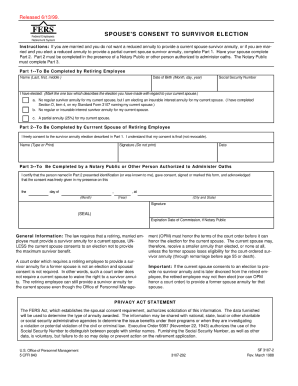
Released 6/13/99. FERS Federal Employees Retirement System SPOUSE'S CONSENT TO SURVIVOR ELECTION Instructions: If you are married and you do not want a reduced annuity to provide a current spouse.

How it works

  1. Open form

    Open form follow the instructions

  2. Easily sign form

    Easily sign the form with your finger

  3. Share form

    Send filled & signed form or save

How to fill out the OPM SF-3107-2 online

Filling out the OPM SF-3107-2 form is a crucial step for individuals seeking to apply for a retirement benefit. This guide will provide clear and straightforward instructions to assist you in completing the form accurately and efficiently.

Follow the steps to successfully complete the form.

  1. Press the ‘Get Form’ button to acquire the OPM SF-3107-2 form and open it within your preferred online editing tool.
  2. Begin with section one by providing your personal information, including your name, Social Security number, and contact details. Ensure that each entry is accurate to avoid delays.
  3. In section two, indicate your retirement plan information. This might include your service type and any applicable retirement dates. Carefully read the descriptions provided in this section.
  4. Proceed to section three, where you will detail your employment history. Include the names of employers, dates of service, and position titles to ensure thoroughness.
  5. In section four, you will need to provide beneficiary information. This is essential for ensuring that benefits are directed to the correct individuals after your passing. Include complete names and relationships.
  6. Complete any additional sections that may apply to your specific situation, such as military service or former government service.
  7. Review your completed form for any errors or omissions. Make necessary changes to ensure all fields are filled out correctly.
  8. Once satisfied with your entries, you may choose to save your changes, download, print, or share the completed form as needed.

Start filling out the OPM SF-3107-2 form online today!

Get form

Experience a faster way to fill out and sign forms on the web. Access the most extensive library of templates available.
Get form

Related content

Application for Immediate Retirement (Federal...
Complete form SF 3107-2, Spouse's Consent to Survivor Election, and attach it to your...
Learn more
voluntary retirement checklist - FERS
Sep 18, 2018 — SF 3107. Sign and date the application. • SF 3107-2 Spouse's Consent to...
Learn more
2010 FULL LINE CATALOG
No Load OPM. 14,000. 7,000 – 12,000. Orbit Diameter. 1/16". 3/32". Vacuum ... two (2)...
Learn more

Related links form

CO DR 2841 2015 CO DR 2843 2015 Colorado Horseless Carriage 2014 Colorado Self Form 2012

Questions & Answers

Get answers to your most pressing questions about US Legal Forms API.

Contact support

The SF-3107-2 form pertains to spousal consent for survivor election in the context of disability retirement benefits. This particular consent is crucial; it ensures that your spouse is aware of and agrees to the choices made regarding your retirement benefits. Properly completing this form not only fulfills legal requirements but also fosters clear communication about financial matters in your household.

To submit the SF-3107, gather all required documents, complete the form accurately, and send it directly to OPM. Ensure that your application reflects all pertinent information, as any omissions could delay processing. Utilizing platforms like USLegalForms can simplify this process by providing clear instructions and template forms to assist you.

Disability retirement calculations by OPM take into account your high-3 salary, length of service, and the nature of your disability. The formula can yield different outcomes, so it’s advisable to consult resources or experts familiar with the OPM SF-3107-2 form to ensure you understand how your individual case might be evaluated. Using OPM's guidelines allows for more accurate and informed decisions in your retirement planning.

To calculate your FERS retirement, use the formula: (Years of Service x 1% x High-3 Average Salary). If you retire at age 62 or older with at least 20 years of service, this calculation changes to (Years of Service x 1.1% x High-3 Average Salary). Carefully applying this formula is vital, and using the OPM SF-3107-2 allows you to document this accurately for your retirement claim.

The OPM SF-3107-2 spouse's consent to survivor election is a form that confirms your spouse's agreement to your retirement benefits election. It ensures your spouse understands their rights and the implications of your retirement choices. Completing this form is essential to validate your survivor benefits and secure their future. Properly filling out this form enhances compliance and peace of mind.

Calculating your high three is essential for determining your federal retirement benefits. Start by identifying your highest earning three consecutive years of service. Then, take the average of those three years' salaries, which is your high-3 average salary. This figure significantly influences your retirement annuity, making the OPM SF-3107-2 even more important.

The OPM SF-3107-2 is a critical form used in the federal retirement process. This form captures essential information about an employee's retirement benefits and ensures accurate calculations. By completing the SF-3107-2, you enable the Office of Personnel Management to process your retirement claim efficiently. Understanding this form is vital for a smooth retirement transition.

The SF 3107-2 form is a critical document used for applying for retirement benefits from the federal government. It collects essential information to determine your eligibility for OPM retirement benefits. For a comprehensive overview of this form and related processes, you can visit the US Legal Forms platform, which simplifies understanding and completing necessary paperwork. This ensures a smooth application process for your retirement benefits.

To get your tax documents from Empower Retirement, log into your Empower Retirement account online. Once logged in, you can navigate to the tax documents section to download your required forms. If you have trouble accessing your account, consider reaching out to their support team. This process helps you manage your retirement finances effectively.

You can acquire your records from OPM by accessing your secure account on their website. The portal allows you to view and download various documents related to your federal service. If you prefer personalized support, OPM offers a customer service hotline to assist you. This ensures you receive the records you need in a timely manner.

Get This Form Now!

Use professional pre-built templates to fill in and sign documents online faster. Get access to thousands of forms.
Get form
If you believe that this page should be taken down, please follow our DMCA take down processhere.
Get OPM SF-3107-2
Get form
  • Adoption
  • Bankruptcy
  • Contractors
  • Divorce
  • Home Sales
  • Employment
  • Identity Theft
  • Incorporation
  • Landlord Tenant
  • Living Trust
  • Name Change
  • Personal Planning
  • Small Business
  • Wills & Estates
  • Packages A-Z
  • Affidavits
  • Bankruptcy
  • Bill of Sale
  • Corporate - LLC
  • Divorce
  • Employment
  • Identity Theft
  • Internet Technology
  • Landlord Tenant
  • Living Wills
  • Name Change
  • Power of Attorney
  • Real Estate
  • Small Estates
  • Wills
  • All Forms
  • Forms A-Z
  • Other Templates
  • Legal Hub
  • About Us
  • Help Portal
  • Legal Resources
  • Blog
  • Affiliates
  • Contact Us
  • Delete My Account
  • Site Map
  • Industries
  • Forms in Spanish
  • Localized Forms
  • State-specific Forms
  • Forms Kit
  • Real Estate Handbook
  • All Guides
  • Notarize
  • Incorporation services
  • For Consumers
  • For Small Business
  • For Attorneys
  • USLegal
  • FormsPass
  • pdfFiller
  • signNow
  • altaFlow
  • DocHub
  • Instapage
Form Packages
  • Adoption
  • Bankruptcy
  • Contractors
  • Divorce
  • Home Sales
  • Employment
  • Identity Theft
  • Incorporation
  • Landlord Tenant
  • Living Trust
  • Name Change
  • Personal Planning
  • Small Business
  • Wills & Estates
  • Packages A-Z
Form Categories
  • Affidavits
  • Bankruptcy
  • Bill of Sale
  • Corporate - LLC
  • Divorce
  • Employment
  • Identity Theft
  • Internet Technology
  • Landlord Tenant
  • Living Wills
  • Name Change
  • Power of Attorney
  • Real Estate
  • Small Estates
  • Wills
  • All Forms
  • Forms A-Z
  • Other Templates
Customer Service
  • Legal Hub
  • About Us
  • Help Portal
  • Legal Resources
  • Blog
  • Affiliates
  • Contact Us
  • Delete My Account
  • Site Map
  • Industries
  • Forms in Spanish
  • Localized Forms
  • State-specific Forms
  • Forms Kit
Legal Guides
  • Real Estate Handbook
  • All Guides
Prepared for you
  • Notarize
  • Incorporation services
Our Customers
  • For Consumers
  • For Small Business
  • For Attorneys
Our Sites
  • USLegal
  • FormsPass
  • pdfFiller
  • signNow
  • altaFlow
  • DocHub
  • Instapage
Social Media
Call us now toll free:
+1 833 426 79 33
As seen in:
© Copyright 1999-2026 airSlate Legal Forms, Inc. 17 Station Street, Suite 303, Brookline, MA 02445
  • Your Privacy Choices
  • Terms of Service
  • Privacy Notice
  • Content Takedown Policy
  • Bug Bounty Program