Loading
Form preview
  • US Legal Forms
  • Form Library
  • More Forms
  • More Uncategorized Forms
  • Scotiabank Tax Residency Self Certification

Get Scotiabank Tax Residency Self Certification

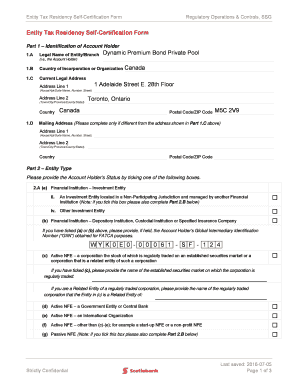
Entity Tax Residency SelfCertification Form Regulatory Operations & Controls, SSG Entity Tax Residency SelfCertification Form Part 1 Identification of Account Holder 1.A Legal Name of Entity/Branch.

How it works

  1. Open form

    Open form follow the instructions

  2. Easily sign form

    Easily sign the form with your finger

  3. Share form

    Send filled & signed form or save

How to fill out the Scotiabank Tax Residency Self Certification online

The Scotiabank Tax Residency Self Certification is an important document for confirming the tax residency of account holders. This guide provides clear, step-by-step instructions on how to complete the form online, ensuring users have the necessary information to navigate each section effectively.

Follow the steps to successfully complete your Tax Residency Self Certification

  1. Press the ‘Get Form’ button to access the Scotiabank Tax Residency Self Certification form.
  2. In Part 1, provide the legal name of the entity or branch as well as the country of incorporation or organization. Fill in the current legal address, including both address lines, city, province/state, and postal/ZIP code.
  3. If the mailing address is different from the legal address, complete the mailing address section with the necessary details.
  4. In Part 2, select the appropriate entity type by checking one of the available boxes that describes the account holder’s status, such as financial institution or other investment entity.
  5. If applicable, provide the Global Intermediary Identification Number (GIIN) for FATCA purposes in the specified field provided for it.
  6. For passive entities, indicate the names of any controlling persons in the designated area and ensure to complete a separate 'Controlling Person Tax Residency Self-Certification' form for each controlling person listed.
  7. In Part 3, complete the table by indicating the country/jurisdiction of tax residence and providing the Taxpayer Identification Number (TIN) where available. If no TIN is available, select the appropriate reason (A, B, or C) and explain if necessary.
  8. Finally, in Part 4, read the declaration statement carefully and certify your authorization to sign the form. Provide your signature, printed name, capacity, and the date of signing.

Complete your documents online with confidence and accuracy!

Get form

Experience a faster way to fill out and sign forms on the web. Access the most extensive library of templates available.
Get form

Related content

Document 2 - file: d827218dex991.htm - SEC.gov
As a Scotiabank shareholder, it is important to vote your shares at the upcoming meeting...
Learn more
Loans - University of Detroit Mercy
... Code is 002323; If possible, use the IRS retrieval tool to transfer your tax data...
Learn more

Related links form

Bail Bond Handbook Tx Form Application - Duke Anesthesiology - Duke University OATH OF SURETY - Travis County - Co Travis Tx Dos And Donts For Retainer Agreement Form

Questions & Answers

Get answers to your most pressing questions about US Legal Forms API.

Contact support

As per agreement signed under FATCA and CRS, all financial institutions are required to provide the necessary information to Indian tax authorities, who will in turn transmit the same to the respective jurisdiction.

Personal banking customers or sole traders should complete this form. For joint account holders, each individual will need to complete a copy of the form.

A Reportable Person is an individual who is tax resident in a Reportable Jurisdiction under the laws of that jurisdiction. Dual resident individuals may rely on tiebreaker rules contained in tax conventions (if applicable) to solve cases of double residence for purposes of determining their residence for tax purposes.

For CRS purposes as soon as the US$250,000 threshold at a year end is exceeded, due diligence on the Account Holder is required. — FATCA generally excluded listed shares or listed interests in certain investment vehicles, such as interests in Exchange Traded Funds (ETFs) and shares in Investment Trust Companies (ITCs).

If we don't have your Social Insurance Number (SIN) on file, you'll first need to update your customer profile with your SIN through Scotia OnLine. After logging in, select Manage My Accounts, and then Profile. You can update your SIN on your Personal Profile page. Once that's updated, you can sign up.

Generally, all new clients are expected to provide the relevant CRS form to open any new financial account with the Bank. If you do not respond to the Bank's request for a self-certification and depending on the details on your record, the Bank may need to treat your account as a reportable account.

Get This Form Now!

Use professional pre-built templates to fill in and sign documents online faster. Get access to thousands of forms.
Get form
If you believe that this page should be taken down, please follow our DMCA take down processhere.
Get Scotiabank Tax Residency Self Certification
Get form
  • Adoption
  • Bankruptcy
  • Contractors
  • Divorce
  • Home Sales
  • Employment
  • Identity Theft
  • Incorporation
  • Landlord Tenant
  • Living Trust
  • Name Change
  • Personal Planning
  • Small Business
  • Wills & Estates
  • Packages A-Z
  • Affidavits
  • Bankruptcy
  • Bill of Sale
  • Corporate - LLC
  • Divorce
  • Employment
  • Identity Theft
  • Internet Technology
  • Landlord Tenant
  • Living Wills
  • Name Change
  • Power of Attorney
  • Real Estate
  • Small Estates
  • Wills
  • All Forms
  • Forms A-Z
  • Form Library
  • Legal Hub
  • About Us
  • Help Portal
  • Legal Resources
  • Blog
  • Affiliates
  • Contact Us
  • Delete My Account
  • Site Map
  • Industries
  • Forms in Spanish
  • Localized Forms
  • State-specific Forms
  • Forms Kit
  • Real Estate Handbook
  • All Guides
  • Notarize
  • Incorporation services
  • For Consumers
  • For Small Business
  • For Attorneys
  • USLegal
  • FormsPass
  • pdfFiller
  • signNow
  • altaFlow
  • DocHub
  • Instapage
Form Packages
  • Adoption
  • Bankruptcy
  • Contractors
  • Divorce
  • Home Sales
  • Employment
  • Identity Theft
  • Incorporation
  • Landlord Tenant
  • Living Trust
  • Name Change
  • Personal Planning
  • Small Business
  • Wills & Estates
  • Packages A-Z
Form Categories
  • Affidavits
  • Bankruptcy
  • Bill of Sale
  • Corporate - LLC
  • Divorce
  • Employment
  • Identity Theft
  • Internet Technology
  • Landlord Tenant
  • Living Wills
  • Name Change
  • Power of Attorney
  • Real Estate
  • Small Estates
  • Wills
  • All Forms
  • Forms A-Z
  • Form Library
Customer Service
  • Legal Hub
  • About Us
  • Help Portal
  • Legal Resources
  • Blog
  • Affiliates
  • Contact Us
  • Delete My Account
  • Site Map
  • Industries
  • Forms in Spanish
  • Localized Forms
  • State-specific Forms
  • Forms Kit
Legal Guides
  • Real Estate Handbook
  • All Guides
Prepared for you
  • Notarize
  • Incorporation services
Our Customers
  • For Consumers
  • For Small Business
  • For Attorneys
Our Sites
  • USLegal
  • FormsPass
  • pdfFiller
  • signNow
  • altaFlow
  • DocHub
  • Instapage
Social Media
Call us now toll free:
+1 833 426 79 33
As seen in:
© Copyright 1999-2026 airSlate Legal Forms, Inc. 3720 Flowood Dr, Flowood, Mississippi 39232
  • Your Privacy Choices
  • Terms of Service
  • Privacy Notice
  • Content Takedown Policy
  • Bug Bounty Program